FluidCalendar
- Platform
- Web Docker
- Licence
- MIT Open source
- Website
- fluidcalendar.com
- Source code
- github.com/dotnetfactory/fluid-calendar
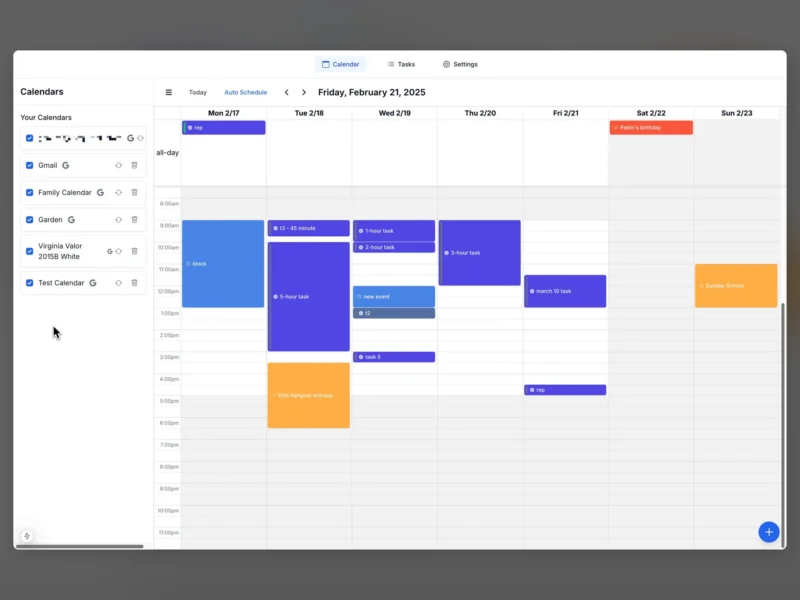
FluidCalendar is a self-hosted calendar and task scheduler built as an open-source answer to Motion, the commercial service that rearranges your to-do list into your working week. You connect the calendar you already use, keep a list of tasks that need time spent on them, and let the app place them into the free slots your working hours leave behind. Calendar, task list and scheduling preferences live in one browser interface, and the data sits in a PostgreSQL database you run yourself.
What it does
- Automatic task scheduling – the Auto Schedule action in the calendar toolbar places open tasks into free slots instead of leaving you to drag time blocks around by hand.
- Calendar management – week view across the calendars you have connected, with per-calendar colours, event blocks and Today / previous / next navigation.
- Task management – a separate Tasks tab holds the work that still needs a slot, so scheduling is a decision the app makes over a list rather than something you assemble one block at a time.
- Provider sync – Google Calendar and Google Tasks, Microsoft Outlook / Microsoft 365 calendars, and CalDAV servers, all available in the open-source build.
- Scheduling preferences – working hours and buffer time between blocks feed the slot finder, and Google and Outlook client credentials can be entered in Settings > System rather than only in the environment file.
- Your own instance – nothing is stored on someone else’s server unless you choose it: the project runs as a container you host, alongside an optional hosted beta and a paid done-for-you self-hosting review.
Requirements and deployment
Docker Compose is the recommended route. The repository ships a compose file that starts the application next to PostgreSQL 16 from the pre-built eibrahim/fluid-calendar image, so docker compose up -d is the whole install on a machine with Docker and a compose file. Three values matter before the first start: DATABASE_URL, NEXTAUTH_SECRET, and NEXTAUTH_URL – the last one has to be the exact public URL you browse, because the OAuth redirect addresses are derived from it, and reaching the app on a different host or port than the one recorded there breaks sign-in and calendar authorisation. Google and Outlook each need an OAuth application you create yourself: a Google Cloud project with the Calendar, People and Tasks APIs enabled, or an Azure AD registration accepting personal Microsoft accounts, with both callback paths registered exactly as the app expects (for Google, /api/auth/callback/google and /api/calendar/google). Google will not accept a bare private IP address or a .local hostname as a redirect target, so a home install needs a real domain and TLS in front of it. The container listens on 0.0.0.0:3000 and pins that port itself; to publish on a different host port you change the host side of the ports mapping and the browser-facing URL variables together. Running from source is supported too – Node.js, PostgreSQL 15 or newer, Prisma migrations, and the Next.js 15 development server.
Where it fits
Motion is the reference point here: a task list that the software schedules into your calendar, sold as a subscription. FluidCalendar is the self-hosted version of that idea, and it is honest about being early – its README still carries an “active development, very buggy” warning and advises against production use, so treat it as something to try on a spare box rather than to depend on. Within the directory’s calendar tools it is a scheduler rather than a calendar server: Cal.rs publishes bookable meeting slots for other people, Cal.com is the same booking model with a far larger ecosystem, and Calino is a CalDAV client for keeping your schedule in view. FluidCalendar instead rearranges your own tasks inside your own week. If the task side is all you need, without a calendar grid, Donetick covers recurring chores and shared household checklists.