PeaNUT
- Platform
- Linux Docker Web
- Licence
- Apache-2.0 Open source
- Website
- github.com/Brandawg93/PeaNUT
- Source code
- github.com/Brandawg93/PeaNUT
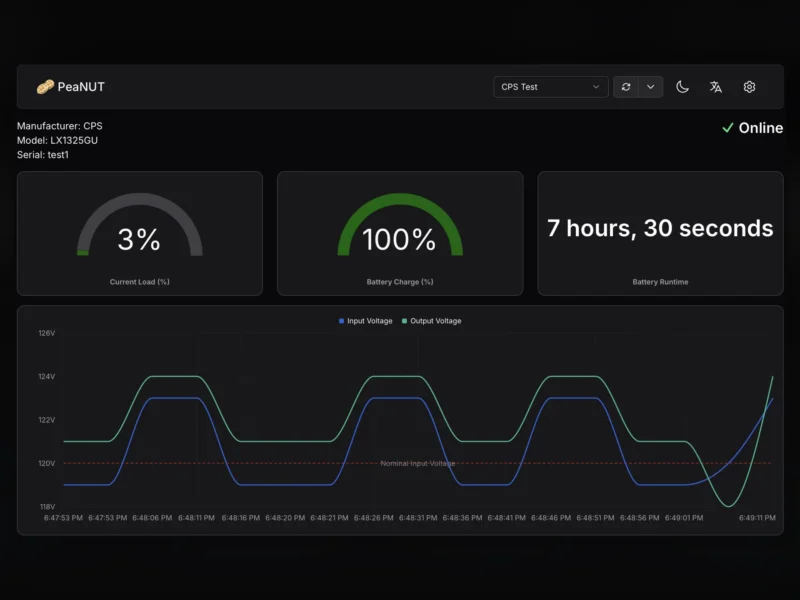
PeaNUT is a small web dashboard for Network UPS Tools servers. Instead of reading battery charge and load from upsc in a terminal, it puts every UPS the NUT daemon knows about on one page with live gauges, history charts and the manufacturer’s own device readings. The whole application is a Next.js container, so it sits next to an existing NUT install rather than replacing any part of it.
What it does
- Lists every UPS device exposed by one or more NUT servers, with model, status and remaining runtime
- Real-time readouts for battery charge, input and output voltage, load and temperature, refreshed on a configurable interval
- History charts for the values that matter over time, plus any extra variables the driver reports
- Runs UPS commands from the UI: battery self-test, beeper control and other instant commands the device supports
- Dashboard layout is editable – widgets can be added, moved and resized per device
- Settings managed in the browser or through a YAML file at
/config/settings.yml - Prometheus endpoint for scraping the same readings, and InfluxDB v2 output for Grafana dashboards
- Widget support for a Homepage dashboard and a REST API for other integrations
What it does not do
PeaNUT is a client, not a driver. It talks to a NUT server over the network and shows what that server reports, so nut-server (and the driver for the connected hardware) still has to run on the machine physically attached to the UPS — typically a Raspberry Pi or a small home server. Without a reachable NUT server it has nothing to display.
Deployment
The documented install is a single container: docker run -v ./config:/config -p 8080:8080 --env WEB_PORT=8080 brandawg93/peanut, with /config holding the settings and the user database. Images target linux/amd64 and linux/arm64; 32-bit ARM (Raspberry Pi 3 and older) was dropped in 5.17.0. The container runs as UID/GID 1000, so the mounted config directory has to be writable by that user or settings stop persisting. WEB_HOST, WEB_PORT, BASE_PATH, SSL_CERT_PATH and DISABLE_CONFIG_FILE cover the usual reverse-proxy and TLS cases.
Accounts and access
Authentication is single-user: on first run PeaNUT redirects to a setup page to create the administrator account, and the password is stored as a bcrypt hash. Credentials can also be seeded with WEB_USERNAME and WEB_PASSWORD, and AUTH_DISABLED=true switches the login off entirely for a network nobody else can reach. There are no per-user roles, so anyone who gets the account sees every UPS and can issue commands to them.
Where it fits
It pairs naturally with NUT itself and with an existing monitoring stack: keep NUT as the source of truth, scrape PeaNUT’s Prometheus endpoint from your metrics server, and mirror the same data in Grafana through InfluxDB. Setup is the one thing to get right before installing it: NUT itself has to be running and reachable, since PeaNUT is only ever the view onto a NUT server.