Kilo Code
- Platform
- Linux macOS Windows
- Licence
- MIT Open source
- Website
- kilo.ai/
- Source code
- github.com/Kilo-Org/kilocode
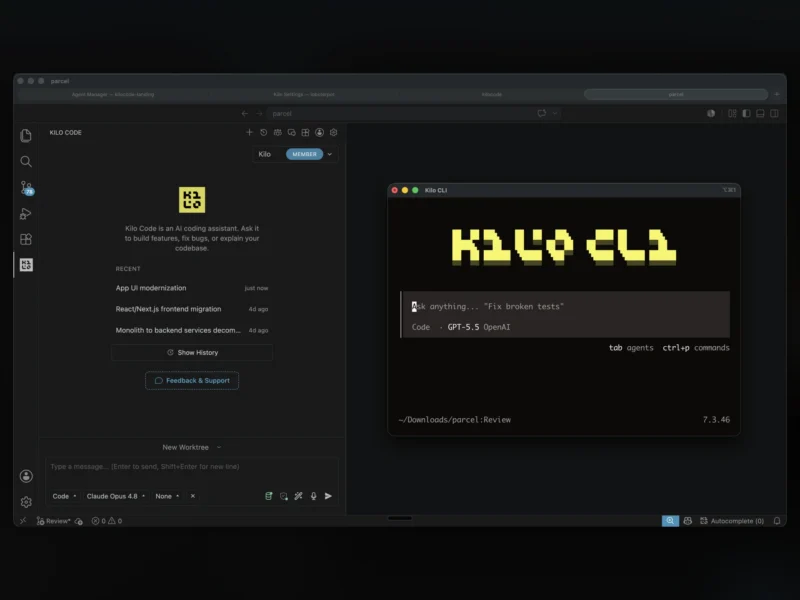
Kilo Code is an open source AI coding agent that runs inside VS Code, JetBrains IDEs and the terminal. It descends from Roo Code and Cline and is maintained by Kilo-Org, combining multi-file code generation with switchable agents, inline autocomplete and a marketplace of skills and MCP servers, across a catalog of more than 500 models.
Key Features
- Four built-in agents — Code implements and edits files from natural language, Plan designs the approach before any code is written, Ask answers questions about the codebase without touching files, and Debug traces failures.
- Multi-file editing with diff review — A single request can span several files, and every change lands as a reviewable diff before it is applied.
- Inline autocomplete — Ghost-text suggestions with tab to accept, and it can be pointed at a cheaper model than the chat agent so completions do not burn the same budget.
- Self-checking work — The agent reviews and corrects its own output before handing the task back, which cuts the review loop on small changes.
- Terminal and browser control — The agent can run commands and drive a browser as part of a task, with per-action approval rules deciding what it may do unattended.
- Kilo Marketplace — Agents, skills, MCP servers and plugins install from the marketplace, so the agent’s toolset is extended without forking it.
- Model switching mid-task — Start a task on a cheap model and finish it on a stronger one, paying the provider’s rate with no markup on top.
- Autonomous mode for CI —
kilo run --auto "run tests and fix any failures"runs headless and auto-approves actions unless a rule explicitly denies them.
Why Use Kilo Code?
Most coding agents tie you to one editor and one vendor’s models. Kilo Code runs the same agent in VS Code, JetBrains and the CLI, keeps the source MIT-licensed, and lets you bring your own API keys or use its gateway, so the model choice stays yours and can change between tasks. Because the agent is open source and its rules are inspectable, teams can audit what it is allowed to run and pin auto-approval to specific paths rather than trusting a closed black box.
Use Cases
- Implementing a feature or bug fix across several files in an existing repository, then reviewing the diff before it is committed.
- Understanding an unfamiliar codebase by asking the Ask agent how a module works instead of grepping for calls.
- Drafting an implementation plan for a risky change first, then handing the approved plan to the Code agent.
- Automating routine repairs in CI, such as running a test suite and fixing the failures it reports.
- Teaching and pair-programming on a laptop with a free or low-cost model, moving to a stronger one only for hard problems.
Getting Started
Install the extension from the VS Code Marketplace (or the JetBrains Marketplace), or install the CLI with npm install -g @kilocode/cli and run kilo in a project directory. Signing in creates a Kilo account; pointing it at your own provider key is also supported. The agent’s approval rules are worth configuring before the first autonomous run.