PDF Arranger

PDF Arranger

Overview

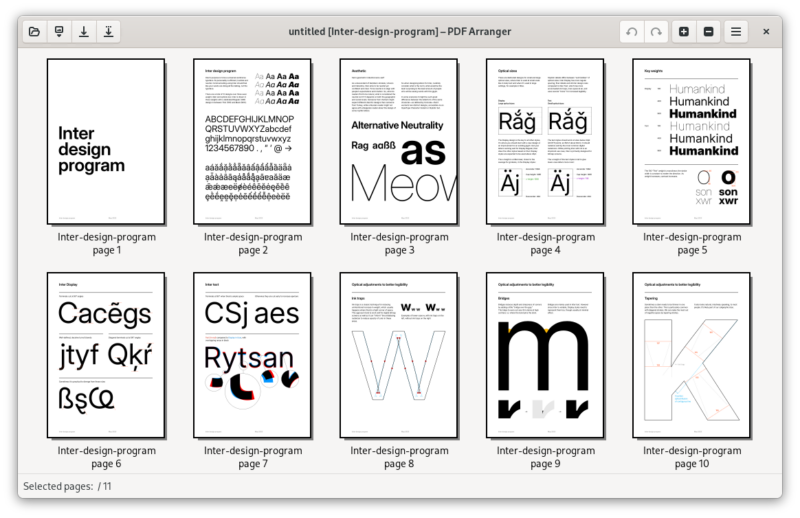
PDF Arranger is a small Python-GTK application that lets you visually rearrange, rotate, crop, and merge pages from PDF documents. It provides a thumbnail-based interface where you can drag and drop pages into any order, making it one of the simplest tools for quick PDF page organization.

Key Features

  • Page Rearrangement: drag and drop pages into any order
  • Rotate Pages: rotate individual pages by 90/180/270 degrees
  • Crop Pages: visually crop pages to remove margins
  • Delete Pages: remove unwanted pages from documents
  • Merge Documents: combine pages from multiple PDFs
  • Thumbnails: see each page as a preview thumbnail
  • Export: save modified document as a new PDF

Why Use It

PDF Arranger focuses on doing one thing well: reorganizing PDF pages visually. Unlike heavyweight editors, it launches instantly and handles page manipulation tasks with minimal friction. No uploads, no accounts, everything is processed locally.

Use Cases

  • Rearranging scanned document pages into correct order
  • Removing blank or unwanted pages from PDFs
  • Cropping margins from scanned book pages
  • Combining PDF excerpts from multiple documents

Platforms

Linux, Windows, macOS

Licence

GNU General Public License v3 or later

Website

https://github.com/pdfarranger/pdfarranger

Sign In

Register

Reset Password

Please enter your username or email address, you will receive a link to create a new password via email.