FilePizza
- Platform
- Docker Web Self-hosted
- Licence
- BSD-3-Clause Open source
- Website
- file.pizza
- Source code
- github.com/kern/filepizza
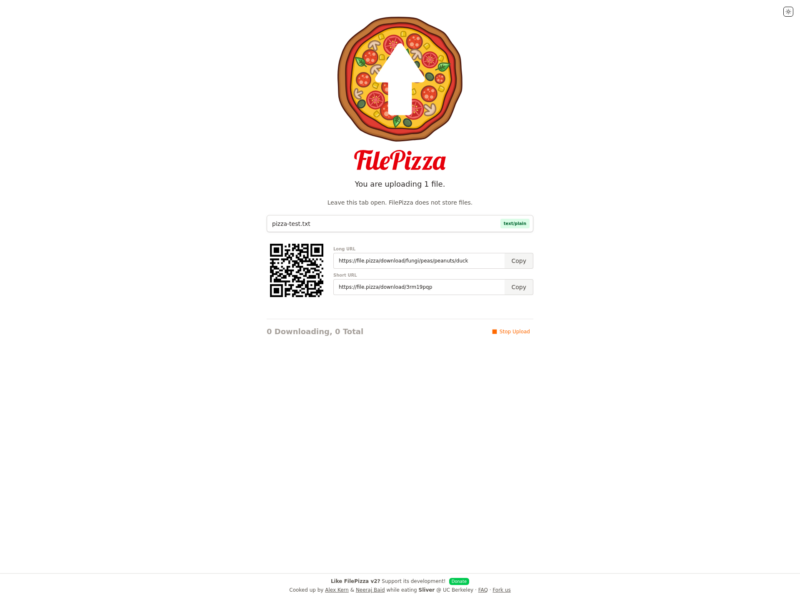
FilePizza is a peer-to-peer file transfer service that runs entirely in the browser. Instead of uploading a file to a server and handing out a link to that copy, it gives the downloader a link that connects their browser straight to yours, and the bytes travel between the two machines over WebRTC. Nothing is stored in the middle.
How a transfer works
You drop a file — or several — on the page and get two links, a long one and a short one, plus a QR code for sending to a phone. The receiver opens the link, and from that point the transfer is direct. The signalling server only helps the two browsers find each other, so even a self-hosted instance never touches the file itself. A password is optional per transfer and is enforced on the downloader’s side rather than used to encrypt the payload — WebRTC’s DTLS already does the encryption.
What version 2 adds
- A new interface with dark mode, built on Next.js, Tailwind and TypeScript.
- Works on most mobile browsers, including Mobile Safari.
- Transfers run directly between the two browsers — WebRTC without WebTorrent — with faster handshakes.
- The uploader can watch progress and stop a transfer at any time.
- Password protection and abuse reporting.
- Several files at once, delivered to the receiver as a zip.
- Streaming downloads through a Service Worker.
- Optional Redis for server state; without it the server keeps channel metadata in memory.
Running your own
The project is a Next.js application with a Docker path (pnpm docker:build, pnpm docker:up) and a short list of environment variables: REDIS_URL for channel metadata, COTURN_ENABLED plus TURN_HOST and TURN_REALM to run TURN for peers behind NAT, STUN_SERVER to use a different STUN server, and PEERJS_HOST / PEERJS_PATH if you host your own PeerJS server rather than leaning on the public one. file.pizza is simply the hosted instance of the same code.
Caveats
Peer-to-peer has one unavoidable cost: both people have to be online at the same time. There is no store-and-forward, so a link is only good while the sender’s tab stays open, and the page says so plainly. Restrictive NATs and corporate firewalls will also block a direct connection unless a TURN server is configured — set COTURN_ENABLED and a TURN host before blaming the app. Transfer speed is capped by the sender’s uplink, not by a server.
Alternatives
If you would rather upload once and hand out a link that keeps working, FerriShare is the encrypted store-and-forward take on the same job, and FileGator covers running your own file manager. The rest of the field is in File Sharing and Transfer.