Drivebase
- Platform
- Web Docker
- Licence
- MIT Open source
- Website
- drivebase.io
- Source code
- github.com/drivebase/drivebase
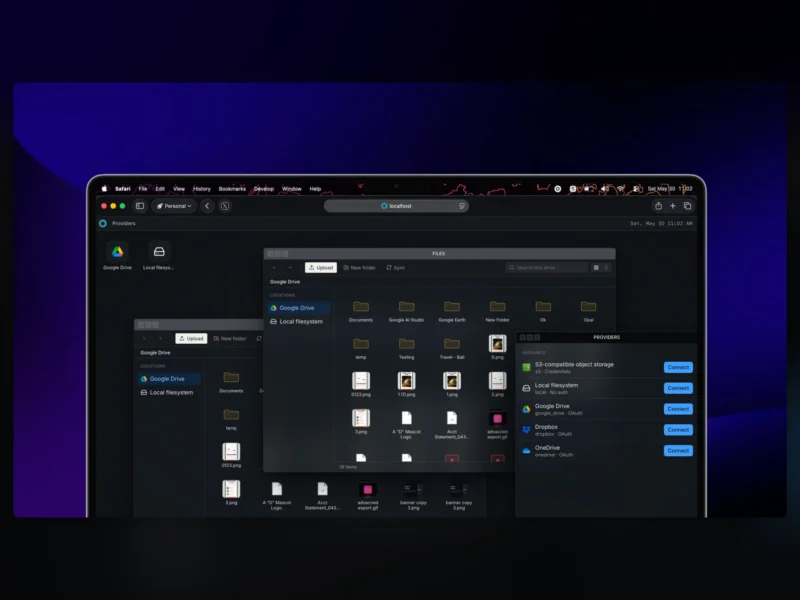
Drivebase is a self-hosted file manager that puts your storage accounts behind one browser window instead of a folder of sync clients. Connect Google Drive, Amazon S3 and any S3-compatible store such as Cloudflare R2, Wasabi or MinIO, or a plain local filesystem, then browse, copy, move and delete across them from a single interface. The front end is built as a desktop shell: Files, Providers and Settings open as movable, resizable windows with a taskbar, so it behaves like a native file manager rather than a dashboard. It deploys with Docker through a one-line installer, the server source is published under the MIT licence, and a paid hosted cloud runs alongside it.
Key Features
- Several providers in one view — Google Drive, AWS S3 and S3-compatible services, Dropbox and local filesystem paths appear as folders in one browser, so moving a file between two accounts is a drag rather than two logins.
- Batch operations with preflight conflict analysis — copy, move, transfer and delete run against many files at once; conflicts are found before anything is written and resolved by overwrite, skip, rename or a manual review pass.
- Live transfer progress — operation status is streamed to the interface over server-sent events, so a long move stays observable while it runs instead of being polled page by page.
- Resumable chunked uploads — an upload session survives a browser reload, and S3 targets accept presigned multipart URLs so the browser writes straight to the bucket rather than proxying every byte through the server.
- Storage usage per provider — quota and consumption are tracked for each connected store, with an on-demand refresh when a current figure matters.
- Pluggable providers and a GraphQL API — new backends sit behind a typed
IStorageProviderinterface, and every capability is exposed over GraphQL, so the bundled web interface is not the only client that can drive it. - Desktop-style shell — Windows, a taskbar and tiling let two folders, or two providers, sit side by side in one tab.
Requirements and installation
The quickest route is the project’s installer, which writes a drivebase/ directory holding a Docker Compose file and a config.toml with generated secrets; docker compose up -d then serves the interface on port 4000. A PostgreSQL 15+ database and a Redis 7+ instance are needed alongside it. Running from source instead requires Bun 1.3.5 or later plus the same database and cache, with the schema applied by bun run db:migrate. A 32-byte master key for encrypting provider credentials is set in config.toml.
Hosted option
Drivebase Cloud sells managed instances (Pro at $9.99 a month, Max at $14.99 and Ultra at $24.99, with larger storage and transfer allowances) for anyone who would rather not run the stack. The software itself is the same, and self-hosting the open-source core is free.
For other ways to reach the same files, see Nextcloud for a full suite with desktop and mobile sync, and rclone for scripted transfers between providers.