OpenJDK
- Platform
- Linux Windows macOS
- Licence
- GPLv2 with Classpath Exception Open source
- Website
- openjdk.org/
- Source code
- github.com/openjdk/jdk
Overview
OpenJDK is the open-source implementation of the Java Platform, Standard Edition (Java SE) — the code base from which Oracle’s own JDK and virtually every other Java runtime is built. Sun released it under the GPL version 2 with the Classpath Exception in 2006, and since JDK 7 it has been the official reference implementation of the Java SE specification. Oracle leads the project, with sustained contributions from Red Hat, SAP, Azul, BellSoft, Amazon, Alibaba, Google and others, and each of those vendors ships a build of the same source. Feature releases arrive every six months in March and September, with a long-term-support line every two years — JDK 8, 11, 17, 21 and 25 — and JDK 27 is the current GA release.
Key Features
- javac and the java launcher — source is compiled to bytecode once and runs on any HotSpot-based JVM, on any supported platform. Since JDK 11
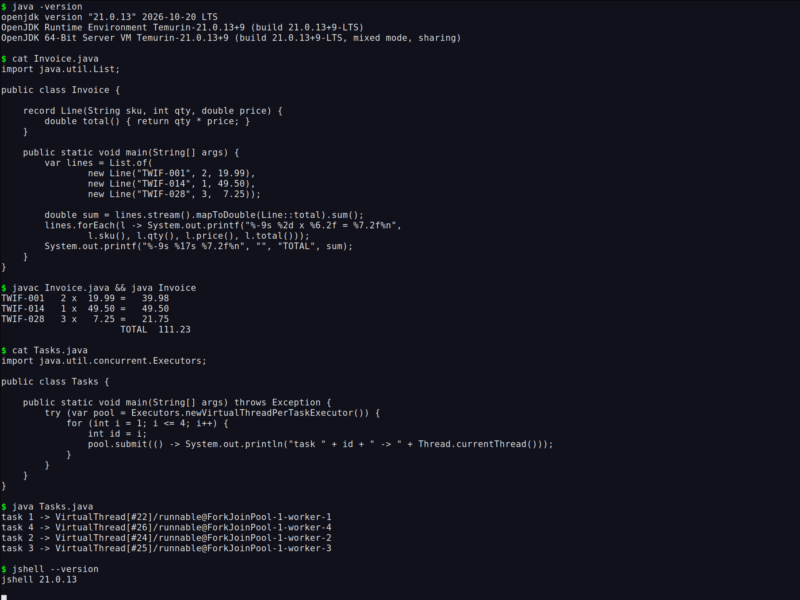
java Hello.javaalso compiles and runs a single source file in one step, which makes small programs and scripts practical. - Records, sealed types and pattern matching — immutable data carriers, closed hierarchies and pattern matching for switch are part of the language rather than bolted on by a library.
- Virtual threads (Project Loom) —
Thread.ofVirtual()andExecutors.newVirtualThreadPerTaskExecutor()make blocking, thread-per-request code scale to hundreds of thousands of concurrent tasks without rewriting it as reactive callbacks. - A choice of garbage collectors — G1 by default, with ZGC and Shenandoah for pause times in the low milliseconds, plus Parallel and Serial for throughput or small footprints, selected at launch with
-XX:+UseZGCand friends. - jshell — a read-eval-print loop for trying expressions, API calls and snippets against a real JVM without writing a class first.
- jlink and jpackage — build a trimmed runtime image containing only the modules an application needs, or wrap it in a native installer for Windows, macOS and Linux.
- Built-in observability — Java Flight Recorder,
jcmd, JMX and the JFR event streaming API are part of the platform, so profiling production does not require a third-party agent. - Very wide hardware support — x64 and aarch64 on Linux, macOS and Windows, plus maintained community ports for RISC-V, POWER/AIX, s390x, the BSDs, Haiku and 32-bit ARM.
Why Use OpenJDK?
OpenJDK is free to use and redistribute under a licence that imposes no per-core, per-server or per-employee cost, and because it is the common source of every vendor build, an application can be moved between Oracle, Temurin, Corretto, Zulu or Liberica without changing a line of code. The language has been hardened for three decades of production work: the memory model, the class loader and the JIT are the reference for the JVM ecosystem, the LTS lines get years of security updates, and the libraries behind it are mature rather than fashionable. The tooling is equally settled — Maven and Gradle for builds, JUnit for tests, IntelliJ IDEA, Eclipse and VS Code for editing — and Maven Central remains one of the largest package repositories in any language. Recent releases have also removed the traditional reasons to look elsewhere: virtual threads make the simple blocking style scale, modern language features cut the boilerplate, and ZGC keeps pauses low enough for latency-sensitive services.
Use Cases
- Backend services and REST APIs built on Spring Boot, Quarkus or Micronaut.
- Data infrastructure — Kafka, Elasticsearch, Spark and Flink all run on the JVM.
- Enterprise line-of-business applications where stability over a decade matters more than novelty.
- Desktop applications with JavaFX or Swing, packaged for all three major platforms with jpackage.
- Cross-platform tooling and CI glue, including the Gradle build system and the Android build toolchain.
- Teaching and interviews: a large share of computer-science courses still start with Java because the platform hides nothing and the errors are explicit.
Getting Started
Install a JDK and check it with java -version. On Debian and Ubuntu, sudo apt install openjdk-21-jdk is enough (trixie ships 21); on macOS brew install openjdk, and on Windows a vendor installer. Ready-made builds of the newest release are on jdk.java.net, and openjdk.org lists the projects and the release schedule. Compile and run a first program with javac Hello.java then java Hello, or open jshell and start evaluating expressions straight away. The official tutorials live at dev.java, and if you want to work on the JDK itself, the source is mirrored on GitHub.