Figranium
- Platform
- Docker Linux Web
- Licence
- GPL-3.0 Open source
- Website
- figranium.dev
- Source code
- github.com/figranium/figranium
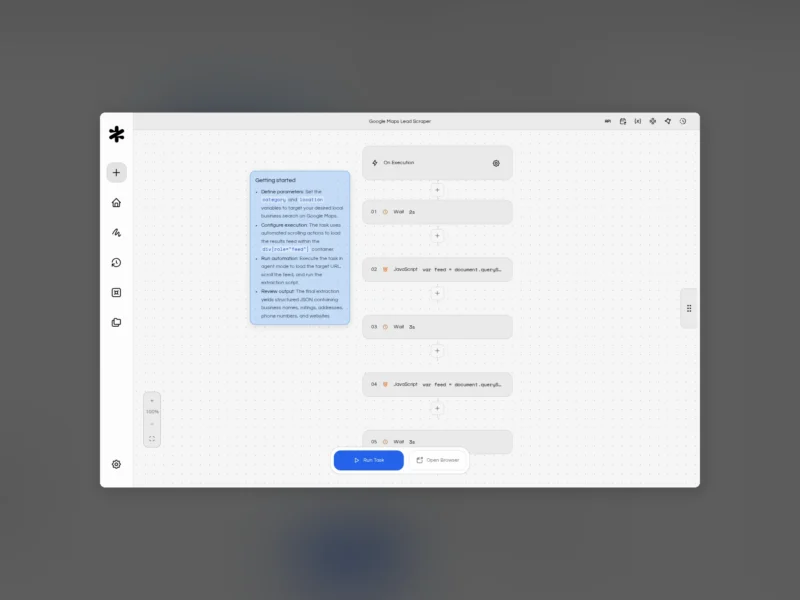
Figranium is a self-hosted, open-source workspace for turning repetitive browser work into repeatable tasks you can trigger from anywhere. You assemble a workflow from visual blocks, then call it through the built-in REST API or let the scheduler run it. Playwright drives a real Chromium browser underneath, and the whole runtime, including credentials and recorded runs, stays on your own infrastructure.
Key Features
- Visual block editor — stack action blocks on a canvas (navigate, click, type, wait, scroll, hover, press, JavaScript, screenshots) and add conditions, loops, variables and error handling where a flow needs them.
- Every workflow is an API endpoint — trigger a saved task over HTTP, pass runtime variables, and gate access with API keys you control.
- Built-in scheduling — visual interval, daily, weekly or monthly settings, or raw five-field cron expressions, with no external cron daemon to babysit.
- Executions and recordings — review queued and running jobs, inspect results, screenshots and video recordings, and cancel work that is still waiting.
- Cabinets — durable file queues that catch browser downloads and feed later upload steps.
- Proxy rotation — host, import or rotate HTTP and SOCKS5 proxies, set a default, and toggle rotation per task.
- Agent and Scrape modes — deterministic full-browser automation, or lightweight HTTP-only scraping when launching a browser is overkill.
- Templates — browse, preview and import community workflows straight from the dashboard.
- Resource-aware execution — a host-aware concurrency ceiling, queue limits and memory and CPU thresholds stop runs from swamping the machine.
- Security controls — session authentication, IP allowlists, scoped API keys and an encrypted credential store with optional 1Password integration.
- Docker-first deployment — one Compose file, the app on port 11345, and a headful browser viewer served through an authenticated WebSocket so you can watch runs live.
Why Use Figranium?
Plenty of tools can automate a browser session, but most of them turn into bespoke scripts that rot the moment a page changes, or push your logins and session cookies onto someone else’s cloud. Figranium sits in the gap: the blocks are visual and editable, so a selector change is a two-minute fix instead of a debugging afternoon, yet each finished task becomes a stable HTTP endpoint with structured JSON output that your own code, an AI agent or a low-code tool can call. Because it is GPL-3.0 and runs on your hardware, the credentials in its vault, the recordings of every run and the data you scrape never leave your network.
Use Cases
- Monitoring prices, stock levels or listings on sites that only render their data in the browser.
- Pulling reports and exports out of portals that never got an API, on a nightly schedule.
- Enriching leads or building datasets from local business directories and public search results.
- Smoke-testing and regression-checking your own web app with screenshots and recorded evidence.
- Giving an AI agent a real browser to work with, through the official MCP server, n8n node, Dify integration, Activepieces piece or Python and JavaScript SDKs.
Licence
GNU GPL-3.0. Every feature, including the visual builder, headful sessions, selector picking, scheduling, REST API and encrypted vault, is free and unrestricted when self-hosted, and there are no task or run limits. A paid managed cloud tier starts at $15/month for people who would rather not run a server, but nothing in the self-hosted product is held back behind it.
Alternatives
- Activepieces — open-source no-code automation with a large connector library.
- n8n — fair-code workflow automation that also ships a browser-driving node.
- Huginn — self-hosted agents that watch pages and feeds and act on changes.