Wizarr
- Platform
- Docker Linux Self-hosted
- Licence
- MIT Open source
- Website
- docs.wizarr.dev
- Source code
- github.com/wizarrrr/wizarr
Overview
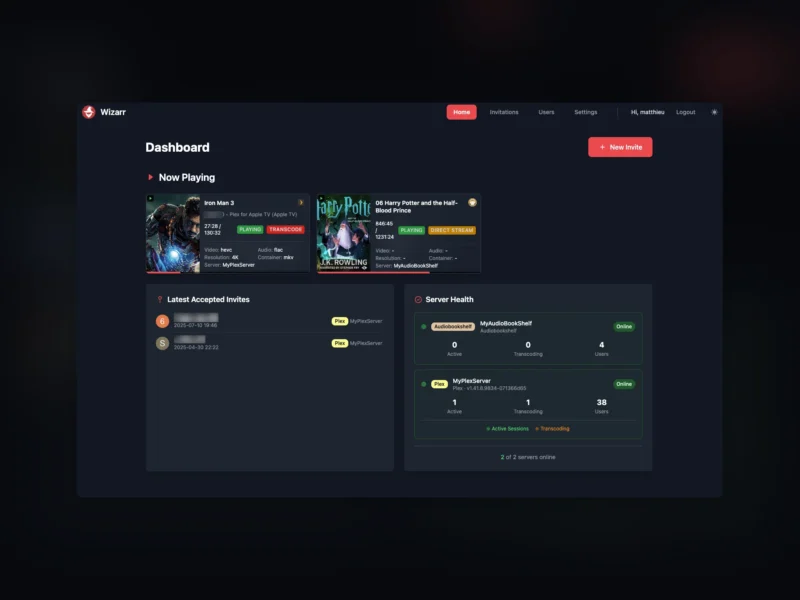
Wizarr is an invitation and user management layer that sits in front of a media server. Instead of explaining to a friend which Plex or Jellyfin app to install, how to accept a share and which request tool to use, you generate one invitation link and send it. The person opens the link, enters the code, and Wizarr creates the account on the server itself — then walks them through the rest of the setup with a short wizard: which app to download, how to sign in, and where to send a request.
It supports Plex, Jellyfin, Emby, Audiobookshelf, Kavita, Komga and Romm, and one installation can manage several of them at once, with an admin dashboard showing what is being played on each server, who joined recently and whether each server is still healthy. Wizarr is written in Python, released under the MIT licence, and runs as a single Docker container with a SQLite database in a data volume.
Key Features
- Automatic invitations: a unique invite link creates the account on Plex, Jellyfin, Emby, Audiobookshelf, Komga, Kavita or Romm when it is redeemed — no manual user creation in the server’s own admin panel.
- Guided onboarding wizard: pre-invite and post-invite steps explain which client app to install, where to sign in and how to reach the request system, in the invitee’s language.
- Multi-server support: one dashboard for several servers of different kinds, each configured with its own URL and API key, with a test button per server entry.
- Invitation tiers and expiry: different invitation codes can grant different library access, and memberships can be time-limited so a guest account lapses on its own.
- Request-system integration: links out to Seerr, Jellyseerr or Ombi as part of the onboarding flow, so a new user knows where to ask for films.
- Single sign-on: plug-and-play SSO with providers such as Authentik or Authelia, with Wizarr’s built-in login switchable off when a reverse proxy handles authentication.
- Customisable pages: the wizard steps, welcome text and styling can be edited in the admin UI, including custom HTML snippets for individual announcements.
- REST API and diagnostics: an OpenAPI/Swagger document is served by the instance itself, and the dashboard reports live sessions, transcodes and per-server user counts through Plex, Jellyfin and the other server APIs.
Typical Uses
- Running a family media server where new people need an account without a manual walkthrough every time.
- Handing out guest access with an expiry date instead of remembering to remove users later.
- Giving different friends access to different libraries through separate invitation tiers.
- Keeping Plex and Jellyfin side by side and inviting people to both from one page.
- Sending a Discord invite alongside the media-server invitation for a community server.
Getting Started
Wizarr ships as ghcr.io/wizarrrr/wizarr and listens on port 5690. Mount a host directory at /data for the database and uploads, set PUID, PGID and TZ, and publish the port; a Compose file, an unRAID Community Applications template and a TrueNAS custom-app recipe are all documented. The first start asks for an admin account, after which you add the media server (URL and API token) under Settings, create an invitation and share the link. Reverse-proxy examples for the common front ends are part of the documentation.