SUB/WAVE
- Platform
- Docker Linux Web Self-hosted
- Licence
- MIT Open source
- Website
- getsubwave.com
- Source code
- github.com/perminder-klair/subwave
Overview
SUB/WAVE is a self-hosted personal internet radio station. It runs one Icecast stream that every listener hears at the same moment, so it behaves like radio rather than a playlist: you tune in and hear whatever is on. An AI DJ picks the tracks from your own Navidrome music library, writes and speaks between them, and takes requests in plain language.
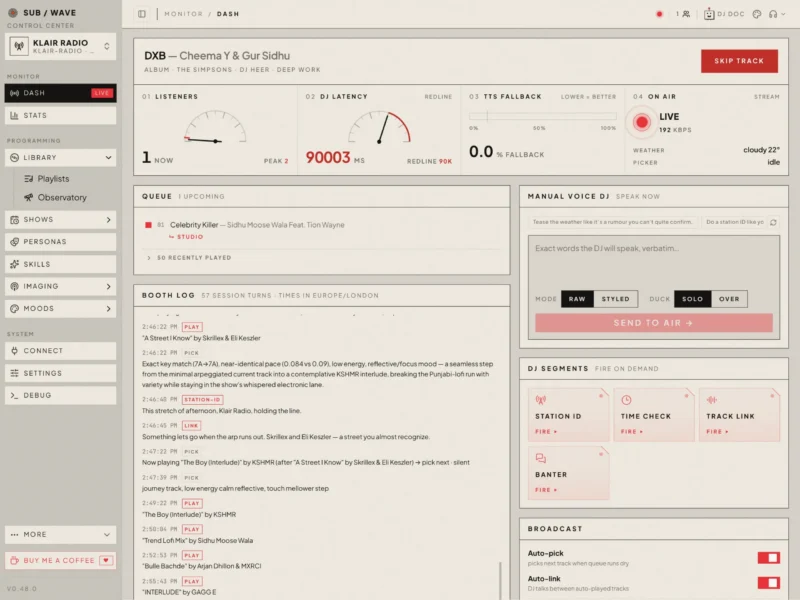
The DJ’s job is the part that makes it a station. It curates the next track, writes intros and links, reads station idents, the time and the local weather, and keeps a written booth log of what it did and why. Everything is operated from a web control centre at port 7700: a live dash with the queue and the booth log, a persona roster, a weekly schedule, statistics on LLM and TTS usage, and a debug page with health and logs. The whole stack is a Docker Compose deployment on a single Linux host and is released under the MIT licence.
Key Features
- One shared Icecast broadcast: a single stream everyone connects to, so the station sounds the same for every listener; track-end is the natural transition and listeners have no skip button (the operator can skip from the admin API).
- AI DJ that picks and talks: an LLM chooses the music and writes the spoken segments — station idents, time checks, the weather, a quick intro for whatever is going out next — with voice delivered through the TTS engine of your choice.
- Your own library, no external catalogue: pulls music from Navidrome over the Subsonic API, so the station only ever plays what you already own and nothing is fetched from a streaming service.
- Plain-language requests: listeners can ask for “something more upbeat” or “anything by Radiohead” in the player, and the DJ works out what was meant and slots it into the queue.
- Swappable LLM provider: Ollama, Anthropic, OpenAI, Google, DeepSeek, OpenRouter, Requesty, Vercel AI Gateway or any OpenAI-compatible server, changeable from the admin UI with no redeploy; a daily token budget can cap spend, and past the cap the music keeps playing without the chatter.
- Six TTS engines: Piper and Kokoro run in-process for fast local speech, an optional
tts-heavysidecar adds Chatterbox (zero-shot voice cloning) and PocketTTS, and cloud OpenAI / ElevenLabs or any self-hosted HTTP endpoint round it out — with a different engine selectable per kind of speech. - Multiple DJ personas: up to 24 in the roster, each with its own voice and writing style; a show can seat up to three guest co-hosts who trade scripted banter with the host, and ready-made personas install from a community catalogue.
- Multi-format broadcast: MP3 always served at a configurable bitrate for Sonos, hardware radios and cars, with optional Opus, AAC and lossless FLAC mounts that the web player picks automatically.
- Scheduled shows and programmes: a 24×7 grid where every slot has its own persona, mood and skills, and a slot can air as a produced episode with a drafted plan, intro and outro.
- Pluggable skills: the between-track segments are skills scaffolded as editable files under
state/skills/, so the news feed or a brief can be rewritten from the admin console, or a new skill dropped in as aSKILL.mdand enabled after a rescan. - Ending-aware transitions: the bundled analyser measures BPM, key, loudness and how each track actually ends, so crossfades size themselves to the material; vocal detection keeps the DJ from talking over a sung intro, and DJ speech ducks the music and lifts it back up.
- Player skins and native apps: eight player faces with a live theme editor, plus native iOS, Android and desktop players and an installable PWA.
- Private station mode: two independent locks over one station password — hide the web player behind a prompt and/or require listener authentication on every stream mount.
Why Use SUB/WAVE
A playlist is a list you control; radio is a broadcast you join. SUB/WAVE is the second kind, which is a different product from every music server in this directory. Navidrome or Jellyfin answer “what do I want to hear next”; SUB/WAVE answers “what is on”, and the DJ is the one deciding, with a reason written down in the booth log. That makes it useful both as a homelab toy that actually gets daily use — a station for the house, the office or a shop — and as a working demonstration of a local LLM plus TTS pipeline running unattended. Because the library comes from Navidrome and the model can be a local Ollama one, the whole station can run without sending a request to a third party.
The project also sells a metered hosted “DJ Brain” and a fully managed station, which fund development; the self-hosted software itself is complete and free, and the hosted plans are optional.
Typical Uses
- A always-on radio station for a house, workshop or small business, playing from a music collection that already lives on a NAS.
- A themed station with scheduled shows — a morning show with one persona, an evening one with another — that runs whether anyone is watching the queue or not.
- Testing and demoing local LLM and speech-synthesis stacks on real, continuous work instead of one-off prompts.
- Giving guests a listen link with in-app song requests, without exposing the music library itself.
Getting Started
The quickest route is the project’s CLI installer, which sets up the stack and then offers to bring it on-air:
curl -fsSL https://cli.getsubwave.com | sh
subwave setup
The plain Docker route is a Compose file plus three variables — ADMIN_USER, ADMIN_PASS and SITE_URL — in a .env file, then docker compose up -d. Either way an onboarding wizard at /onboarding collects the Navidrome URL and credentials, the LLM provider and key, the TTS engine, the first DJ persona, and offers to render jingles. A Linux host with Docker is the only requirement; the optional heavy TTS sidecar adds roughly 5–6 GB of PyTorch for voice cloning and the faster multilingual engines. Cloudflare in front of the host is the project’s suggested way to add TLS.