Metadata Remote
- Platform
- Docker Linux Web
- Licence
- AGPL-3.0 Open source
- Source code
- github.com/wow-signal-dev/metadata-remote
Overview
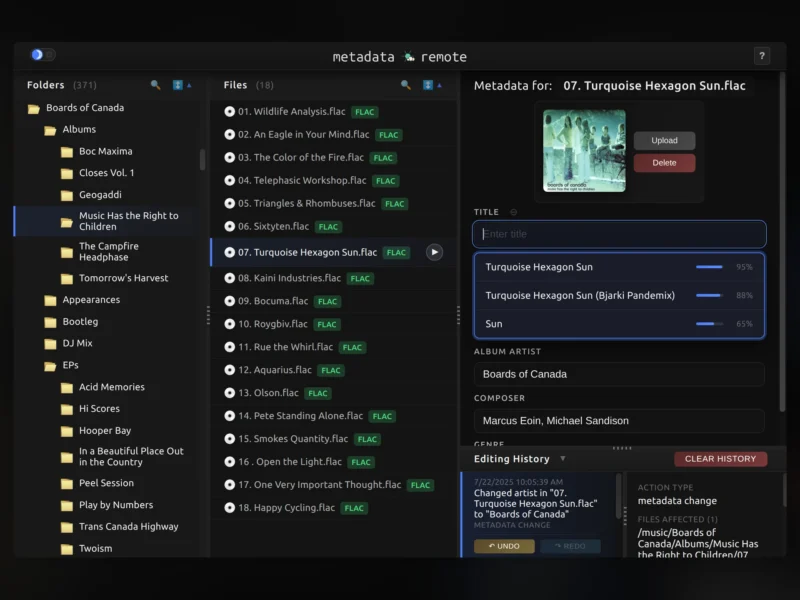
Metadata Remote — mdrm for short — is a browser-based audio metadata editor built for headless servers. It runs as a single small Docker container, mounts your music directory read-write, and serves a three-pane web interface: folders on the left, files in the middle, every metadata field of the selected track on the right. No import, no library database, no desktop environment and no file transfers.
The point is the gap it fills. On a NAS, a VPS or a Raspberry Pi there is no desktop tag editor, so editing tags usually means either SSH and command-line surgery, copying files down to a workstation and back, or adopting a full library manager with an import pipeline and its own configuration. Metadata Remote takes the direct path: open the page on any device, edit the field, save. It reads and writes tags with the Mutagen library, falling back to FFmpeg or FFprobe for formats Mutagen does not cover, and keeps an in-memory undo history for the session.
Key Features
- Three-pane browser editor: folder tree, file list and a metadata panel side by side, with resizable panes and real-time search filtering.
- Every text field, not a subset: standard and extended tags are grouped for editing, and custom fields can be created or deleted.
- Bulk operations: apply an edit to a single file or to a whole folder in one action, which is what makes cleaning up a large collection practical.
- Metadata suggestions with confidence scores: an empty field can be filled from the filename, the folder patterns and sibling files, combined with MusicBrainz lookups, with each suggestion ranked by a confidence percentage — including strategies for classical, compilation and live recordings.
- Undo and redo: a full editing history of up to 1000 operations, covering bulk changes too, shown as a timeline in the bottom panel.
- Album art management: upload, preview, delete and bulk-apply cover images, with automatic repair of corrupt artwork.
- In-browser playback: stream a track straight from the UI before deciding what to change.
- Renaming in place: rename files and folders from the interface, with the rename tracked in the history.
- Keyboard-first: every action has a shortcut — arrows and Page keys to navigate, Tab to switch panes, Enter to edit or play, Escape to cancel,
?for the full list; the mouse is optional. - Broad format support: MP3, FLAC, OGG, OPUS, M4A, M4B, WMA, WAV and WavPack.
- Tiny and multi-architecture: roughly 81 MB on Alpine, running on x86_64, ARM64 and ARMv7, with light and dark themes and no external services other than optional MusicBrainz lookups.
Why Use Metadata Remote
Tagging a collection that lives on a server should not require moving it. Metadata Remote edits the files where they are, through a UI that works on the device you already have in front of you, and it saves on an explicit action rather than importing your folders into somebody else’s database. That makes it safe to run next to a media server that reads the same directory: Jellyfin, Plex or Navidrome picks up the corrected tags on its next scan, without a round trip through a workstation. The undo history and the confidence-scored suggestions matter just as much — when you are renaming hundreds of tracks, being able to see what a suggestion was based on, and to reverse it, is the difference between a cleanup and an accident.
Typical Uses
- Fixing album, artist and track tags on a NAS (TrueNAS, Unraid, Synology) with no desktop tag editor available.
- Preparing metadata before a Jellyfin or Plex library import, so the server does not have to be corrected afterwards.
- Bulk cleanup of a newly ripped or digitised collection: one folder, one set of fields, applied in a click.
- Correcting or replacing missing album art across an album at once.
- Renaming files and folders to a consistent scheme without SSH and a shell script.
- Working on a VPS or Raspberry Pi music library from a laptop browser over the LAN.
Getting Started
The current release is v1.2.0. The container image is ghcr.io/wow-signal-dev/metadata-remote:latest for x86_64, ARM64 and ARMv7. A minimal Compose service maps your music directory to /music read-write, publishes port 8338 and sets PUID and PGID to the owner of those files so writes do not end up root-owned; additional libraries can be mounted as subfolders under /music. Environment variables are just PUID, PGID and optionally MUSIC_DIR. Then open http://localhost:8338. There is no built-in authentication, so keep the port on your LAN or put it behind a reverse proxy with auth. The undo history lives in memory and is cleared when the container restarts, so finish and save an edit session rather than leaving it open indefinitely. The repository has not published a release since v1.2.0 in July 2025, so treat it as a focused, stable tool rather than a fast-moving project.
Licence
Free and open source, licensed under the GNU Affero General Public License v3.0 (AGPL-3.0); the full text is in the repository’s LICENSE file.