scrot
- Platform
- Linux
- Licence
- MIT-feh Open source
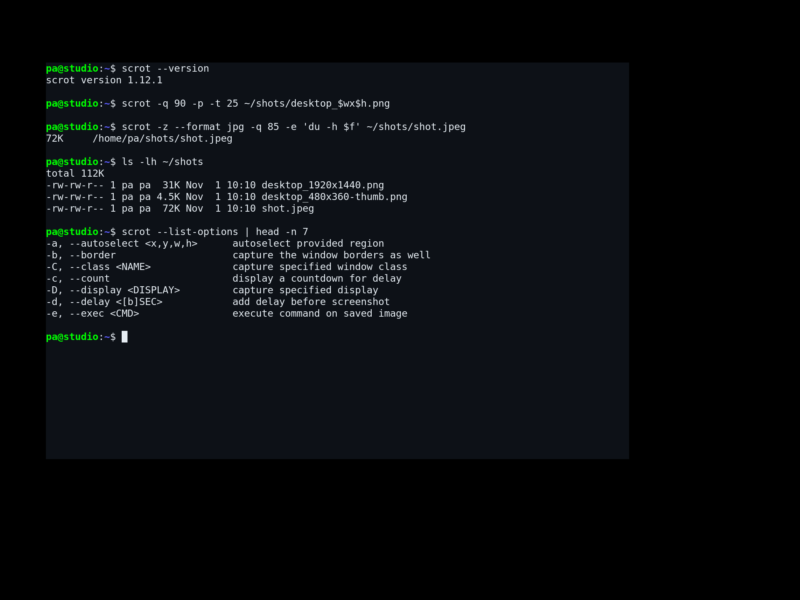
scrot (SCReenshOT) is a small command-line screen capture utility for X. One short command grabs the whole screen, the focused window, a window you name, or a rectangle you drag with the mouse, and writes it to PNG, JPEG, GIF or any other format Imlib2 can encode. There is no window, no tray icon and no preferences dialog: everything is a flag, which is exactly why it slots into shell scripts, hotkey daemons and cron jobs without friction.
The program began in 1999 as a personal tool by Tom Gilbert, and after it went unmaintained the source of the last release, 0.8, was imported from Debian. Debian and upstream patches were applied on top to produce 0.9, and the project now lives under Resurrecting Open Source Projects, where volunteers maintain it. That history matters in practice: it is a two-decade-old utility with a stable command line, still receiving real releases. Version 2.0.0 landed in March 2026 and moved monitor capture from Xinerama to Xrandr, made the default selection line width follow the display DPI, fixed selection artefacts under compositors, dropped the old --note and --script options and raised the Imlib2 floor to 1.11.0.
Key Features
- Four ways to choose what to capture. The whole screen by default; a single Xrandr monitor with
-M NUM; every head in order with-m; the focused window with-u; a window by X identifier with-w; a window by class with-C; or a rectangle drawn with the mouse via-s. Non-interactive rectangle capture is available too, with-a X,Y,W,H. - Format and quality control.
--formatforces the encoder and the file extension decides it otherwise, defaulting to PNG.-qsets quality from 1 to 100 (default 75) and-Zsets compression from 0 to 9 (default 7), both interpreted by the chosen format. - Filename templates and post-processing. Output names accept strftime specifiers plus scrot’s own strings, and
-e CMDruns a command on the finished file, so saving, resizing, uploading or moving can be one line.-F -writes the image to stdout for pipelines. - Delay, countdown and thumbnails.
-d SECwaits before shooting, with abprefix moving the delay in front of the selection step;-cshows a countdown;-twrites a second, smaller copy at a percentage or an exact width by height. - Window and pointer detail.
-bincludes the window manager border,-pdraws the mouse pointer into the image,-kjoins stacked windows vertically or horizontally where a compositor is running, and-ffreezes the screen while the selection is made. - Script-friendly by design.
--list-optionsprints every flag in a machine-readable TSV form,-zsuppresses the shutter beep,-oallows overwriting an existing file and-ikeeps the program alive while keys are pressed. Bash and Zsh completion scripts ship with it.
Filename templates and format strings
Because -F, -e and the positional filename all expand the same template language, a capture can describe itself. Characters after a % are handed to strftime, so dates sort naturally, while $-prefixed strings are filled in by scrot: $f the image path, $n the basename, $w and $h the dimensions, $p the pixel size, $s the size in bytes, $t the file format, $m the thumbnail path, $a the hostname and $W the window name. The documented example, scrot '%Y-%m-%d_$wx$h.png' -e 'du -h $f', produces a dated file and immediately reports its size, which is a fair summary of how the tool is meant to be used.
Everyday uses
- Documentation and bug reports — bind a key to a scrot call that selects a region and copies it straight into a ticket, a wiki page or a chat window.
- Unattended monitoring — the README’s own example: keep an eye on an X server while nobody is at the machine, saving a timestamped frame on a schedule.
- Build and test pipelines — capture the screen from a script at an exact moment, with a known size, and hand the path to the next step through
$f. - Lightweight desktops — a full screenshot tool with no tray process and no dependencies beyond the X libraries already present.
Licence
MIT-feh — the MIT licence with an added acknowledgment clause, written by Tom Gilbert in 1999 and 2000. Free software, no paid tier.
Alternatives
- FlameShot — a graphical capture and annotation tool, better when shots need arrows and text added on the spot.
- Spectacle — the KDE screenshot utility, useful when a full desktop environment is already in place.
Repository and documentation: github.com/resurrecting-open-source-projects/scrot