recordMyDesktop
- Platform
- Linux
- Licence
- GPL-2.0-or-later Open source
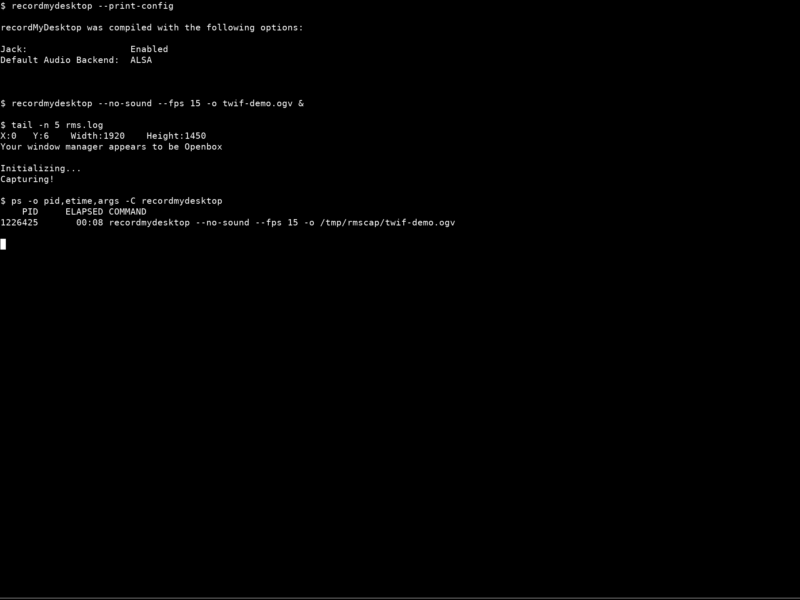
recordMyDesktop is a desktop session recorder for the X Window System on GNU/Linux. It captures your screen and writes the result straight to open formats: Theora video and Vorbis audio inside an Ogg container, the same codecs Xiph.org develops. Nothing about the output is proprietary, so the file plays back in VLC, mpv, Firefox or any media player that ships Ogg Theora support.
The project is deliberately split in two. A small command-line tool — recordmydesktop, written in C — does the capturing and the encoding, and an optional graphical front-end exposes the same functionality through a window. That split is the reason the tool has aged so well: the recorder itself has no toolkit dependency and no interactive UI, so it keeps working on systems where a modern screen recorder would need a full compositor stack.
Key features
- Full screen, a region, or a single window. Run it with no arguments to record the whole screen; pick a rectangle with
-x,-y,--widthand--height; or record just one window with--windowid. - Open formats only — Ogg Theora video plus Ogg Vorbis audio. No H.264, no MP4, no patent-encumbered codec anywhere in the pipeline.
- Encoding after capture, not during it. Since version 0.3 the recording phase is kept cheap and the encoding runs once you stop, which matters a great deal on older hardware.
--on-the-fly-encodingrestores the old behaviour if you would rather stream out as you go. - Change-aware capture through the X Damage extension. By default only the areas that actually changed are marked and updated, so a mostly static desktop stays cheap to record.
--full-shotsforces complete frames when accuracy matters more than CPU — for example accelerated 3D windows that do not emit damage events. - Sound from ALSA, OSS or JACK. Choose the audio backend and device, or record silently with
--no-sound. - Tunable output — frame rate (
--fps), video and audio quality, channels and sample rate. - Controls without a GUI. Ctrl+C stops a recording cleanly,
SIGUSR1toggles pause, andSIGABRTaborts and discards the file.--pause-shortcutand--stop-shortcutbind those signals to keyboard shortcuts. --rescuerebuilds an output file from the data of a recording that was interrupted.
How it works
A plain run is a one-liner: recordmydesktop records the full screen and leaves out.ogv in the current directory, while recordmydesktop demo.ogv names the output explicitly. Recording stops on Ctrl+C, and the encoding pass then produces the final file. Because everything is driven from the command line and from signals, the same recorder works inside a script, over SSH, from a cron job, or against a headless X server such as Xvfb.
Why choose it
It is the least invasive way to get a screen recording out of a Linux box. There is no tray applet, no compositor requirement and no runtime to keep updated — one binary, a handful of X and Ogg libraries, and a file at the end. For automated captures (documentation screenshots, demo clips, regression recordings on a virtual display) that is exactly the right shape, and the Theora/Vorbis output is guaranteed to be redistributable.
Worth knowing
The historical graphical front-ends — gtk-recordMyDesktop (PyGTK) and qt-recordMyDesktop (PyQt4) — were written for Python 2 and are not shipped by current distributions, so what Debian 13 packages is the command-line recorder, version 0.4.0. It records X11 sessions only: it relies on X extensions such as X Damage, so a native Wayland session is out of scope. If you want a modern GUI recorder for Wayland desktops, look at the alternatives below.
Use cases
- Recording a scripted demo or a terminal session on a headless X display.
- Producing redistributable clips without touching a proprietary codec.
- Capturing a bug reproduction on an older or low-powered machine.
- Classroom and documentation clips on X11 desktops where heavier recorders struggle.
Licence
Free and open source — GNU General Public License, version 2 or later (GPL-2.0-or-later).
Alternatives
- OBS Studio — full streaming and recording studio, far heavier, works on Wayland.
- SimpleScreenRecorder — Qt recorder with a clear GUI, X11 and OpenGL aware.
- vokoscreenNG — modern Qt front-end for tutorial recording.
- Kazam — lightweight GTK screencaster.
- Peek — quick animated GIF and video captures of a window or region.
Project home: recordmydesktop.sourceforge.net