Peek
- Platform
- Linux
- Licence
- GPL-3.0 Open source
- Website
- github.com/phw/peek
- Source code
- github.com/phw/peek
Overview
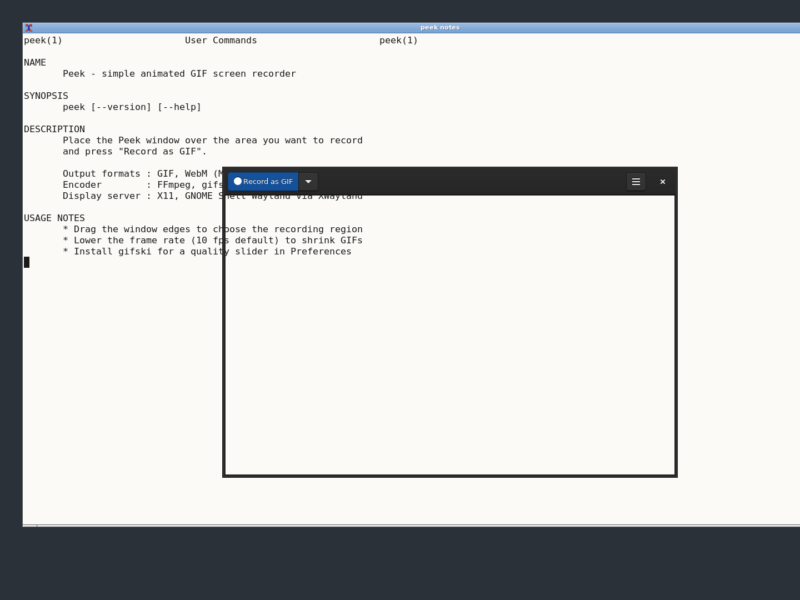
Peek is a small screen recorder for Linux with exactly one job: turn a rectangle of your desktop into a short, silent animation – an optimised animated GIF by default, or a WebM video if you prefer. Instead of a timeline, tracks and export presets, it gives you a single window you drag over the part of the screen you care about, one Record as GIF button and a stop button. That is the whole interface, and it is deliberate.
The project was written in Vala on GTK3 by Philipp Wolfer (phw) and it is explicitly not a general purpose screencast suite. Its own documentation limits the scope: Peek “focuses on the single task of creating small, silent screencasts of an area of the screen for creating GIF animations or silent WebM videos”. Recording defaults to 10 frames per second, there is a downsample option to shrink the captured area, and if the gifski encoder is installed Peek uses it automatically and exposes a quality slider in Preferences – a real quality jump over plain FFmpeg palette optimising, at the cost of file size.
One thing a reader deserves to know up front: Peek is deprecated. Its author declared the project deprecated on 14 January 2023, closed issue reporting and archived the repository; the last release is 1.5.1 from February 2020. Nothing new will be developed. It still installs from the distributions listed below and it still works well on X11 and inside a GNOME Shell Wayland session through XWayland, which is exactly why people keep using it – but it is a finished, frozen tool, not an actively maintained one. If you need something maintained, look at GPU Screen Recorder or Kooha instead.
Key Features
- The window is the region selector – resize or move the Peek window and you have chosen the capture area. No coordinate fields, no full-screen-only modes.
- Animated GIF output – the default and the reason the project exists; frames are encoded and palette optimised with FFmpeg.
- Optional gifski encoder – installed separately, detected automatically; adds a quality slider in Preferences for cleaner gradients and more colours per frame.
- WebM output – choose the format in the dropdown next to the record button; better than GIF for anything with motion or many colours.
- Frame rate and downsample controls – 10 fps by default, lower rates and downsampling both shrink GIF files dramatically.
- Small dependency footprint – GTK3, GLib, libkeybinder3 and FFmpeg; GStreamer Good plugins only for capturing inside GNOME Shell.
- Entirely local – no account, no cloud upload, no telemetry; the file is written where you asked for it.
- Translated – community translations managed on Weblate, so the interface speaks your language.
How It Works
- Install Peek from your distribution, Flathub, Snap or as an AppImage (or build it with Meson and the Vala compiler).
- Start Peek and resize the window until it covers exactly the part of the screen you want to capture – the window frame is the recording region.
- Pick the output format from the dropdown next to the button (GIF or WebM).
- Press Record as GIF and work through the interaction you want to show.
- Press stop. Peek encodes the frames with FFmpeg or gifski and offers to open the finished file, ready to drop into a bug report, a README or a chat.
On a GNOME Shell Wayland session Peek runs as an X11 application through XWayland and records using the GNOME Shell recorder, so the GStreamer Good plugins have to be present; on plain X11 it captures the X server directly and the Wayland limitations do not apply.
Why Use It
- The five-second workflow – for a bug report or a quick “look, it does this” message, opening a full recording suite costs more time than the clip is worth. Peek is running and recording before an OBS scene is even configured.
- GIFs go everywhere – issue trackers, wikis, documentation sites and chat apps all accept an animated GIF where a video file is awkward or blocked.
- Silent by design – no audio pipeline to configure, no microphone accidentally captured, no codec decisions.
- Runs on modest hardware and lightweight desktops – the dependency list is a short one, so it works on old laptops and on tiling window managers where heavier recorders misbehave.
Use Cases
- Recording a reproducible bug for a GitHub or GitLab issue.
- Demonstrating a UI interaction in a README, release note or pull request.
- Producing one step of a written tutorial where a static screenshot would miss the transition.
- Capturing a chart, an animation or a plot from another application as a self-contained file.
- Showing a configuration change in a terminal without shipping a video file.
Limitations and Alternatives
- Deprecated and unmaintained – no fixes, no new features, issues closed. What ships today is what you get.
- No native Wayland support – Peek relies on knowing its own window position, which native Wayland does not expose; it runs through XWayland, and that path is itself on the way out.
- No click or keystroke overlay – the documented workaround is an external tool such as key-mon with
--visible_click. - MP4 was removed – it was available up to 1.5.1 and dropped afterwards; GIF and WebM only.
- GIF is a poor video format – a 256-colour palette, large files and visible dithering on long or full-screen captures. Keep the region small, keep the frame rate low, or use WebM.
- Alternatives – GPU Screen Recorder for fast GPU-encoded video, OBS Studio for full production and streaming, SimpleScreenRecorder and vokoscreenNG for classic X11 desktop recording, and Kooha for a Wayland-native GIF recorder.
Licence
Free and open source, released under the GNU General Public License v3.0 (the README badge states GPL v3 or later). Source code, translations and the issue tracker that documented the deprecation live at github.com/phw/peek.