ToolJet
- Platform
- Web Docker Linux
- Licence
- AGPL-3.0 Open source
- Website
- tooljet.com
- Source code
- github.com/ToolJet/ToolJet
Overview
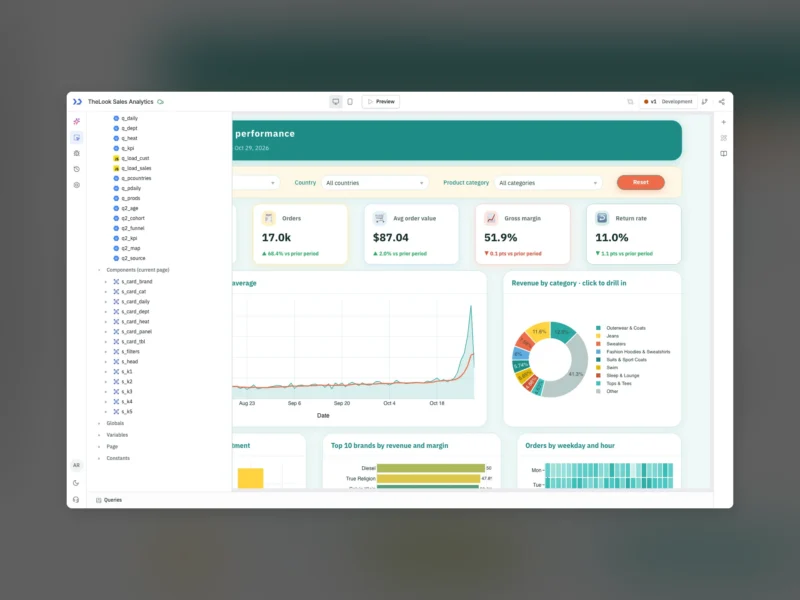
ToolJet is an open-source low-code platform for building internal tools — admin panels, back-office dashboards, customer portals, approval screens and business applications that sit on top of databases and APIs an organisation already runs. The product is a browser-based visual builder: drag components onto a canvas, point queries at PostgreSQL, MySQL, a REST or GraphQL endpoint or one of the hundred-plus bundled integrations, wire the two together with JavaScript where the property panels run out, and publish the result to the people who need it. The core is licensed AGPL-3.0 and distributed as a self-hostable server application; there is also a hosted cloud and a paid Enterprise edition for teams that want SSO, finer-grained permissions and support.
Because the runtime stays on your own infrastructure, the data does not have to leave the network. ToolJet is deployed with Docker, Helm or plain Kubernetes, pointed at your PostgreSQL and Redis, and serves the apps it generates from that instance. The appeal is narrow and practical: the repetitive 80% of internal software — the CRUD table, the filter bar, the CSV export, the approval form with three states — stops being three separate applications written in whatever framework nobody maintains any more, and becomes configuration plus a small amount of JavaScript.
What ToolJet 3.0 Changed
ToolJet 3.0 was released in November 2024 and was a rebuild rather than a feature pack. The application builder was re-architected around a new state-management and rendering model, which the project measured as up to ten times faster app loading, with the editor staying workable on applications holding thousands of components and hundreds of queries. The canvas gained a grid system, a configurable page manager, restyled components with more styling properties, a rewritten query manager for previewing data, better completion and type hints in the JavaScript editor, more intelligible errors in the debugger, and light, dark and auto themes set at application level.
Workflows left beta in the same release: they can be triggered by a webhook secured with a secret, loop over arrays, return several results from one run, handle errors at node level, keep full execution logs and be deployed across multiple environments. Access control was reworked around predefined user roles plus OIDC group sync, and workspace constants gained encrypted secrets. ToolJet Database picked up a SQL mode, a no-code interface for joins, aggregates and group-by, custom primary and foreign keys, JSON and datetime columns, CSV bulk upload and table duplication. Fifteen integrations arrived on the way in, among them Salesforce, OpenAI, Databricks, Supabase, AWS Textract, Lambda and Redshift, Jira, SharePoint, Pinecone, DynamoDB and gRPC, alongside parameterised SQL for PostgreSQL, MySQL and SQL Server and client-credentials authentication for REST.
The major version also made deliberate breaks, and the migration guide matters more than the feature list if you are upgrading: dynamic references to component names are no longer accepted, a component and a query cannot share a name while migrating, the property panel’s variable existence checks move to the variables["name"] ?? false form, and the old Kanban component stops functioning entirely. Development has continued on the 3.x LTS line — v3.20.252-lts shipped on 30 October 2026 — which adds the AI layer: prompt-to-app generation inside the builder, and ToolJet MCP, an MCP server that lets Claude Code, Codex or Cursor create, inspect and modify applications on a ToolJet instance from the coding agent the developer already uses.
Key Features
- Visual app builder — a canvas with a substantial component library (tables, forms, charts, lists, containers, calendars, file inputs, code editors, custom components) and per-component properties and event handlers, with a JavaScript editor for the rest.
- Data-source integrations — the site advertises 100+ connectors covering relational databases, REST and GraphQL, cloud services, SaaS products and LLM providers, plus gRPC and a generic HTTP path for anything without a connector.
- ToolJet Database — a built-in no-code database on PostgreSQL, with GUI joins and aggregates, a SQL mode, CSV import and custom keys, so a small app does not need a separate backend to exist first.
- Workflows — a node-based automation engine for the parts that are not screens: webhook triggers, loops, branching, multiple result nodes, per-node error handling, execution logs and multi-environment deployment.
- Access control — predefined user roles, granular permissions, OIDC and LDAP single sign-on with GitHub and Google social login, group sync over OIDC and SAML, encrypted workspace constants and audit logs streamed to syslog or Datadog, aimed at the point where an internal tool stops being a prototype.
- Development lifecycle — version control for apps, staging and production environments, release and rollback, and Git-backed app versioning.
- AI-assisted building — the AI Builder generates pages, queries, bindings and logic from a description, and the MCP server hands the same capability to external coding agents, with a Governance MCP for permissions.
- Self-hosting — the AGPL-3.0 community edition is published as per-release Docker images; the Enterprise build has its own tag, and the whole platform runs offline on your own hardware.
Why Use It
The licence is the reason many teams pick ToolJet over Retool: the platform itself is AGPL-3.0 and can be audited, forked and run entirely inside a private network, with no per-seat cost for the community edition and no requirement that app data travel through a vendor. Against the other open-source builders, the differentiators are the breadth of the data-source list and the fact that Workflows and the built-in database make it a single deployment rather than a builder plus two other services.
The honest trade-offs: AI features are metered in credits even on the free plan, so prompt-heavy use pushes you toward a paid tier; several features are Enterprise-only — BYOK for model provider keys and the self-hosted AI server among them — and a low-code platform is still a platform, so the apps are only as portable as the queries and JavaScript inside them. Teams that need a handful of static screens and nothing else will find the installation heavier than a Django admin.
It is worth separating ToolJet from the automation platforms it is often compared with: for unattended workflow automation n8n and Activepieces are the closer fit, and for orchestrated data pipelines Kestra is the obvious comparison. ToolJet’s difference is that the deliverable is an interface a non-technical colleague can actually operate, rather than a job that runs when nobody is looking.
Use Cases
- Admin and back-office panels — a checked, permissioned front end over an existing production database, with the write paths you decide and nothing else exposed.
- Operations dashboards — join data from a warehouse, an ERP and a SaaS API into one screen for the team that actually needs to see it, refreshed on demand rather than shipped to a BI tool.
- Approval and request workflows — a form, a role check, a webhook and an audit trail, built as one app instead of an email thread.
- Customer and partner portals — public-facing applications that still run inside your perimeter, with their own authentication.
- Replacing spreadsheet processes — moving a shared sheet with six tabs and no validation into a small app backed by the ToolJet Database or the real database underneath.
- Prototyping before committing — building the screen the product team keeps describing, then deciding whether it deserves engineering time.
Requirements
Self-hosting runs on Linux x86_64 — the project states that arm64 is not supported — with 4 GB RAM, one vCPU and around 8 GiB of storage for a modest deployment, and more as usage grows. ToolJet itself is a Node application served over HTTP, so all that is needed at the front end is a browser. It expects PostgreSQL (16.x recommended, 13.x still works) and Redis 7.x for caching and sessions, either as separate containers or managed services.
Deployment paths documented upstream include docker-compose for a single server, Helm and plain Kubernetes manifests for clusters, and the managed options on AWS ECS, Azure Container Apps, Google Cloud Run and OpenShift. A trial instance can be started with a single docker run against the project’s combined image, and the source, release images and migration notes for each LTS line are all published by the project.