GitButler
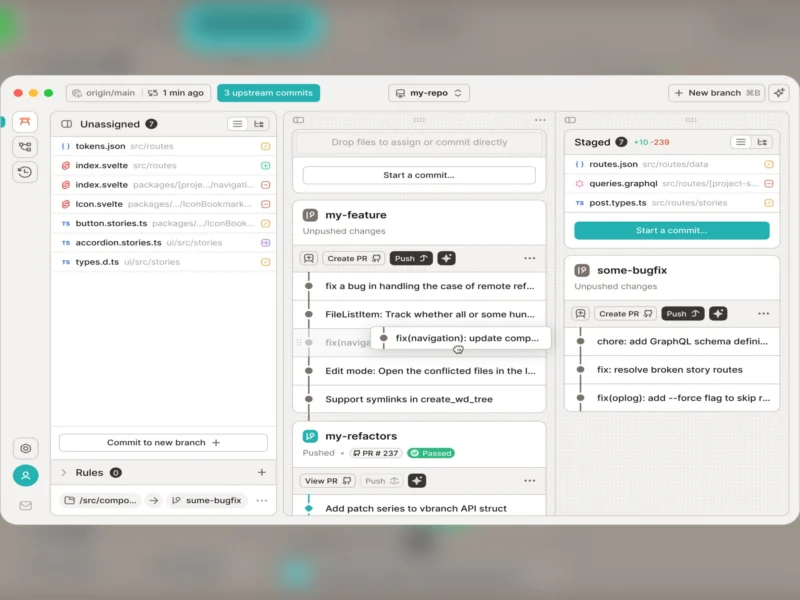
GitButler is a Git client — a desktop GUI written in Rust plus a companion but command-line tool — built around a different idea of what a branch is. Instead of one working directory that belongs to one checked-out branch, GitButler lets you keep several “virtual branches” (lanes) alive at once: you mark individual files and whole commits into the lane they belong to, switch between features without stashing, and land each lane independently. It works on your existing repositories and remotes, so it layers onto a normal Git workflow rather than replacing it. It is also one of the more notable recent Git clients, and it is not open source: the client is published under the Functional Source License 1.1 (FSL-1.1-MIT, the “Fair Source” licence), which makes the code public and free to use but adds a non-compete restriction, so it does not meet the Open Source Initiative definition. Each release converts to the permissive MIT licence two years after publication. The latest release is 0.22.3 (29 August 2026).
Licence notice — this is not open source software
GitButler is included here because it is free of charge, actively developed and genuinely useful for the workflow it targets, but its licence is deliberately not an open-source licence — the FSL adds a non-compete condition and is classed as source-available or “Fair Source”. If you need a fully free-software Git client, use Git Cola (GPL-2.0), GitHub Desktop (MIT) or Git itself; the project’s own blog post, “GitButler is now Fair Source”, explains why it chose FSL over the AGPL.
Key Features
- Virtual branches (lanes) — work on several features at the same time in one working directory, assigning each uncommitted file and each commit to the lane it belongs to. No stashing, no switching, no juggling worktrees.
- Stacked branches — build a feature on top of another feature, review and land each layer independently, then update the stack from upstream.
- Unlimited undo and redo — an operation history that lets you roll back commits, rebases, absorbs and landings, not just the last thing you typed.
- History editing without the CLI — drag commits between branches, absorb a change into an earlier commit, reorder, amend and squash from the interface, with conflicts surfaced as resolvable items.
- A smartlog-style view — see what your lanes actually contain instead of reading a linear
git log, with the target branch and its upstream status shown in place. - Push and pull-request workflows — create branches, push, open pull/merge requests on GitHub, GitLab, Bitbucket and self-hosted forges, and land a branch with the upstream strategy you chose.
- The
butCLI, built for automation — the same model on the command line, with JSON output, idempotent commands and a TUI, plus agent skills so coding agents can drive it. The project publishes a benchmark claiming agents complete tasks with fewer tool calls than with plain Git — a vendor claim, not an independent measurement. - Runs wherever your editor does — desktop builds for macOS (Apple silicon), Linux (.deb and .rpm) and Windows (MSI), with the CLI installed by a shell script.
- Works with existing repositories — your commits, hooks, remotes and Git configuration stay standard; no repository format to migrate and no remote service required for day-to-day work.
Why Use GitButler?
Git’s model is branch-shaped: the working directory belongs to one branch at a time, so anyone working on two things at once ends up stashing, or creating worktrees, or committing half-finished work to keep it safe. GitButler inverts that — the uncommitted changes are the primary object, and branches are labels you apply to them. If you regularly juggle a review comment, a hotfix and a feature in the same repository, or if you have ever lost work to a mis-timed rebase, the combination of lanes, unlimited undo and per-commit staging is a genuinely different way to work, and the CLI means you do not have to leave the terminal to use it. Be clear-eyed about the licence, though: the non-compete clause in FSL rules out using the code to build a competing Git client or service without permission, and only releases older than two years are available to you under MIT. The client itself is free to download and use, needs no account for local work, and does not lock your repository to a proprietary format — so the practical exit cost is low, which is exactly why a source-available licence is a reasonable compromise for a tool like this. If licence purity matters more than the lanes workflow, the alternatives above are a one-command install away.
Use Cases
- Keeping several features in flight at once without stashing or spinning up extra worktrees.
- Reviewing and reshaping a messy history before pushing: splitting a commit, absorbing a fix, reordering a stack.
- Recovering from a bad rebase or a wrong reset with undo instead of
reflogarchaeology. - Driving Git from an AI coding agent through the
butCLI’s structured output, while keeping the human interface for review. - Developers who want a visual client that still behaves like the real thing — same repositories, same hooks, same identity.
- Teaching branch hygiene: the smartlog view shows what a stack is and why landing order matters.
Similar
- Git Cola — the free-software desktop client (GPL-2.0) with status, diff, DAG and rebase windows; the closest fully-open alternative workflow.
- GitHub Desktop — MIT-licensed and simple, but GitHub-centric and without lanes or a scripting CLI.
- GitKraken — the polished commercial client with team features and a paid tier.
- GitLens — a VS Code extension rather than a standalone app; the best choice if your editor is already VS Code or VSCodium.
- Git — the command line itself, which every client here drives, and the ground truth for the model GitButler reorganises.
- lazygit and jj (Jujutsu) — a terminal client and an alternative VCS that also treat change-sets rather than checked-out branches as the unit of work.
Platform
macOS (Apple silicon builds; Intel supported by older releases) · Linux (.deb and .rpm packages; CLI via curl -fsSL https://gitbutler.com/install.sh | sh) · Windows (MSI) · requires Git and an existing repository; desktop GUI and but CLI share the same workspace state
Licence
FSL-1.1-MIT (Functional Source License 1.1, MIT Future License) — a source-available, “Fair Source” licence: not open source, not OSI-approved. The source is public and free to use, modify and self-build for most purposes, but the licence carries a non-compete restriction on offering a competing product or service, and each release becomes available under the MIT licence two years after it is published.
Website
gitbutler.com · source on GitHub · documentation · “GitButler is now Fair Source” · also see the Developer category for more tools that sit next to your repository.