Git Cola
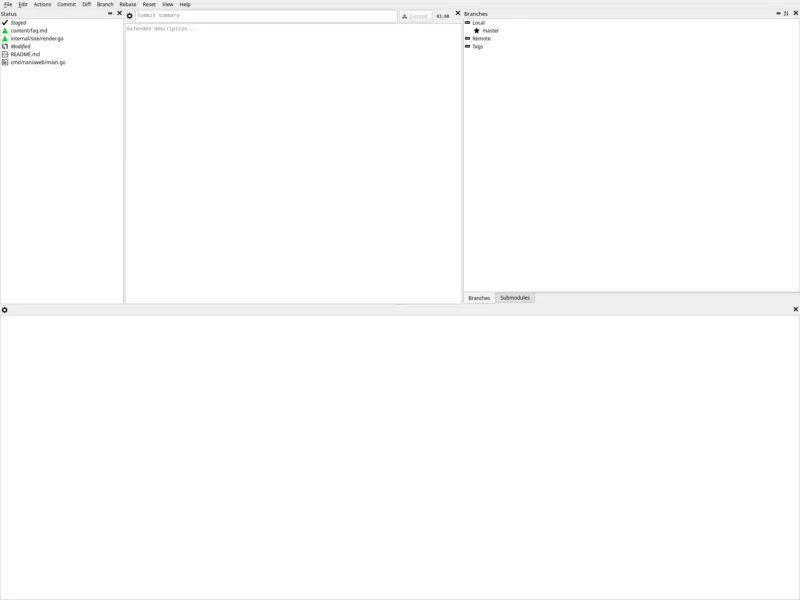
Git Cola is a sleek, keyboard-friendly Git GUI written in Python — “the highly caffeinated Git GUI”, as its authors put it — that has been the pragmatic desktop client of choice on Linux for well over a decade. Instead of hiding Git behind a wizard, it shows you the repository: a status pane listing staged and unstaged changes, a diff pane with per-hunk staging, and separate windows for the commit DAG, diffs, grep, file search and interactive rebase. It is free software under the GPL-2.0, packaged by essentially every Linux distribution (Debian, Ubuntu, Fedora, Arch, Gentoo, openSUSE, Slackware, FreeBSD), and available for macOS and Windows. The current upstream release is v4.19.0 (July 2026).
Key Features
- Status and diff in one window — staged and unstaged changes are listed side by side with the diff below, so staging individual hunks, reviewing what you are about to commit and amending are all one click apart.
- Git DAG window — the bundled git dag view draws the commit graph across branches with actions on each commit (checkout, cherry-pick, revert, tag, create branch), which makes a tangled history readable instead of forensic.
- Sub-commands as first-class tools —
git colaplusam,archive,branch,browse,config,dag,diff,fetch,find,grep,merge,pull,push,rebase,remote,search,stash,tagandversioneach open just that tool, so the GUI stays out of the way when you want one job done. - Everything the CLI does, visually — interactive rebase, merge with conflict resolution, stash and unstash, remotes, tags, patches (
git am) and archive export all have a GUI path. - Image diff viewer — side-by-side and diff-overlay comparison for images, handy for design assets and screenshots tracked in the repository.
- Multiple repositories in tabs — keep several working trees open at once and switch between them without leaving the window.
- Search tools built in — file finder, grep across the tree, and commit-message search from the same menu.
- Runs from source or from a package — a Python 3.9+ application on QtPy with either PyQt5, PyQt6 or PySide2, so it works with whatever Qt bindings the distribution already ships.
- Desktop-integration niceties when available — Send2Trash for “move to trash” instead of deleting, notify2 for desktop notifications, macOS theme support via pyobjc.
- Shell completions and a hotkey reference — bash and zsh completion scripts are shipped, along with a documented shortcut list for the whole UI.
Why Use Git Cola?
Git’s command line is unbeatable for scripted work and unforgiving for a quick review: reading a unified diff in a terminal, staging three of five hunks and amending the last commit means juggling git add -p, git diff --cached and git commit --amend with your scrollback. Git Cola puts all of that on one screen and leaves the command line untouched for everything else — it drives the real git binary rather than reimplementing it, so hooks, configuration and GPG/SSH setup behave exactly as they do from the terminal. It is also light: it needs only Python, Qt bindings and Git 2.2+ (it can even run straight from a checkout without installing), which is why distributions keep it available when heavier Electron clients are not. And because it is GPL-licensed free software with no account, no telemetry and no “sign in to use the free tier”, it suits machines and workflows where a proprietary client is not an option.
Use Cases
- Reviewing and staging a large change hunk by hunk before a release, then amending it cleanly.
- Reading history in the DAG window when bisecting a regression or explaining a branch to someone else.
- A graphical Git client on a work machine where installing a proprietary or Electron-based client is not allowed.
- Editing the repository’s Git configuration, remotes and tags through a form instead of memorising options.
- Working with design or documentation repositories where the image diff view matters more than code review tooling.
- Teaching Git’s data model: the DAG view shows what checkout, cherry-pick and revert actually do.
Similar
- GitHub Desktop — the easiest on-ramp for GitHub-centric workflows; Electron-based, MIT-licensed, and less close to the raw Git model.
- GitKraken — the polished commercial client with team features and a paid tier; closed source.
- GitLens — a VS Code extension rather than a standalone app; the best option if your editor is already VS Code or VSCodium.
- Git — the command line itself: free, ubiquitous and the ground truth every GUI here drives.
- gitg, git-cola‘s GNOME/Qt siblings and lazygit — other free clients; lazygit in particular is the terminal-native equivalent of this workflow.
Platform
Linux (Debian, Ubuntu, Fedora, Arch, Gentoo, openSUSE/SLE, Slackware) · macOS (Homebrew or the packaged git-cola.app) · Windows (installer on GitHub releases, with Git for Windows) · FreeBSD · installable from PyPI, or run directly from the source tree without installing · requires Git 2.2+ and Python 3.9+ with PyQt5/PyQt6 or PySide2
Licence
GPL-2.0 (GNU General Public License, version 2) — the application and its bundled tools are free software; the optional add-ons it can use (Send2Trash, notify2, pyobjc) carry their own licences.
Website
git-cola.github.io · source on GitHub · documentation · also see the Developer category for more tools that sit next to your repository.