OWASP ZAP
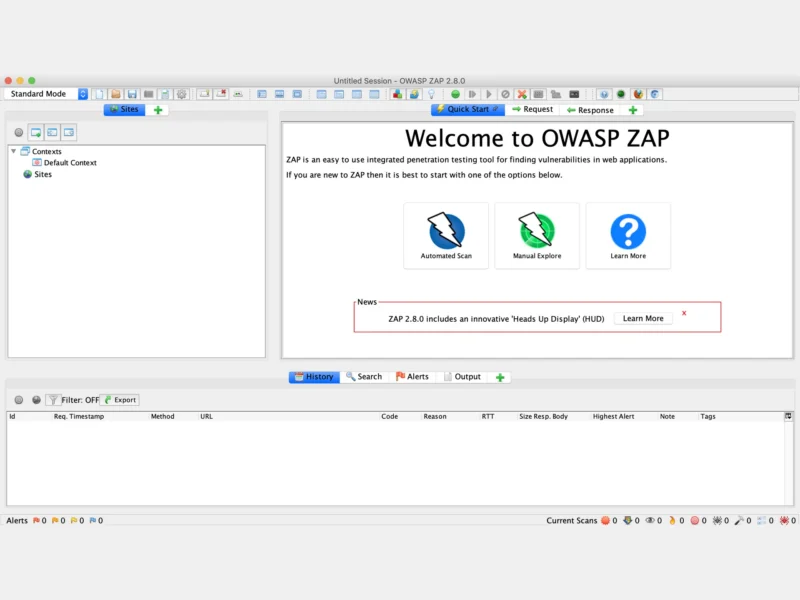
OWASP ZAP — the Zed Attack Proxy — is the open-source web application security scanner that most people meet first. Maintained by the ZAP Dev Team and sponsored by Checkmarx under the OWASP umbrella, it is a full interception proxy and dynamic application security testing (DAST) tool: you point a browser or an automated scan at a web app, ZAP sits in the middle of the traffic, and it reports what it finds as you go. It is written in Java, so the same application runs on Linux, macOS and Windows, or headless inside a container. The current release is 2.17.0 (December 2025), and the project describes itself — accurately — as the world’s most widely used web app scanner. It is the usual answer to “Burp, but free and scriptable”.
Key Features
- Intercepting proxy at the centre — ZAP runs as an HTTP/HTTPS man-in-the-middle for your browser or API client, with certificate generation, breakpoints (request, response or both), a manual request editor and a history of every message. On top of that sit the passive rules, which inspect every request and response that flows through and flag issues without sending any traffic of their own — useful because a passive scan can be run against production safely.
- Active scanning — once a target is in a context, an active scan drives real attack payloads (injection, XSS, path traversal, and so on) through the discovered parameters, with per-rule and per-alert tuning, scan policies, a strength/threshold matrix and an alert filter system so that known-acceptable findings can be muted deliberately rather than ignored.
- Two spiders, because modern apps need both — the traditional spider walks links and forms; the AJAX Spider drives a real browser (via the bundled Selenium/Chrome or Firefox add-ons) to crawl single-page applications that render entirely in JavaScript. ZAP also reads OpenAPI/Swagger, GraphQL, gRPC, SOAP and WebSocket traffic through first-party add-ons, so API-only targets are first-class citizens rather than an afterthought.
- Authenticated scanning — contexts, users and authentication methods (form-based, browser-based, JSON, OAuth2, client scripts, header-based session management) let ZAP log in, detect when a session has dropped and re-authenticate mid-scan. Access control testing uses the same model to check whether one user can reach another user’s data.
- Automation Framework — YAML plans instead of shell glue — an automation plan is a single YAML file describing spider, passiveScan, activeScan, report, delay and exitStatus jobs (plus add-on jobs), runnable from the GUI, from a CLI script or from CI. This is the project’s recommended route for anything non-trivial.
- Packaged scans and containers —
zap-baseline.py(a safe, passive-only minute-long check),zap-full-scan.pyandzap-api-scan.pyship in the Docker images, which come in four flavours:stable,weekly,nightlyand the minimalbareimage built for CI. Both Docker Hub (zaproxy/zap-stable) and GHCR (ghcr.io/zaproxy/zaproxy:stable) are published, all with a health check on the default API port 8080. - CI/CD integrations — official GitHub Actions (
zaproxy/action-baseline,action-full-scan,action-api-scan) run a scan on every pull request or deploy, publish the HTML report as an artefact and can fail the build on a risk threshold. The same containers drop into GitLab CI, Jenkins or any other runner. - API and daemon mode — ZAP exposes a comprehensive REST API and can run headless as a daemon (
-daemon), so any language with an HTTP client can drive a scan; official bindings exist for Python, Java, Node.js, .NET and others. - Marketplace of add-ons — the core is deliberately small; functionality such as the fuzzer, the report generator (traditional HTML/PDF, modern, risk-and-confidence templates), JavaScript/HTML/JSON rendering and the various scan rule packs install from the ZAP Marketplace and update independently of a core release.
- Risk modes and a safe default posture — a mode selector (Safe, Protected, Standard, ATTACK) gates what ZAP is allowed to do, so a scanner left running against a sensitive site cannot accidentally start an attack scan.
Why Use ZAP?
ZAP’s advantage is breadth of on-ramps to the same engine. A beginner can install it, click Automated Scan, give it a URL and get a report in a couple of minutes; a security engineer can write an automation plan, mount it into the bare container in a pipeline and run it against staging on every merge; a pentester can leave the GUI open with breakpoints set and rewrite requests by hand. All three are the same tool with the same rule set, so a finding reproduced in a manual session can be turned into a regression check without switching products. It is also genuinely free: Apache-2.0, no feature gates, no request quotas, no cloud account required — the scanner runs on your machine or your runner, and the traffic and results stay there. The trade-offs are honest ones: being Java-based it is heavier than a single Go binary, the active scanner can be slow and noisy on large applications unless the scan policy is tuned, and like every security tool it must only ever be pointed at systems you own or are explicitly authorised to test.
Use Cases
- Add a baseline (passive) scan to a pull-request pipeline so every change is checked for missing security headers, cookie flags, exposed comments and information leakage before it ships.
- Run an authenticated full scan against a staging copy of your application, seeded with a test account, as part of a release checklist.
- Intercept and replay traffic by hand while debugging a broken authentication flow or probing an IDOR — the proxy is a working tool in its own right, not just a scanner front end.
- Scan an OpenAPI/Swagger definition or a GraphQL endpoint directly, so an API with no browsable pages still gets covered.
- Teach web security: ZAP runs on a laptop, needs no licence, and the community-maintained vulnerable apps make a safe practice target.
- Re-check a previously reported finding after a fix, using the same automation plan and alert filters so the diff is meaningful.
Similar
- Lynis and OSQuery — host-level audits of the machine the app runs on; ZAP tests the application itself from the outside.
- Nuclei — template-driven scanning of hosts and APIs; where nuclei is fast breadth from a shared template library, ZAP is a full interactive proxy with deep active testing.
- OpenVAS — network and infrastructure vulnerability scanning; ZAP’s focus is the web application layer.
- Nmap — mapping hosts, ports and services; ZAP picks up at the web application layer once Nmap has shown what is listening.
- Gitleaks and Trivy — static scanning of repositories, dependencies and container images, a natural complement to a dynamic scan of the running site.
- Wazuh, Suricata and Snort — continuous runtime detection and monitoring, where ZAP is the periodic scheduled check.
Platform
Linux · macOS (Intel and Apple silicon) · Windows · Docker / OCI (zaproxy/zap-stable, ghcr.io/zaproxy/zaproxy:stable, plus weekly, nightly and bare images) · Snap · Homebrew (brew install --cask zap) · Chocolatey (choco install zap) · requires a Java runtime (JRE 17+ for the current release), bundled with the installers.
Licence
Apache-2.0 — free and open source, with no feature restrictions, usage limits or account requirement. The project is an independent open-source effort hosted under OWASP and sponsored by Checkmarx; the ZAP Dev Team maintains it in public on GitHub, and the core, the add-ons in the Marketplace and the Docker images are all published under the same licence.
Website
zaproxy.org · documentation · getting started guide · source on GitHub · also see the Security & Privacy category and the full directory for more tools that keep systems honest.