OBS Studio
- Platform
- Linux Windows macOS
- Licence
- GPL-2.0 Open source
- Website
- obsproject.com/
- Source code
- github.com/obsproject/obs-studio
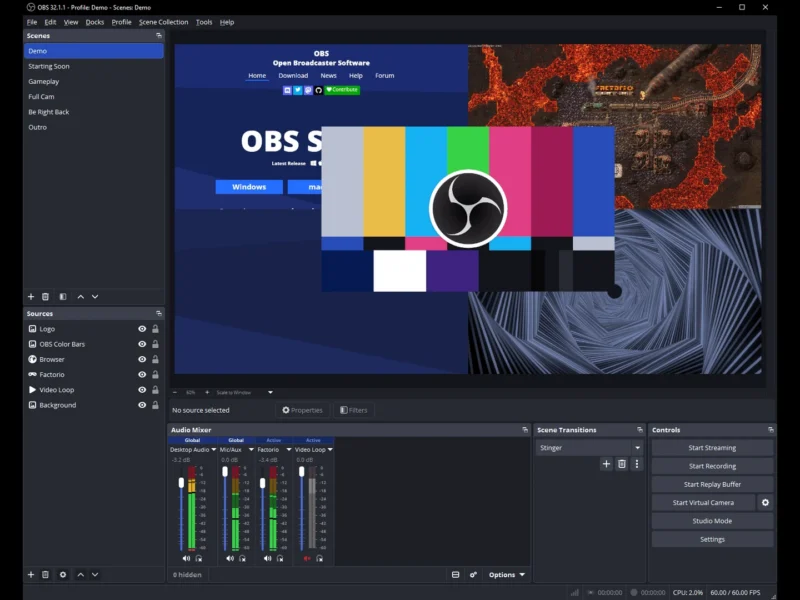
Overview
OBS Studio (Open Broadcaster Software) is the de facto standard free and open-source application for video recording and live streaming. It captures and composites audio and video in real time, letting you build scenes from windows, screens, webcams, images, text and capture cards — then record them to disk or broadcast them to streaming platforms.
Key Features
- Scenes and sources — compose unlimited scenes from screen and window captures, webcams, images, text, browser sources and capture cards, switching between them with custom transitions.
- Live streaming — broadcast to Twitch, YouTube and any RTMP/SRT service, with per-service settings and a stream-health readout.
- Local recording — record to MKV or MP4 using x264, hardware encoders (NVENC, AMF, QuickSync) or AV1, including a replay buffer that saves the last few moments at a keystroke.
- Audio mixer — per-source volume, monitoring and filters (noise gate, noise suppression, compressor, gain), with VST plugin support.
- Studio Mode and Multiview — preview scenes before they go live, and monitor several scenes at once for cueing and transitions.
- Hotkeys and automation — bind nearly any action to a key, and drive OBS from other software through its WebSocket API or Lua/Python scripts.
- Plugin ecosystem — native plugins and scripts extend capture, encoding and output well beyond the core.
Why Use OBS Studio?
It is the most capable free option by a wide margin: multi-scene compositing, hardware encoding, a proper audio mixer and studio preview — the things commercial streaming suites charge for — are all included, with no account, watermark, time limit or paid tier. It runs on Windows, macOS and Linux with effectively the same feature set, so a workflow transfers between machines, and its plugin and scripting surface means it can be extended rather than outgrown.
Use Cases
- Livestreaming gameplay, coding sessions, talks or events to Twitch or YouTube.
- Screencasting tutorials and demos with picture-in-picture webcam and microphone.
- Recording presentations, meetings or gameplay locally for later editing.
- Producing multi-source video (slides, camera and capture card) for webinars.
- Feeding a virtual camera into Zoom, Meet or Teams for higher-quality video.
.