CronMaster
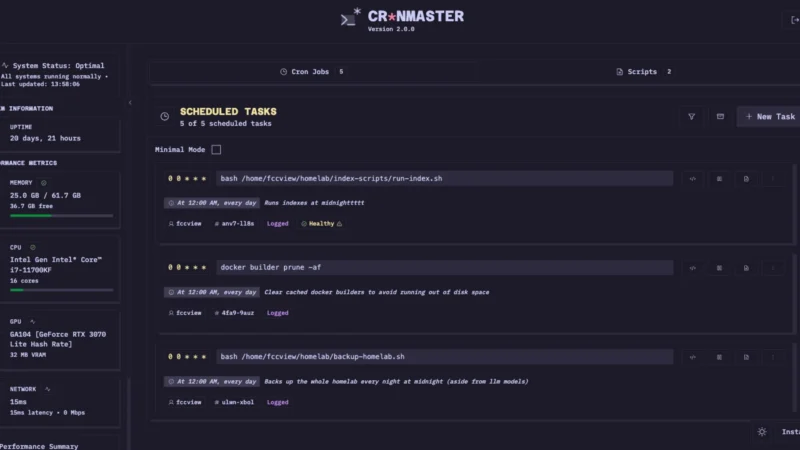
CronMaster is a self-hosted web application for managing your cron jobs through a clean, modern interface instead of editing crontab by hand. It adds human-readable scheduling syntax, live logging and a full run history for every job, a built-in bash script library, and system information u2014 all with optional password or OIDC (SSO) authentication.
Key Features
- Cron job management u2014 view, create, and delete cron jobs with comments and human-readable syntax, plus quick presets for common schedules.
- Live logging & history u2014 optional per-job execution logging with automatic cleanup, capturing stdout, stderr, exit codes, and timestamps.
- Live updates (SSE) u2014 real-time job status and live log streaming for long-running jobs when logging is enabled.
- Smart job execution u2014 jobs run in the background with live updates when logging is on, or synchronously (with a 5-minute timeout) otherwise.
- Script management u2014 create and edit bash scripts on the go and reuse them inside cron jobs.
- System information u2014 uptime, memory, network, CPU, and GPU health at a glance.
- Authentication u2014 password-based and/or OIDC (SSO) with proper session management.
- REST API u2014 full API, optionally protected with an API key, for external integrations.
- Docker-first u2014 deploy with a single Compose file; listens on port 3000 (host: 40123).
Why Use CronMaster?
crontab is powerful but unforgiving: a typo silently breaks a job and there is no built-in way to review run history at a glance. CronMaster gives the same host crontab a visual, auditable, logged interface u2014 without moving your scheduling to a third-party SaaS. Because it is free and open source (AGPL-3.0) and runs entirely in Docker on your own host, your cron data and logs stay with you.
Use Cases
- Manage every cron job on a host from the browser u2014 add, pause, comment, and delete without touching crontab directly.
- Spot failed jobs at a glance with exit statuses and full execution logs.
- Keep a library of reusable bash scripts and run them straight from the UI.
- Drive your own tooling through the REST API, or gate access with OIDC SSO for teams.
Platform
Web app (browser) u00b7 self-hostable via Docker u00b7 runs on Linux (requires root or privileged access to the host crontab to work as intended)
Licence
GNU AGPL-3.0