Flood
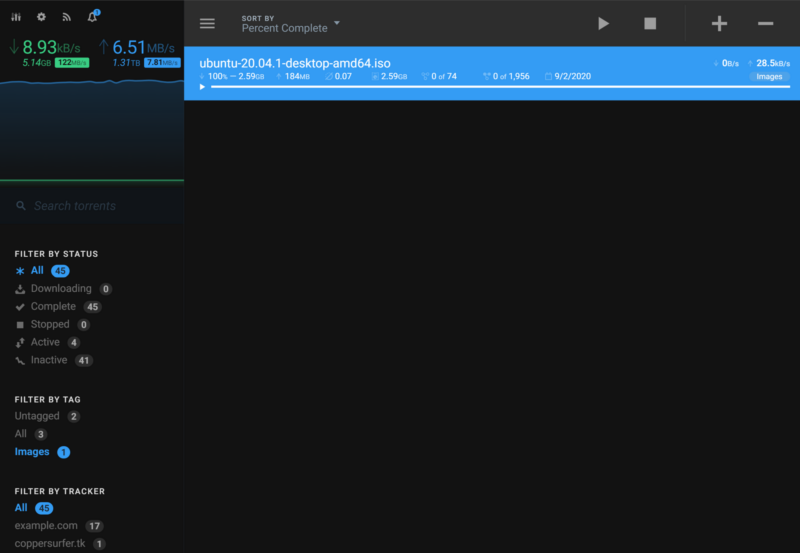
Flood is a modern, self-hosted web interface for controlling your BitTorrent clients. It runs as a Node.js service next to the client you already use — rTorrent, qBittorrent, Transmission or Deluge — and serves a fast, responsive browser UI for adding torrents, watching transfers, and administering several clients and users at once. The frontend is built with React; the backend is a TypeScript Node.js service, and the project follows semantic versioning with regular releases.
Key Features
- Multi-client support — connects to rTorrent (TCP or Unix socket), qBittorrent v4.1+, Transmission and experimental Deluge, and can manage more than one client from the same dashboard.
- Built-in multi-user accounts — its own authentication and user management (enabled by default); administrators can create additional users, each with a different password and their own torrent client configuration.
- Transfer dashboard — filter torrents by status, tag and tracker, sort the list, search it, and start, pause, remove or add torrents and magnet links straight from the toolbar.
- Tagging and organisation — tag transfers and use the tag filters to keep large libraries organised.
- Speed statistics and history — live global and per-transfer upload/download rates plus a stored history of transfer speeds, so you can see how a swarm behaved over time.
- Light and dark themes — follows your system theme by default, or you can pin your preferred one.
- Touch-ready and responsive — collapsible sidebar and a layout that works on phones and tablets, not just desktops.
- 20+ languages — detects your browser language automatically, with translations managed on Crowdin.
- OpenAPI spec and Swagger UI — a documented REST API for scripts, dashboards and third-party integrations.
- Flexible self-hosting — install from npm, download a single-executable build (Linux, macOS, Windows), or run the official
jesec/floodDocker image with your chosen port and data paths.
Why Use Flood?
Command-line torrent clients are powerful but awkward for everyday use, and each client ships a different, sometimes dated web UI. Flood puts one consistent, actively maintained interface in front of them: it talks to the client you already run, so you keep your existing setup and get a clean dashboard, user accounts and an API on top. Filesystem operations are performed by Flood itself, so it needs the same paths and permissions as the client it manages. It pairs naturally with the directory’s other media tools — for example qBittorrent or Transmission as the backend, and Bazarr alongside for subtitles. Development continues at github.com/jesec/flood; the older Flood-UI/Flood repository is archived.
Use Cases
- Put a single good-looking web UI in front of a headless server running rTorrent or Transmission.
- Give household members or teammates their own account, with their own client connection, instead of sharing one login.
- Monitor seeding ratios, transfer history and swarm speeds from a phone or tablet.
- Drive torrent automation from scripts using the documented OpenAPI endpoints.
- Deploy Flood alongside the client in Docker for a repeatable, self-hosted download box.
Platform
Self-hosted web UI (Node.js 22+) · Docker image jesec/flood · single-executable builds for Linux, macOS and Windows · any modern browser, including mobile. Manages rTorrent, qBittorrent v4.1+, Transmission and Deluge (experimental). Source: github.com/jesec/flood
Licence
GNU General Public License v3.0 (GPL-3.0-only) — source at github.com/jesec/flood. Latest release: v4.16.2 (September 2026).