Tunarr
- Platform
- Docker Web Self-hosted
- Licence
- zlib Open source
- Website
- tunarr.com/
- Source code
- github.com/chrisbenincasa/tunarr
Overview
Tunarr turns your own media library into live television. You build channels out of the films, episodes, music videos or loose files you already have, and Tunarr streams them as linear broadcasts: a schedule runs whether or not anyone is watching, so a show is always midway through when you tune in. The libraries can come from Plex, Jellyfin or Emby, or from plain local folders.
The output is deliberately compatible with the tools people already own. Tunarr presents itself as a spoofed HDHomeRun tuner, which Plex, Jellyfin and Emby accept as a live TV source, and it also publishes an M3U/IPTV URL for players such as Tivimate, Dispatcharr, Threadfin or xTeVe. It runs as a single container with a web interface and is released under the zlib licence.
Key Features
- Channels from your own library: assemble a lineup from Plex, Jellyfin, Emby or local files using search, filters and sorting across all connected libraries at once.
- Drag-and-drop lineup editor: order programmes by hand when a curated channel matters more than a random shuffle.
- Filler content: slot commercials, music videos, prerolls or branding between programmes so the channel keeps running between shows.
- Time-slot and random-slot scheduling: either pin each programme to a slot or let Tunarr fill the day randomly from a set of shows.
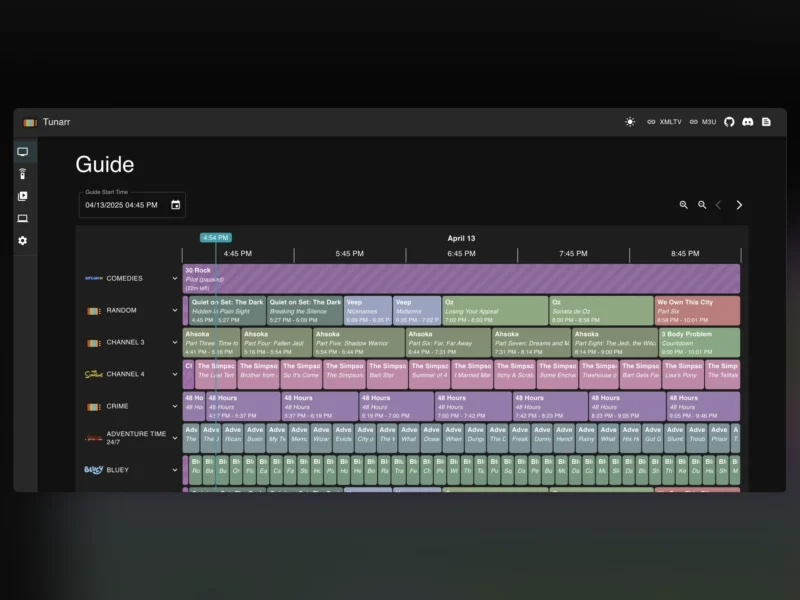
- Web TV guide: a programme guide of what is airing now and next across every channel you have built.
- HDHomeRun emulation: adds live TV to Plex, Jellyfin and Emby without any plugin on the media server side.
- IPTV output: an M3U URL that works with Dispatcharr, Threadfin, xTeVe or any IPTV client.
- Per-channel presentation: channel logos, audio language and subtitle preferences set individually per channel.
- Hardware transcoding: Nvidia NVENC, VAAPI, Intel QuickSync and macOS VideoToolbox, with several transcoding profiles selectable per channel.
- Browser playback: channels can be streamed directly in the web interface as well as through a tuner or IPTV player.
Why Use It
A media library is a pile of files until something gives it shape. Tunarr gives it the shape of broadcast television: a channel that starts at a fixed point in the day and simply keeps going. That is a different way of using a collection than on-demand playback, and it is particularly good for the kind of content that is annoying to choose – old sitcoms, cartoons, music videos, holiday specials – or for putting something on in the background without deciding what. Because it speaks HDHomeRun and IPTV, it slots into a setup that already has a media server and a player rather than replacing either.
Common Use Cases
- A nostalgia channel: one channel running a favourite decade of cartoons or sitcoms on a loop, all day.
- Live TV in Plex or Jellyfin: use the HDHomeRun emulation to give the media server a genuine live TV section without a tuner card.
- Kids or background TV: a fixed channel with no menus that anyone in the house can switch on.
- Music video blocks: schedule a channel of clips with prerolls and branding between them, closer to MTV than to a playlist.
- Feeding an IPTV stack: publish channels over M3U into Dispatcharr or Threadfin alongside real streams.
Running It
Tunarr ships as a Docker image (chrisbenincasa/tunarr) and needs a port, a timezone and a persistent config directory; the compose example in the repository is three lines. Point it at your media server or a file library, build a channel, then add the HDHomeRun tuner or M3U URL to whatever is going to play it. Transcoding is optional but matters on modest hardware: with hardware acceleration enabled, a small server can serve several channels at once.