Synfig Studio
- Platform
- Linux macOS Windows
- Licence
- GPL-3.0 Open source
- Website
- synfig.org/
- Source code
- github.com/synfig/synfig
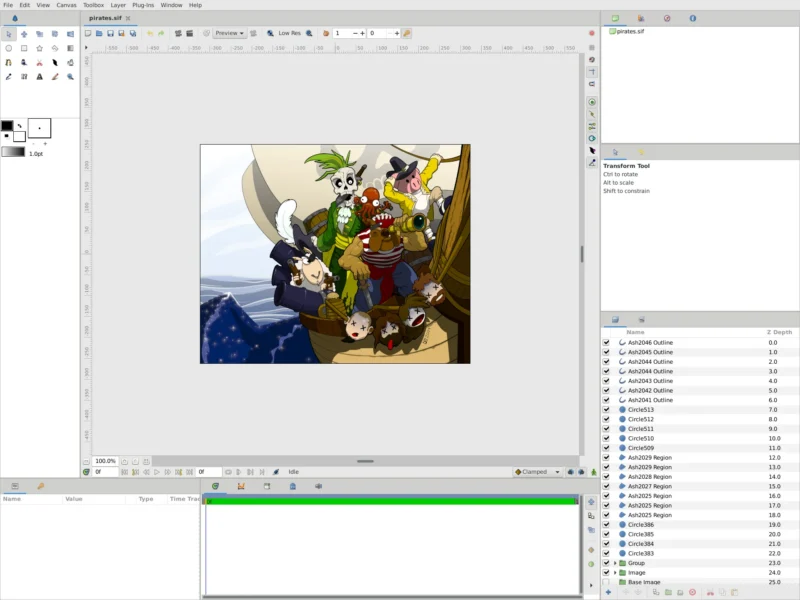
Overview
Synfig Studio is a free and open-source 2D vector animation suite built around tweening instead of frame-by-frame drawing. You place artwork at the key positions you care about, and Synfig calculates every frame in between — the same principle that made Flash a studio tool, applied to vector and bitmap artwork with an unusually deep layer and parameter system underneath.
The project is deliberately split into two programs. Synfig Studio is the graphical front-end where you build and preview the animation; Synfig Tool is the command-line renderer that takes the saved file and produces the final frames. That separation means an animator can work on a laptop while the heavy render runs on a faster machine with no display attached, and it is why render-farm tools such as RenderChan can drive Synfig for incremental and parallel rendering.
Synfig was started by Robert Quattlebaum with contributions from Adrian Bentley, began life as the in-house animation platform for the now-defunct Voria Studios, and was released as free software in 2005. It has been developed in close association with the Morevna Project since 2008 — an open animation project whose pirate characters and Pepper & Carrot animatics are the source of many of the sample files that ship with the program. The current release is 1.5.5, published in March 2026, and it is licensed under the GNU GPL v3.
Key Features
- Vector tweening — transform any vector shape into another shape by setting key positions; the in-between frames are interpolated automatically, so you animate a shape rather than redraw it.
- More than 50 layer types — geometric layers, gradients, filters, distortions, transformations and fractals can be stacked, nested and grouped, and effects such as radial blurs and colour tweaks are resolution-independent, so the output is not tied to a fixed pixel size.
- Full bone system for cut-out animation — rig either bitmap artwork or vector artwork with bones, and use the Skeleton Distortion layer to apply complex deformations to imported bitmaps.
- Linked parameters and expressions — any parameter can be connected to another, directly or through a mathematical expression, which is how you build character puppets and other dynamic structures that stay coherent as they move.
- Animatable line width — the thickness of a stroke can be controlled and animated at each individual control point, so outlines taper and swell along a drawing.
- Soft shading without drawing it — curved gradients inside a shape simulate soft shading, so gradients do not have to be painted into every frame.
- High dynamic range workflow — Synfig works with HDR imaging and can render to OpenEXR for compositing with the rest of a pipeline.
- Its own document format with history — projects are stored as XML:
.sifuncompressed,.sifzgzip-compressed, or.sfgas a zip container. A file holds the vector data, any embedded or referenced bitmaps, and a revision history of the project. - Real interchange and output options — SVG import is supported, Inkscape can save directly to
.sif, and rendering covers video (AVI, Theora, MPEG), animated graphics (MNG, GIF) and numbered image sequences (PNG, BMP, PPM, OpenEXR). - A separate renderer for farms — Synfig Tool renders without a graphical session, which is what makes incremental and parallel rendering on a render farm practical.
Why Use It
Synfig is the closest thing the free-software world has to a dedicated 2D animation studio package, and the reason to pick it is the vector-plus-tween model: shapes, gradients and outlines stay editable and resolution-independent, and a scene is a stack of layers and animated parameters rather than a sequence of drawings. When a client asks for the logo 30% bigger or the character to hold a pose two seconds longer, that is a parameter change, not a re-render of hand-drawn frames.
The second reason is that the pipeline is honest about scale. Because the renderer is a separate program, the same project file can be rendered overnight on a server, split across a farm, or dropped into a script — a workflow that most free 2D tools do not offer at all. The program is also proven in production rather than only in demos: the Morevna Project has used it for published animation episodes and Pepper & Carrot animatics since 2008.
The trade-off is real. Synfig exposes the machinery — layer trees, parameter panels, value nodes, expressions — and it expects you to think in those terms. It is not a storyboard tool, it does not hold your hand, and its ecosystem of tutorials and plugins is smaller than that of commercial animation suites. Competing with Blender’s Grease Pencil or a subscription package means accepting a steeper first week in exchange for a tool you fully control and never rent.
Use Cases
- Cut-out character animation — rig imported character art with bones and the Skeleton Distortion layer, then animate poses instead of drawing each frame.
- Motion graphics and explainer sequences — build titles, diagrams and transitions from vector shapes, gradients and animated line width, all resolution-independent so the same project renders for web or broadcast.
- Animating existing bitmap artwork — import painted or scanned art, deform it with the skeleton system, and keep the original drawings intact.
- A studio pipeline with a headless render stage — artists work in Synfig Studio, the render is farmed out to Synfig Tool on machines without a display, and RenderChan handles incremental and parallel jobs.
- Interchange with a free-software stack — draw in Inkscape or import SVG, animate in Synfig, render to a PNG or OpenEXR sequence, and composite in Blender, Kdenlive or Natron.
- Teaching and learning 2D animation — a complete animation environment with no licence cost and no per-seat accounting, on Windows, macOS or Linux.
Requirements
Synfig publishes builds for Windows 7 and above, macOS 10.8 and above, and any Linux distribution released in 2012 or later. The stated minimum is a dual-core CPU at 2 GHz with 2 GB of RAM; complex scenes with many bitmap layers benefit from more memory, and renders are faster with more cores.
Installation on Linux is by the official AppImage — download it, mark it executable in the file properties, and run it — while Windows uses a guided installer and macOS a disk image you drag into Applications. Some distributions also package Synfig in their own repositories, though those builds often lag behind upstream releases. The user manual, tutorials and build instructions live at synfig.readthedocs.io, and development happens in the open on GitHub.