Pitivi
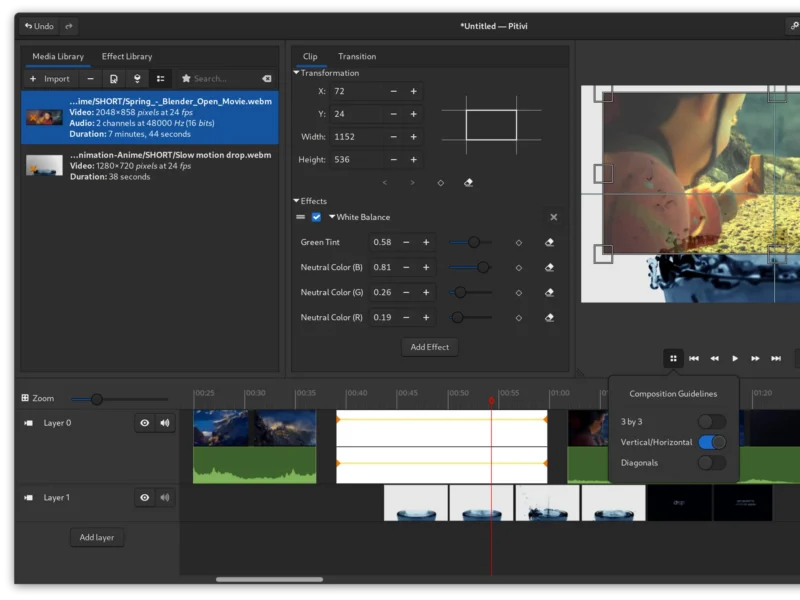
Overview
Pitivi is a free and open-source non-linear video editor for Linux, built on the GStreamer multimedia framework and its GStreamer Editing Services (GES) library. It is a community project under the GNOME umbrella — the website describes it as “a Free video editor with a beautiful and intuitive user interface, a clean codebase and a fantastic community” — and its stated aim is to be the intuitive, flexible video editor that appeals to newcomers and professionals alike.
Edward Hervey began writing it in December 2003 as an end-of-studies project at the EPITECH engineering school in Paris; the code was first committed to version control in May 2004, originally in C and rewritten in Python a year later. For most of its life it was spelled PiTiVi; the 0.91 release of October 2013 dropped the capitalisation and was also the first version built on GES, replacing the older GNonLin-based engine. Version numbers switched to a calendar scheme with 2020.09, and the current stable release is 2023.03 “Time Was Money” (26 March 2023). Commits still land on the project’s GitLab repository — the master branch saw activity from Michael Calabrese, Alexandru Băluț and others in September and October 2026 — but no release has followed 2023.03, and the long-running GTK4 port that started as a Google Summer of Code project in 2022 has not yet shipped.
The design philosophy is unusual for a video editor. Pitivi deliberately pushes its engine work upstream into GStreamer and GES rather than carrying private patches (“no downstream hacks, upstream first”), and it treats interface design as a first-class engineering problem, following the GNOME Human Interface Guidelines and providing contextual hints in the UI instead of expecting a manual to be read first.
Key Features
- A timeline built for careful cutting — realtime trimming previews, ripple and roll editing, non-modal cutting, splitting, snapping, grouping and selections, layers, and a playhead-centric workflow with zoom-on-scroll, smooth scrolling and automatic zoom adjustment.
- Precision — nanosecond internal precision, timecodes and frame numbers accepted interchangeably, and keyboard shortcuts for scrubbing, markers and seeking.
- Keyframe curves — any clip property (opacity, position, scale, effect parameters, audio volume and pan) can be animated over time on editable curves, with keyframes dragged vertically or horizontally by holding Ctrl.
- Effects and transitions — an Effect Library of GStreamer-based audio and video effects applied per clip, crossfades and other transitions, and a full properties panel for the selected clip. Release 2022.06 added object tracking and blurring, a source blend mode, easier fade in/out, and text borders and shadows for title clips.
- Audio work — volume and pan curves drawn directly over the waveform, beat detection with snapping of clips to the detected beats, a playback VU meter, more precise waveform rendering, and the autoaligner revived in 2023.03, which aligns two or more clips automatically by comparing their audio — the standard trick for syncing separate camera and sound recordings.
- Media Library — import and organise material with search, tagging (added in 2021.05) and metadata, and drag it onto the timeline.
- Import and export anything GStreamer can handle — Pitivi supports every video, audio and image format provided by the installed GStreamer plugins, and renders to any container and codec those plugins support, with presets for common targets. It was the first open-source video editor to support the Material Exchange Format (MXF) used in professional video.
- Projects and archiving — automated project backups, project tarball export for moving a whole edit to another machine, and project settings and metadata you can edit directly.
- Scriptable and scriptable-from-the-shell — because the engine is GES, projects can be processed and rendered from the command line and driven by scripts.
- Extensible and inspectable — plugin support alongside a built-in developer console for debugging pipelines.
- GNOME-native — GTK interface following the GNOME HIG, with detachable interface components, a hardware-accelerated and touch-capable canvas, and translations maintained by the GNOME translation teams; a light or dark system theme is followed automatically.
Why Use Pitivi?
The appeal is a short path from raw footage to a finished cut without a subscription, an account or a watermark. Pitivi is licensed under the LGPL, has no paid tier, and runs entirely on your own machine: your media is never uploaded anywhere to be edited.
The usability-first design matters more than it sounds. Trimming is done with realtime previews, cuts are non-modal, and the interface annotates itself with contextual hints, so a first edit does not require reading a manual — while keyframe curves, per-clip effect stacks, multi-layer timing and nanosecond precision are there when the edit gets serious. Because everything is built on GStreamer, the practical definition of “supported format” is the set of plugins you choose to install, including the professional MXF formats, rather than a fixed list decided by the vendor.
Two honest caveats. First, the release cadence is slow: 2023.03 is the newest release and the GTK4 port is still in progress, so if you need a video editor with a two-month release train, Pitivi will feel quiet. Second, it is a Linux application distributed as a Flatpak and through distributions — there is no official Windows or macOS build.
Use Cases
- Cutting a short film, vlog, tutorial or screencast on Linux: import, trim, arrange on layers, add titles and crossfades, and render to a web-friendly file.
- Syncing separate audio and video recordings — drop the clips on the timeline and let the autoaligner line them up by their sound.
- Cutting a montage to music by detecting the beats and snapping clips to them.
- Building an audio edit — podcast or voice-over — with volume and pan curves over the waveform.
- Finishing work on an older or low-specification Linux machine, where a heavyweight editor would be uncomfortable.
- Archiving a finished project as a self-contained tarball, or batch-rendering edits from the command line through GES.
- Learning non-linear editing without commercial lock-in, on the editor designed to be the GNOME desktop’s default.
Similar
- Kdenlive — the other long-standing free editor for Linux, with a deeper feature set and a faster release cadence; also GStreamer-based.
- Shotcut — MLT-based, cross-platform and heavier on filters and formats.
- OpenShot — aimed squarely at beginners with a simpler, template-driven workflow.
- Avidemux — a lightweight tool for cutting and transcoding single files rather than multi-track editing.
Platform
Linux (X11 and Wayland) · GNOME desktop, GTK 3 interface (a GTK4 port is in progress) · Python 3 with GStreamer 1.x — installed as an official Flatpak from Flathub (org.pitivi.Pitivi) or from distribution packages; codec support follows the GStreamer plugins installed.
Licence
LGPL-2.1-or-later — the COPYING file in the project repository grants use under the GNU Lesser General Public License, “either version 2.1 of the License, or (at your option) any later version”. Free of charge, with no paid edition and no account required.
Website
pitivi.org · feature tour · user manual · source on GitLab (GNOME) · Flathub · contribute