Opensidian
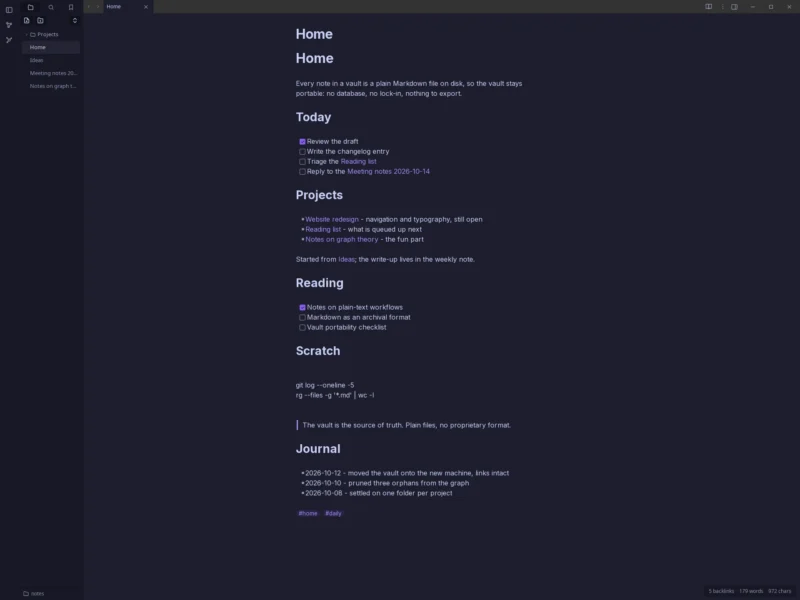
Overview
Opensidian is a free, GPL-licensed desktop notes app that opens Obsidian-style vaults: a folder of plain .md files plus the .obsidian/ config folder that goes with them. It is a Rust + Tauri v2 application with a plain-JavaScript frontend, developed in the open at github.com/jpzk/opensidian by a single maintainer (Jendrik Poloczek, jpzk), and it has been shipping signed releases roughly weekly since early October 2026. The current release is 0.6.2 (12 October 2026).
The point of the project is compatibility rather than import/export: point it at a vault you already have and the links, tags, bookmarks, pinned tabs and community themes are still there, because it reads the same vault format and the same theme format. It is explicitly not affiliated with Obsidian or Dynalist Inc. — “Obsidian” is their trademark — and it is positioned as the open-source alternative for people who like the vault but not the closed-source, freemium model behind it. If you want the proprietary original for comparison, see our Obsidian listing.
Two things are worth stating plainly. First, this is a 0.x release under heavy development, not a finished product: it is usable today, but features and behaviour still move between releases. Second, the project is unusually open about how it was built — it states in its README that nearly all of the code, the design documents and the README itself were written by AI models (Claude, via Claude Code) working from prompts, reviews and corrections by the one human maintainer, who decided what to build and what the trust model must guarantee. It is non-profit, donation-funded, and has no paid tier, no account and no server component.
Key Features
- Obsidian vault compatibility — opens any folder of Markdown files with its
.obsidian/configuration: it honoursapp.jsonsettings such asreadableLineLength, reads CSS snippets from.obsidian/snippets/, and round-tripsbookmarks.jsonin file order, preserving keys it does not understand. Your notes stay plain text files you can point any other tool at. - Live preview, source and reading modes — write with Markdown rendered as you type, switch to the raw source or a read-only reading view, and keep your place when moving between them on a long note.
- Wikilinks, backlinks and unlinked mentions —
[[wikilinks]]with completion, a Backlinks pane, unlinked mentions for notes that mention a title without linking it, tags and a document outline. - Graph view — a global graph and a per-note local graph in a tab, using the stock force model (60 Hz steps, the same repel curve and centre pull, a fixed seed) so layouts look like the original. Filters, Groups, Display and Forces panels; the layout, camera and zoom are remembered per tab and per vault.
- Tabs, splits and navigation — tabs with Ctrl+click or middle-click to open to the right, full-text search, a quick switcher (Enter on a title that does not exist yet creates it), a command palette, and bookmarks with groups.
- Themes, fonts and hotkeys — ships four Obsidian community themes vendored byte-exact and pinned by SHA-256: AnuPpuccin (default), Material Gruvbox, Minimal and Solarized. Most other community themes and CSS snippets work unmodified; themes reload live and a broken theme is greyed out with the reason instead of breaking the app.
- Attachments and PDF embeds — drag an image from your file manager onto a note and it is moved into the vault (the original is deleted only once the vault copy is complete and on disk) with
![[name]]inserted where you dropped it; a PDF is copied and embedded, rasterised by a pure-Rust renderer with no JavaScript PDF engine involved. An existing file name is never overwritten — the new file gets a fresh name. - Built for large vaults — 0.6.2 was measured on a 50,000-note test vault against 0.6.1: index build about 92% faster, moving a note about 95% faster, index build a further ~30% faster with notes parsed on up to 8 threads, saving about 87% faster when the Backlinks pane is showing the note you save, and live-preview updates about 91% faster.
- Remembers where you were — window size, position and maximised state per vault, graph layout and camera, collapsed folders and bookmark groups, and your place in long notes.
- Sandboxing and write safety — every vault write (saves, new notes, link rewrites, moves, deletes, attachment drops,
.obsidianfiles) goes through a handle on the vault folder and never follows a symlink; temporary files get random names, are created exclusively and then renamed into place; an optional Landlock self-sandbox (OPENSIDIAN_LANDLOCK=1) and Flatpak sandboxing are available, and the window can only navigate to the app itself. A round of hardening followed an external audit by Aikido in 0.4. - Telemetry you can reason about — lag telemetry records lengths, counts and timings only, never paths, note titles or search text.
- Signed releases — every release ships
SHA256SUMSwith a detached GPG signature from the project keyA6E6 9ED6 BC47 79F3 2817 2148 4CC1 AFDE 15B6 4EA3, so you can verify exactly what you downloaded. Security reports go privately to the maintainer, with a 90-day disclosure window.
Use Cases
- Leave (or trial) Obsidian without converting anything — open your existing vault and see how it feels; nothing is rewritten into a proprietary store, so you can go back at any time.
- A personal knowledge base on one machine — projects, reading notes and daily entries in folders, with the graph as a map of how the notes you write actually connect.
- Notes that outlive the app — the vault is a directory of Markdown files; no database, no lock-in, nothing to export, and any editor can read it.
- Local-first, account-free note-taking — no sign-up, no sync service, no server: useful on air-gapped or company-restricted laptops.
- Large research or documentation vaults — tens of thousands of notes, with search, quick switcher, backlinks and the graph all driven by an index rebuilt in parallel.
- Try before installing — the same application compiled to WebAssembly runs at opensidian.org/webversion/, with vaults kept in the browser’s private storage (OPFS), no server and no account. It is marked there as a testing build: PDF embeds and file attachments from disk are missing, the whole vault is held in memory, and it is not the desktop app.
Similar
- Obsidian — the closest comparison and the app whose vault format Opensidian reads. Obsidian is proprietary (free for personal use, paid tiers for commercial and sync features) and ships Windows, macOS, Linux, iOS and Android builds; Opensidian is GPL-3.0-or-later, Linux x86_64 only for now, and has no sync service of its own.
- Logseq, Joplin, Trilium Notes, Standard Notes — also in this directory. Each solves the same problem with a different storage and sync model (Logseq: outliner over local Markdown; Joplin: its own database with pluggable sync targets; Trilium: hierarchical notes with a self-hostable server; Standard Notes: end-to-end encrypted notes with self-hostable sync). Opensidian’s differentiator is that it is a vault-compatible editor rather than a service: single-machine, no sync backend, files first.
- Cherrytree and OpenTodoList — desktop note-taking apps with their own storage formats; both are more mature, neither reads an Obsidian vault.
Platform
Linux x86_64 today, tested on Fedora 44, Ubuntu 26.04 LTS and Debian 13. Downloads: a slim AppImage (smallest, uses your distro’s WebKitGTK 4.1), a portable AppImage (WebKit bundled, nothing to install), a Flatpak (sandboxed, uses the GNOME 49 runtime from Flathub), a .deb for Debian 13 / Ubuntu and an .rpm for Fedora — all covered by the signed checksums. Building from source needs Rust 1.98 plus the usual WebKitGTK/GTK development packages, and takes about two and a half minutes on four cores. The project describes itself as cross-platform and is explicitly looking for Linux distribution maintainers, but no Windows or macOS builds are published yet — treat it as Linux-first.
Licence
GPL-3.0-or-later — the whole application, since the first commit. The badge is set from the LICENSE file in the repository, matching the license = "GPL-3.0-or-later" metadata in src-tauri/Cargo.toml and the statement on the project homepage. Free of charge, non-profit and donation-funded, with no paid tier, no account and no server component. Note that the bundled community themes carry their own licences; the project’s THIRD-PARTY.md should be read before redistributing.
Website
opensidian.org · source on GitHub · releases · web version (WASM testing build) · security policy