OctoPrint
- Platform
- Linux Windows macOS Docker
- Licence
- AGPL-3.0 Open source
- Website
- octoprint.org
- Source code
- github.com/OctoPrint/OctoPrint
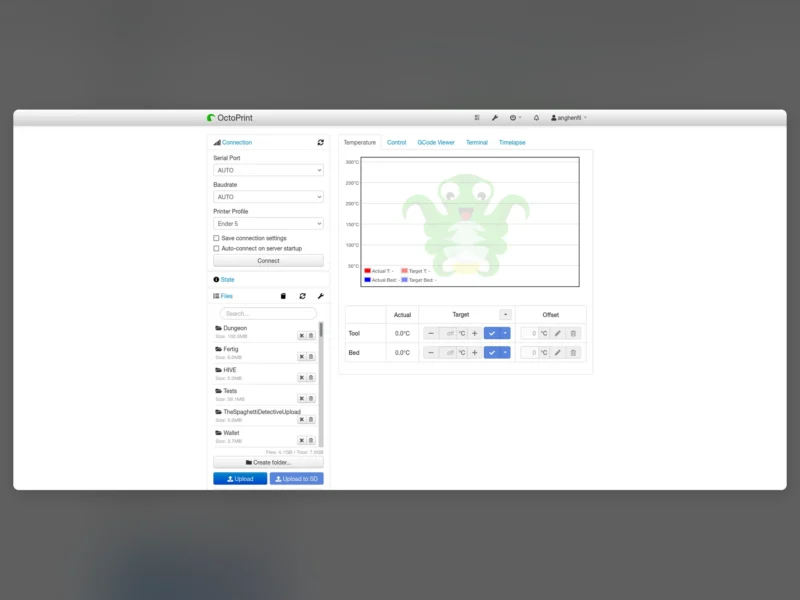
OctoPrint is the reference web interface for 3D printers: a Python application that owns the printer connection and exposes it as a browser dashboard, a REST API and a plugin platform. It is the project most hobbyist printers end up using, and the ecosystem around it — OctoPi images, a public plugin repository, a large community forum — is the reason it stays the default choice.
Key Features
- Browser control of the machine — start, pause and cancel jobs, jog axes, set and monitor hotend and bed temperatures, and send G-code by hand, all from a web page that works on a phone as well as a desktop.
- Plugin system with an official repository — functionality is extended through plugins published at plugins.octoprint.org, covering slicing integration, extra printer types, notifications, themeing and hardware add-ons. This is what turns a print host into a platform.
- Webcam streaming and timelapse — the OctoPi image ships MJPG-Streamer alongside OctoPrint for live viewing of a print and for recording timelapse video from a USB webcam or a Raspberry Pi camera module.
- Many installation routes — the official download page documents OctoPi for the Raspberry Pi, Octo4a for Android, an Orange Pi image, a Docker install, octoprint_deploy for Linux, a Windows installer, and a manual pip install on Linux, Windows and macOS.
- REST API — every action available in the interface is reachable over HTTP, so scripts, dashboards and home-automation systems can drive the printer without going through the UI.
- Printer profiles and connection settings — serial port, baud rate, and the printer’s build volume and print head offsets are stored as profiles, so one installation can be pointed at a different machine without reconfiguring the software.
Why use OctoPrint?
It removes the SD card from the printing workflow. You upload a file from your laptop, watch the first layer on a camera feed, and stop a failed print from the sofa. Because it sits between the slicer and the printer as a normal application rather than as firmware, it keeps working across printer upgrades and can be extended without reflashing anything.
Use cases
- Running a Raspberry Pi as a permanent print server so the printer no longer needs a tethered computer.
- Remote monitoring and job control on a printer that lives in a garage, workshop or spare room.
- Adding capabilities through plugins — notifications when a print finishes, automatic slicing, or support for a printer the core software does not talk to directly.
- Automating a print farm through the REST API.
Requirements
A Raspberry Pi 3B or newer (the project recommends 3B, 3B+, 4B or Zero 2) for the OctoPi image, or any Linux, Windows or macOS machine for a manual install, plus a USB or network connection to the printer. Docker is a supported alternative to a dedicated device.