NetAlertX
- Platform
- Docker Linux
- Licence
- GPL-3.0 Open source
- Website
- netalertx.com
- Source code
- github.com/netalertx/NetAlertX
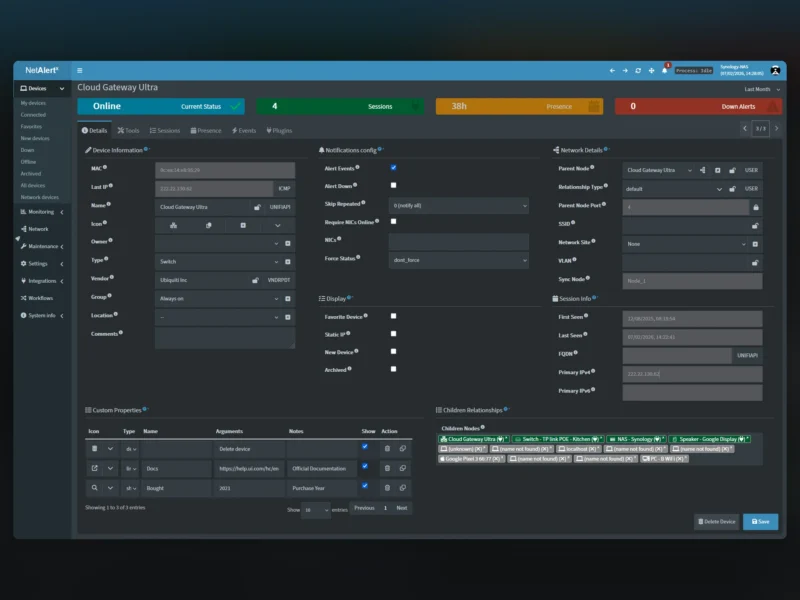
NetAlertX is a self-hosted network visibility and asset intelligence platform. It continuously discovers the devices on a network, keeps an inventory of everything it finds, and records when a device appears, goes quiet, changes address or shows up somewhere it should not be.
It is built for homelabs, small IT teams and managed service providers who want a real answer to “what is actually connected right now” without operating a full network management system or a SIEM. Discovery is assembled from several sources – ARP scanning, Pi-hole database and DHCP lease imports, UniFi controller data and SNMP-enabled routers – and normalised into a single device inventory with presence history behind every entry.
What it does
- Continuous device discovery and inventory, with a presence timeline per device showing when it was seen and when it dropped off
- Alerting on new or unknown devices, devices going down, IP and MAC changes and IP address management drift – the signals that reveal shadow IT and unauthorised hardware
- Notification delivery to more than 80 services through Apprise, plus native Pushsafer, Pushover and ntfy publishers
- A workflows module for device governance: assign newly discovered devices to a network, group devices by vendor, unarchive a device when it is seen online again, or delete devices that match a rule
- Sync Nodes for multi-site monitoring – distributed collectors on VLANs, branch offices and remote networks report back to a central hub, so one interface covers many independent networks; NOC-style wallboard dashboards are supported for eyes-on-glass displays
- Integrations: Prometheus metrics export, REST API endpoints, webhooks for automation flows such as n8n, and a Home Assistant integration
- A plugin system for writing custom scanners and importers, documented well enough that a first plugin takes about fifteen minutes
Deployment and requirements
The standard deployment is a Docker container. ARP-based discovery needs to see the local broadcast domain, so the container is normally run with host networking and the NET_RAW, NET_ADMIN and NET_BIND_SERVICE capabilities; persistent state lives in a /data volume holding config and db folders, and the web interface listens on port 20211 by default. A bare-metal installation is documented for hosts where containers are not an option, and Home Assistant and Unraid users get packaged add-on and app options. Supported browsers are Chrome and Firefox.
All scan data stays local: nothing is sent to an external service unless notifications or integrations are explicitly configured. The project recommends putting the interface behind a reverse proxy with authentication, and role-based access can be delegated to an existing SSO or identity provider at that proxy.
Known limits
ARP scanning only reports devices on the same broadcast domain, so devices behind a router on another subnet need a different scanner method or a Sync Node; Wi-Fi-only networks may need alternate scanners for reliable detection. Large networks usually need notification throttling to avoid a flood of alerts when a whole segment drops. Low-level scanning can require elevated network capabilities depending on the host, and an installation upgrade should follow the project’s migration guide for the installed version.
Alternatives and related tools
- Pi-hole – local DNS and DHCP, whose lease database NetAlertX can import devices from
- Zabbix – full infrastructure monitoring with agents and templates rather than discovery-led inventory
- Nagios – classic host and service availability checks
- Prometheus – metric collection and time-series storage; NetAlertX can export metrics to it
- Grafana – dashboards over Prometheus and other metric sources
- Uptime Kuma – lightweight uptime checks for services you already know about