Kontoj
- Platform
- Web
- Licence
- MIT Open source
- Website
- kontoj.galaksio.tech
- Source code
- github.com/galaksiotech/kontoj
Overview
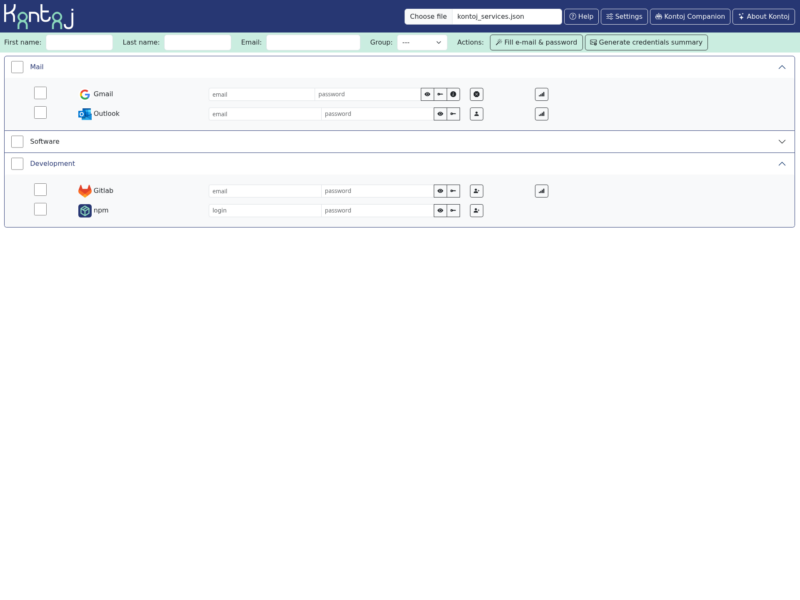
Kontoj is a browser-based tool for handing out access to a list of web services. You describe the services once in a JSON file — name, logo, login and sign-up URLs, status page, password rules — and Kontoj turns that file into a checklist you work through with each person: it generates an email address and a password per service, keeps track of which services belong to which group, and produces a credentials summary you can paste into a message.
Everything runs client-side in a static page: there is no backend, no database and no account of its own, so the only copy of the services list is the file you keep. Released under the MIT licence as version 2.0, with English and French documentation.
Key Features
- Services defined in JSON: the services list is a plain file with a published schema, so it can be version-controlled and shared; Kontoj can also autoload a list at start-up from a config entry.
- Generated credentials: one button fills an email address into every selected service and generates a password that follows the rules written for that service in the JSON file.
- Groups and selection: services and people carry groups, so you can tick a whole group — for example only the services a given team needs — instead of clicking each entry.
- Credentials summary: generates a mail body listing what was created, as plain text or as HTML for mail clients such as Thunderbird.
- Kontoj Companion userscript: an optional browser userscript (Violentmonkey or Tampermonkey) autofills sign-up forms on services whose JSON entry defines the CSS selectors, and can delete the stored credentials after a configurable number of minutes.
- Status pages inline: each service may carry a status URL, opened inside the page when the target site permits framing.
Why Use Kontoj
Setting up a family or a team on a dozen self-hosted services is the same loop every time: open the sign-up page, invent an address, invent a password that satisfies rules you have to look up, write it down, repeat. Kontoj keeps the address and password generation and the service addresses in one place, so the repeating part is three clicks, and the record of what was created is a message you can hand over instead of a spreadsheet nobody updates.
Because the whole thing is a static page, there is no credential store to secure: passwords are generated in the browser and, in the companion workflow, kept by the userscript only as long as you tell it to.
Typical Uses
- Onboarding a household onto a self-hosted stack — media server, password manager, notes, photos.
- Creating accounts on several SaaS tools for a new employee without drafting a password list by hand.
- Keeping a living inventory of the sign-up and status URLs of the services an organisation uses.
Getting Started
Open the hosted demo or serve the project’s static files yourself, then load a copy of services.example.json and edit it to match your services — the project publishes a JSON schema and an online editor for that file. Install the Kontoj Companion userscript if you want the sign-up forms filled automatically. The README covers the file format, the password rules and the userscript’s retention setting.