GitLab Community Edition
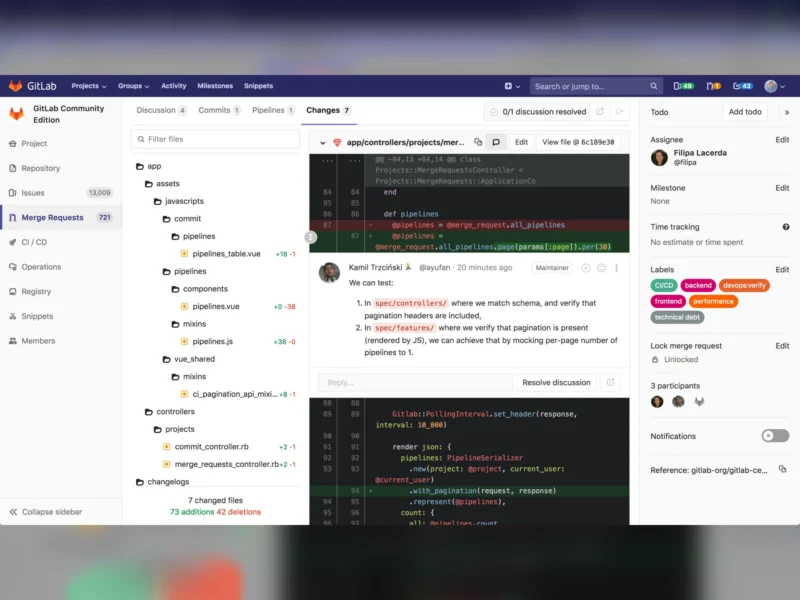
GitLab Community Edition (CE) is the self-hosted, MIT-licensed edition of GitLab — not just a Git server but a whole DevOps platform in one installable package. It gives a team repositories over SSH and HTTPS, merge requests with inline review, issues and issue boards, wikis and snippets, and, unlike a plain forge, built-in CI/CD with runners, a container registry, a package registry and static-site publishing through GitLab Pages — all from the same web interface, the same database and the same upgrade cycle. CE is the free tier of GitLab Self-Managed: you run it on your own hardware, own the repositories and the pipeline data, and pay nothing per seat. The trade-off is weight. GitLab is a Ruby on Rails application shipped together with PostgreSQL, Redis, Gitaly, Sidekiq, Puma and nginx, and the current installation requirements put the single-node baseline at 8 vCPU and 16 GB of RAM (it can be run with 8 GB in memory-constrained environments, but not happily). If your server is a Raspberry Pi, use Gitea, Forgejo or Gogs instead; if you need review, CI, registries and issue tracking in one machine you control, GitLab CE is the most complete free option.
Key Features
- Merge requests built for review — inline comments, thread resolution, suggestion commits, branch protection, required approvals and merge-when-pipeline-succeeds, all inside the same project.
- CI/CD included, not bolted on — pipelines defined in a
.gitlab-ci.ymlfile, shared and project runners, stages and parallel jobs, manual and delayed jobs, scheduled pipelines, and artifacts passed between them. - Environments and review apps — deployments tracked per environment, plus ephemeral review apps spun up from a branch and torn down when the merge request is merged.
- Container and package registry — store container images and packages next to the code they belong to, with the same access control.
- GitLab Pages — publish a static site straight out of a pipeline, with HTTPS certificates handled automatically.
- Planning tools — issues, labels, milestones, issue boards, epics-free project work items and time tracking, so the tracker lives where the code does.
- Wikis, snippets and the Web IDE — documentation and shared code fragments per project, and a browser editor for small changes without a local clone.
- Kubernetes and infrastructure integration — connect a cluster with the GitLab agent for Kubernetes and deploy to it from pipelines.
- Importers and mirroring — import projects with history from GitHub, Bitbucket Server, Gitea and Gogs (or any Git remote), and mirror repositories in or out on a schedule.
- Authentication in the free tier — local accounts plus LDAP and OmniAuth providers (group-level SAML/OIDC single sign-on is a paid feature).
- Service Desk — an incoming mailbox per project that turns external email into issues without giving the sender an account.
- No seat limits on CE — unlimited users, unlimited projects and unlimited CI minutes of your own hardware, with no licence key to renew.
Why Use GitLab CE?
Most self-hosted forges solve one problem — where the code lives — and leave the rest of the software lifecycle spread across a CI service, a registry, a wiki and a task tracker. GitLab CE puts all of it into one system with one set of user accounts and one backup, which is both its selling point and its cost: you get an integrated platform without stitching five tools together, but you also take on a stack that wants real hardware and a monthly upgrade. That trade is worth it for a team that has outgrown a lightweight forge, wants CI on its own machines with access to internal networks and secrets, and needs the repositories, pipelines and issue history to stay under its own control rather than in a vendor’s account. Two things are worth knowing before you commit. First, the free tier is genuinely useful but not the whole product: multiple approval rules, most advanced security scanning, group-level SAML/SSO, compliance tooling and the GitLab Duo AI features live in the paid Premium and Ultimate tiers, so check that the features you actually need are not behind the licence. Second, a self-managed GitLab sends GitLab Inc. a weekly Service Ping payload of aggregated usage statistics, which is opt-out for free instances and can be disabled in the admin settings — the instance still tracks nothing about your code, but the switch is worth knowing about. Finally, CE is not the same code base as a Gitea-class forge: it is the MIT-licensed part of a repository that also contains proprietary ee/ and jh/ directories, which are not part of Community Edition builds.
Use Cases
- A software team that wants repositories, code review, CI/CD and a container registry on its own infrastructure with no per-seat cost.
- Replacing paid per-seat DevOps SaaS while keeping the integrated workflow developers already know.
- A home lab or small business that needs internal Git hosting plus pipelines that can reach private services on the LAN.
- Regulated or air-gapped environments where source code and pipeline logs must never leave the network.
- A consultancy hosting projects for several clients in separate groups, with one place to audit who did what.
- Running pipelines on your own runners — including GPU or ARM machines — instead of renting hosted CI minutes.
- Migrating off a hosted forge: import the projects, then keep mirroring until the team has switched over.
Similar
- Forgejo and Gitea — lightweight forges in Go that add built-in Actions-style CI and package registries without GitLab’s Rails stack; the usual choice when the hardware is small.
- Gogs — the minimalist ancestor of both, for when one binary and a SQLite file are all you want.
- Sourcehut — a no-JavaScript forge built around mailing-list and patch-based workflows, self-hostable from the same AGPL code.
- Gerrit — review-first: a patch-queue forge for projects that gate every change on approval.
- Tuleap — an application-lifecycle platform with requirements and test management alongside the Git host.
- Gitea + Drone/Woodpecker, Jenkins or Buildbot — assembling CI separately from the forge, which keeps each part small but costs you the integration.
Platform
Linux server (Debian, Ubuntu, RHEL, AlmaLinux, Rocky, Oracle Linux, openSUSE, Amazon Linux; x86-64, ARM64 and s390x) · Docker and Podman · Kubernetes via the official Helm chart · installation from source · any modern browser (Firefox, Chrome, Chromium, Safari, Edge — JavaScript required) · single-node baseline 8 vCPU and 16 GB RAM, 40 GB of application storage plus PostgreSQL and Gitaly disk space
Licence
MIT Expat for the Community Edition — everything in the repository except the ee/ and jh/ directories, which are licensed separately and are not part of CE builds. Documentation is under CC BY-SA 4.0 and client-side JavaScript under MIT Expat, with third-party components keeping their own licences. The Premium and Ultimate tiers, group-level SAML/OIDC, advanced security scanning and GitLab Duo AI features are commercial add-ons; the free self-managed tier sends an opt-out Service Ping usage payload.
Website
about.gitlab.com · source on GitLab.com · installation documentation · hardware requirements · also see the Software Forges category for lighter alternatives.