digiKam
- Platform
- Linux Windows macOS
- Licence
- GPL-2.0-or-later Open source
- Website
- digikam.org/
- Source code
- invent.kde.org/graphics/digikam
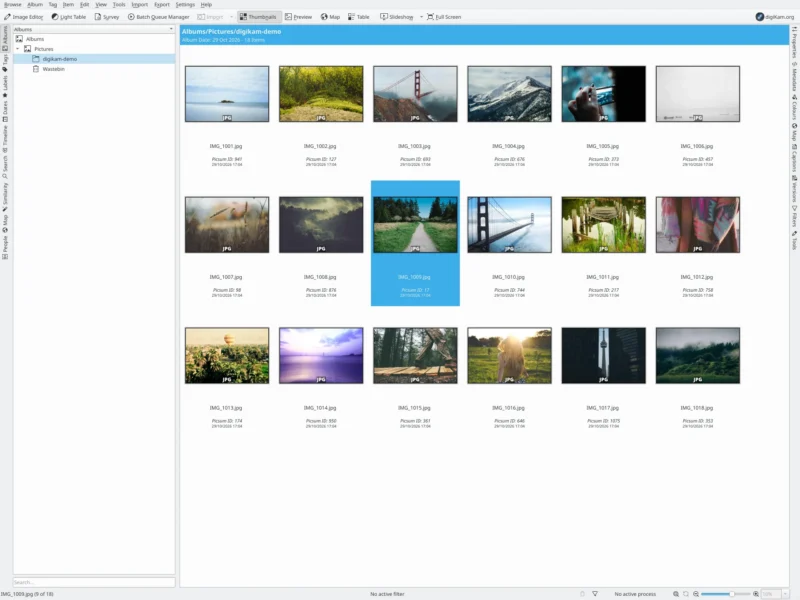
digiKam is an advanced open-source digital photo manager for photographers who keep their library on their own disks. It covers the whole desktop workflow — importing from cameras and cards, cataloguing, keywording, searching, everyday editing, batch work and publishing — and it is built for libraries far larger than a typical consumer app tolerates, comfortably past 100,000 items. Development started in 2001, the project is part of the KDE family, and the current stable release is digiKam 9.1.0, published in June 2026.
Where cloud photo services ask you to upload first and organise later, digiKam treats a library as ordinary folders of files plus a catalogue you own. It reads and writes EXIF, IPTC and XMP metadata through the Exiv2 library, so ratings, keywords and captions can live both in the database and inside the files themselves — and survive being read by any other program that understands those standards. Collections can sit on local disks, removable media or network shares, and the database can be a local SQLite file or a MariaDB server. Nothing leaves the machine unless you explicitly export it.
Key Features
- Import from almost anywhere — Downloads from cameras supported by GPhoto2, from USB mass-storage devices, from remote storage and from scanners, with auto-rename, auto-rotate, automatic album creation, lossless conversion, RAW-to-DNG conversion on import and detection of items already downloaded.
- Large-library database — Separate core, thumbnail, face and similarity databases, stored locally in SQLite or on a MariaDB server; ignore rules for directories and files during scans, a database shrink tool to fight fragmentation, and a migration tool to move between backends.
- Metadata-first cataloguing — Read and edit EXIF, IPTC and XMP in bulk, add captions and hierarchical tags, and optionally write the information back into the files so other photo tools can read it.
- Labels and filtering — Star ratings, colour labels and pick flags, with filtering by tags, labels, file type, filename and rating, plus item grouping by filename, date or time-lapse.
- Search that scales — Query by tags, labels, calendar date, a time-range histogram, location on a world map, visual similarity for duplicates, and detected faces; the advanced search tool combines technical criteria, and a natural-language search front end added in 2026 accepts a plain-English phrase instead of filters.
- On-device AI — Face detection and recognition, eye-shape detection for automatic red-eye repair, auto-tagging of image content, aesthetic classification that assigns pick labels, and automatic rotation, all running through OpenCV’s deep-neural-network engine on your own hardware. The model files are an optional on-demand download (about 1.2 GB in 9.1.0) and are never sent to a cloud service.
- Several ways to browse — Thumbnail icon view, map view, table view, and a Light Table for comparing near-identical shots side by side, with video thumbnails and previews, RAW decoding through LibRaw, ICC colour management and HiDPI support.
- Real editing — Cropping, rotation, resize, curves and levels, white balance, hue/saturation/lightness, local contrast, perspective correction, lens correction via Lensfun, noise reduction, sharpening, the G’MIC-Qt filter collection and panorama stitching — all at 16 bits per channel, with image versions so the original is never overwritten.
- Batch Queue Manager — Queue items for parallel multi-core processing, chain several tools into one pass, save the setup as a reusable workflow, convert to DNG and batch-rename by metadata.
- Plugins and output — Print creator, calendars, time and date adjustment, geolocation editor, presentations, panoramas, HTML galleries, video slideshows and email, plus export to Dropbox, Flickr, OneDrive, Piwigo, Pinterest, Box, MediaWiki, iNaturalist, a remote computer, DLNA/UPnP devices or an MJPEG stream.
Why Use digiKam?
The reason to choose digiKam over a simpler viewer is the combination of scale, standards and ownership. Its catalogue handles six-figure libraries with fast filtering, but the information it holds is not locked in: keywords and ratings can be written into the files’ own metadata, so the library stays portable to Lightroom, darktable, PhotoPrism or anything else that reads XMP. It is also a genuine Swiss-army knife for a photo archive — the same application imports, culls, edits, prints, publishes and streams.
It complements rather than replaces a dedicated RAW developer. Photographers commonly use digiKam to ingest, keyword, rate and cull a shoot, then hand the keepers to darktable or RawTherapee for heavy raw development, and digiKam can be configured to open RAW files in exactly that external editor while still decoding natively through LibRaw when you want a quick look. Being GPL-licensed, offline by design and free of accounts or subscriptions makes it a durable choice for an archive meant to last decades.
Use Cases
- A large personal or family archive — Catalogue and tag decades of photographs and videos stored across several disks and network shares, with face recognition to keep people organised.
- RAW workflow front end — Ingest, rate and cull a shoot with the Light Table and labels, then export the picks to a raw developer.
- Institutional or club collections — Apply controlled keywords and captions, then publish through MediaWiki, Piwigo or a generated HTML gallery.
- Offline and field work — A laptop with digiKam imports, reviews and edits on location with no internet connection at all.
- Bulk housekeeping — Batch-rename by capture date, shift timestamps from a camera with a wrong clock, fix geolocation, convert to DNG or resize and watermark through the Batch Queue Manager.
- Home network publishing — Serve a collection to a TV or media player over DLNA/UPnP without uploading anything.
Running digiKam
digiKam is a Qt/KDE application but does not require the KDE desktop, and it is available for the three main desktop systems: Linux (official AppImage builds for glibc 2.31 or newer, plus packages in most distributions including Debian and Fedora), Windows 10 or later in 64-bit builds, and macOS 11.3 or later on Apple Silicon or 10.15 or later on Intel. The project recommends the Qt6 bundles where available and signs its downloads with GnuPG for verification.
Two practical notes for a first install. Distribution packages can lag well behind upstream — Debian’s current package is digiKam 8.6.0 while upstream is 9.1 — so use the official bundle if you want current features. And a MariaDB/MySQL server is worth the extra setup for very large libraries or a collection shared between machines; a single-user local archive is fine on SQLite. Expect the optional AI model set to be a separate download that must be fetched before face detection and auto-tagging will run.
Alternatives and Companions
For raw development only, darktable and RawTherapee are the usual open-source choices, and digiKam is designed to work alongside both. For a shared browser-based library, PhotoPrism and Immich take the self-hosted server approach. For a minimal Linux desktop viewer, Shotwell is lighter but far less capable with metadata and large catalogues.