BigBlueButton
Overview
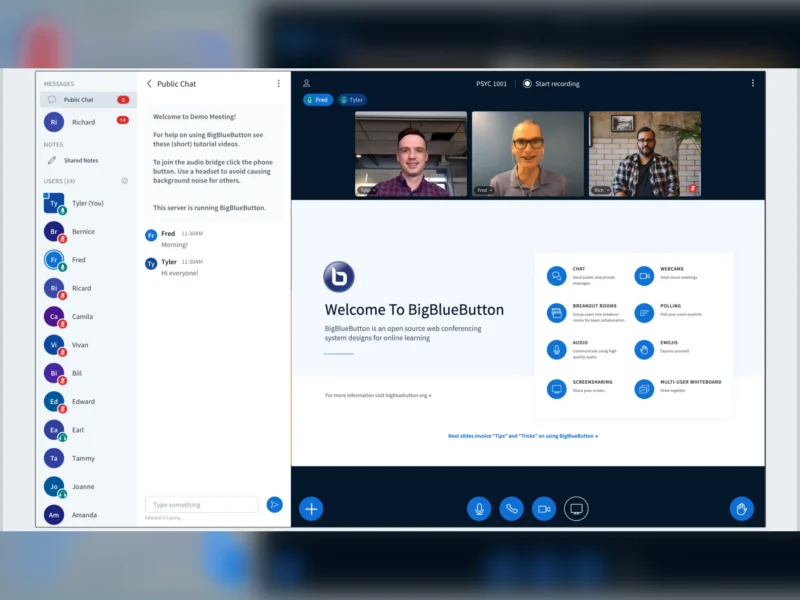
BigBlueButton is an open-source virtual classroom — a web conferencing system designed for teaching first and meetings second. It began in 2007 inside Carleton University’s Technology Innovation Management programme and is still developed by BigBlueButton Inc. with a community of committers, under the LGPL-3.0. Its feature list reads like a lesson plan rather than a meeting app: annotated presentations, breakout rooms, polls, quizzes, hand-raising and an engagement dashboard. That focus is why it ended up inside the learning management systems — Moodle ships a BigBlueButton activity in core, and Canvas, Sakai, D2L and Schoology maintain integrations — and why millions of classes a day run on it, in over 65 languages.
The current stable series is 3.0. BigBlueButton 3.0.0 was released in February 2025, and 3.0.39 (2 October 2026) is the latest maintenance release, so the series is actively patched rather than frozen; a 4.0 series exists but is still in release candidate, and the project continues to point production users at 3.0.x. Installation is a clean, dedicated Ubuntu 22.04 LTS server plus the bbb-install.sh script (or the Debian packages), with the server’s own components running as Docker containers; a community-maintained Docker deployment exists for those who prefer compose files.
Key Features
- Teaching tools built in — a multi-user whiteboard that lets anyone in the session write over the shared slides, with undo, zoom, and an infinite-canvas whiteboard on the roadmap. Since 3.0.20 the multi-user whiteboard stays active across slide changes and presentation switches instead of having to be re-enabled per slide, and breakout rooms start with it enabled.
- Breakout rooms, polls and quizzes — split a class into groups that get their own audio, video, chat, whiteboard and shared notes, then pull everyone back into the main room. Polls can be run from the presentation area, and 3.0.11 added quizzes: the presenter sees who answered correctly as the votes come in and can choose whether to reveal the answers, with results tracked in a dedicated Quiz section of the Learning Analytics Dashboard.
- Presentation sharing with LibreOffice conversion — upload a PDF, or a PowerPoint, Word or OpenDocument file; a bundled LibreOffice service converts Office documents to PDF on the server, so you present the deck you actually have. Slides can be annotated, zoomed, written over, exported, and pushed into a live session through the API.
- Recording and playback — sessions are recorded when the front end asks for it, and the recording is processed into playable formats: presentation playback with the annotations, screenshare, an audio podcast, an optional MP4 (H.264) video output, and since mid-2026 the Learning Analytics Dashboard as a recording format of its own.
- Live captions and transcription — a stenographer can join a session and type live closed captions that appear for everyone, with several captioners able to work in different languages in parallel; the captions are carried through into the recording as subtitles. The official plugin collection adds typed captions, live transcription, H5P content, chat mentions and session sharing.
- Chat, shared notes and engagement — public and private chat (3.0 added editing, reactions, replies, and deletion by the author or a moderator), shared notes in either Etherpad or the newer BlockNote editor with Markdown import and export, raising hands, emoji reactions, a countdown timer, away mode, a guest lobby where moderators admit arrivals, and lock settings that restrict what viewers are allowed to do.
- Learning analytics — the Learning Analytics Dashboard gives moderators a per-participant view after the session: online time, talk time, webcam time, messages and emoji sent, hands raised, and an activity score, alongside totals for the meeting. It answers the question a recording cannot — who was actually following.
- API, plugins and front ends — BigBlueButton has no user or meeting database of its own: everything is driven by a checksum-signed HTTPS API that creates and joins meetings, ends them, injects a presentation, uploads caption tracks and fetches recordings. That is what lets Moodle, Canvas or a custom portal own the users, and a bundled front end, Greenlight, gives you a simple room manager if you have no LMS at all.
- One server, several rooms — the documented minimum specification (8 CPU cores, 16 GB of RAM, 250 Mbit/s symmetrical) is quoted as supporting around 200 simultaneous users — for example three sessions of 50 or six of 25 — and the project recommends keeping any single session at or under that figure. Past one box, ScaleLite load-balances a cluster of BigBlueButton servers.
- Audio that works on a bad connection — WebRTC audio and video in the browser (Firefox and Chrome are the documented recommendations), a transparent listen-only mode so a viewer can switch to a microphone without re-joining, push-to-talk, and a phone dial-in number for participants who cannot use a headset.
Why Use BigBlueButton?
The reason to choose BigBlueButton over a general conferencing stack is that the teaching workflow is the product rather than an add-on. In a generic meeting room, presenting is screen sharing and the whiteboard is a separate app; in BigBlueButton a lecturer uploads the slides, writes on them, splits the class into groups, runs a quiz, records the whole thing, and afterwards sees who spoke and who went quiet — without installing anything. It also fits the tools a school or university already runs: because every meeting is created through the API, Moodle or Canvas can hand a student a working classroom in one click, with no extra links to keep track of. And it stays yours: LGPL-3.0, self-hosted on your own server, recordings on your own disk, no per-seat billing and no dependency on a vendor’s classroom product decisions.
The honest trade-off is weight. BigBlueButton expects a dedicated server with real resources — 8 cores and 16 GB of RAM as a minimum, ports 80/443 and a UDP range open, and a valid TLS hostname, because browsers refuse webcam and microphone access over plain HTTP. If all you need is a link that starts a video call, a lighter tool will do; if you need a classroom, this is the one built for it. The project also supports one Linux distribution well rather than many, which is a deliberate choice of quality over breadth: Ubuntu 22.04 LTS for 3.0, with 24.04 on the 4.0 branch.
Use Cases
- Live online classes and lectures where the slides, the annotation and the recording all matter.
- One-to-one tutoring and office hours, with the whiteboard and shared notes standing in for a desk.
- Flipped classrooms: record the content ahead of time, then spend the live session in breakout rooms and quizzes.
- Staff training and webinars, using polls, quizzes and the engagement dashboard as evidence of participation.
- Institutions already running Moodle, Canvas or Sakai that want a virtual classroom inside the LMS rather than beside it.
- Group project work, giving each breakout its own whiteboard, notes and chat.
- Keeping a recorded, self-hosted archive of sessions for attendance, revision or compliance.
Similar
- Jitsi Meet — the other big self-hosted conferencing project: lighter to run and instant to join, but without the classroom tools.
- Mattermost — team chat with meetings bolted on, where BigBlueButton is the classroom with chat inside it.
- Zulip — threaded text discussion for a course or a team; pair it with BigBlueButton for the live sessions.
- Element — Matrix chat and calls, self-hosted and federated, for the conversation around the teaching.
Platform
Server: Ubuntu 22.04 LTS 64-bit, dedicated (Ubuntu 24.04 on the 4.0 branch) · components run as Docker containers · community Docker deployment · clusters via ScaleLite. Client: any modern browser on desktop or mobile — Firefox and Chrome are the documented recommendations · phone dial-in · integrations for Moodle, Canvas, Sakai, D2L, Schoology, Nextcloud and WordPress.
Licence
LGPL-3.0 (BigBlueButton server and client)
Website
bigbluebutton.org · docs.bigbluebutton.org · source on GitHub