Nimtable
- Platform
- Docker
- Licence
- Apache-2.0 Open source
- Source code
- github.com/nimtable/nimtable
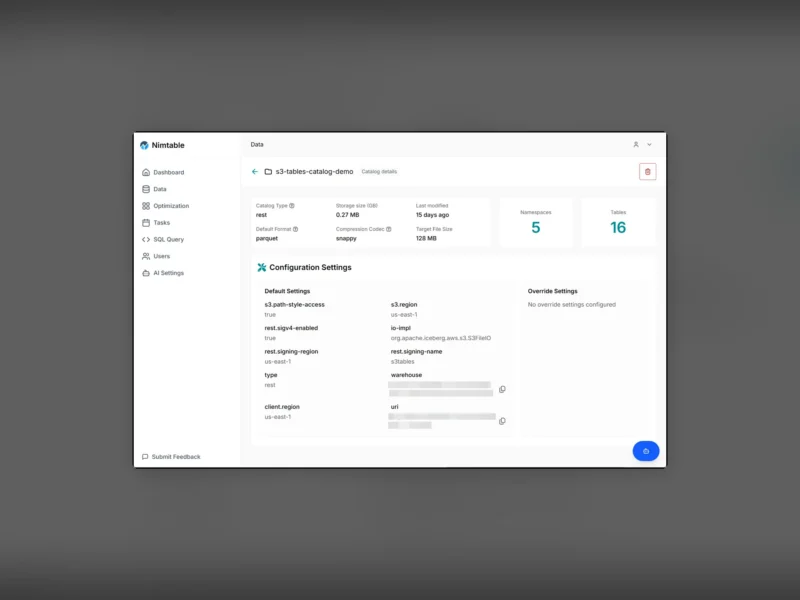
Nimtable is a lightweight web console for Apache Iceberg catalogs. It sits between you and the catalog service, reads the metadata Iceberg already keeps, and turns it into pages you can click through — tables, schemas, partitions, snapshots and manifests — instead of queries you have to remember. The UI is TypeScript (Next.js) with a Java service behind it, and the documented install is a small Docker Compose stack.
What it does
- Catalog browser — connect one or more catalogs (REST, AWS Glue, S3 Tables, Apache Polaris, Unity Catalog, Lakekeeper, Hive Metastore) and walk namespaces, tables and their metadata from a single sidebar.
- Table detail — schema, partition spec, snapshots, manifests and file layout for each table, which is the part of Iceberg that is hardest to inspect from a SQL prompt.
- File and snapshot distribution — charts of how data is spread across files and snapshots, so small-file and layout problems are visible before they turn into a rewrite job.
- SQL query page — run a query from the browser for a quick look without opening another client.
- Maintenance through your own engine — compaction, snapshot expiry and orphan-file cleanup are handed to an engine you already run, such as Apache Spark or RisingWave, rather than executed inside the catalog process.
- Iceberg REST catalog endpoint — it can also act as a standard Iceberg REST catalog endpoint for other tools.
Connecting a catalog
Catalogs are added in the UI with the same properties an Iceberg client would use: type, URI, warehouse, and the S3 or SigV4 settings for object storage. Once a catalog is in place its namespaces and tables appear under Data, with a summary of tables, namespaces, storage size, default format and compression codec, plus per-table pages for schemas, partitions and snapshots.
Deployment
The documented route is the docker/ Compose file in the repository, which starts the Next.js front end, the Java service and a PostgreSQL database; the UI listens on port 3000 and the backend on 8182. The first login is the built-in admin account with the password admin, and the project’s own documentation recommends changing it — once changed the password is stored in the database and the environment variables are ignored. Release artifacts are published for the backend as well, if you would rather place the pieces yourself.
Who it is for
Teams that already run Iceberg and want a read-mostly view of catalog state: data engineers checking what a pipeline actually wrote, platform owners auditing storage and file layout, or anyone debugging a table without a notebook. It is not a query engine and it does not store your data — everything it shows comes from the catalog and the object store.