DbGate
- Platform
- Windows Linux macOS Docker Web
- Licence
- GPL-3.0 Open source
- Website
- dbgate.io
- Source code
- github.com/dbgate/dbgate
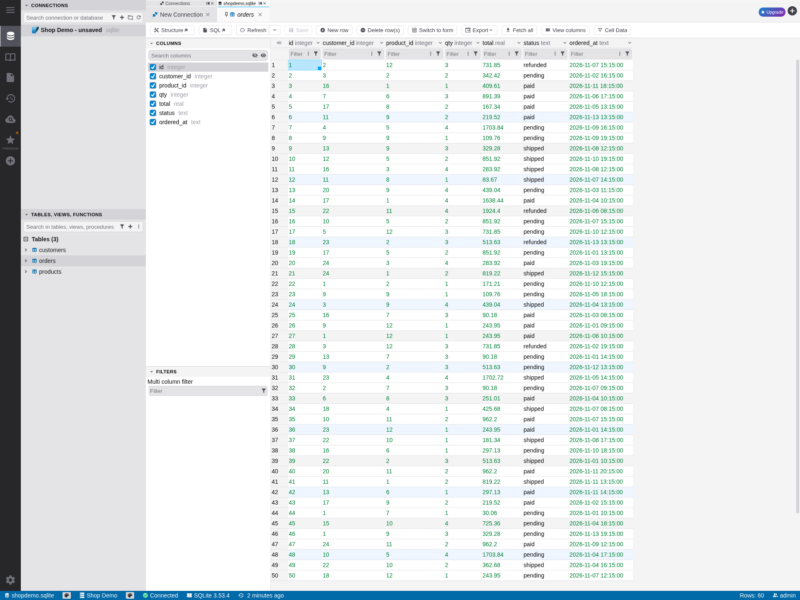
DbGate is a database manager for SQL and NoSQL engines that runs either as a desktop application on Windows, Linux and macOS or as a self-hosted web application in a browser tab. It is built for people who work with several databases at once: connections live in one tree, and the same grid, SQL editor and schema tools work whatever engine is behind them.
What it does
- Many engines, one client — MySQL, MariaDB, PostgreSQL, CockroachDB, SQL Server, Oracle, SQLite, libSQL, DuckDB, Firebird, ClickHouse, Apache Cassandra, MongoDB and Redis are supported in the free edition.
- Data grid — open a table and browse it in a paged grid with per-column filters, edit values in place, and jump to Structure, SQL or Export for the same table from the toolbar.
- Schema compare and sync — diff two databases and generate the script that brings one in line with the other.
- Visual query designer — build joins by dragging tables instead of writing the SQL by hand.
- Chart visualisation — turn a result set into a chart without leaving the client.
- Batch export and import — move whole schemas or selected tables between databases and formats.
- Scripting interface — a Node.js API for automating the same operations, documented at docs.dbgate.io.
- Web deployment — the same UI is published as a Docker image and as the
dbgate-servenpm package, so a team can share one installation on a server.
Getting started
Download the desktop build from dbgate.io, or run the web version with docker run -p 3000:3000 dbgate/dbgate and open port 3000; LOGIN and PASSWORD environment variables set the sign-in for the web instance. A connection needs only the engine type and its host and credentials — for SQLite, the path to the database file on the server. The online demo at demo.dbgate.cloud shows the interface without installing anything.
Licence
Open source. DbGate is released under GPL-3.0 and is free to use for any purpose. A separate proprietary Premium edition adds cloud and API connectors — Amazon Redshift, Cloudflare D1, Azure Cosmos DB, DynamoDB, Firestore, GraphQL, OData and OpenAPI — which are not part of the free build.
For other ways to work with a database from a browser or desktop, see the Databases and Search category.