OliveTin
- Platform
- Linux macOS Windows Docker
- Licence
- AGPL-3.0 Open source
- Website
- olivetin.app
- Source code
- github.com/OliveTin/OliveTin
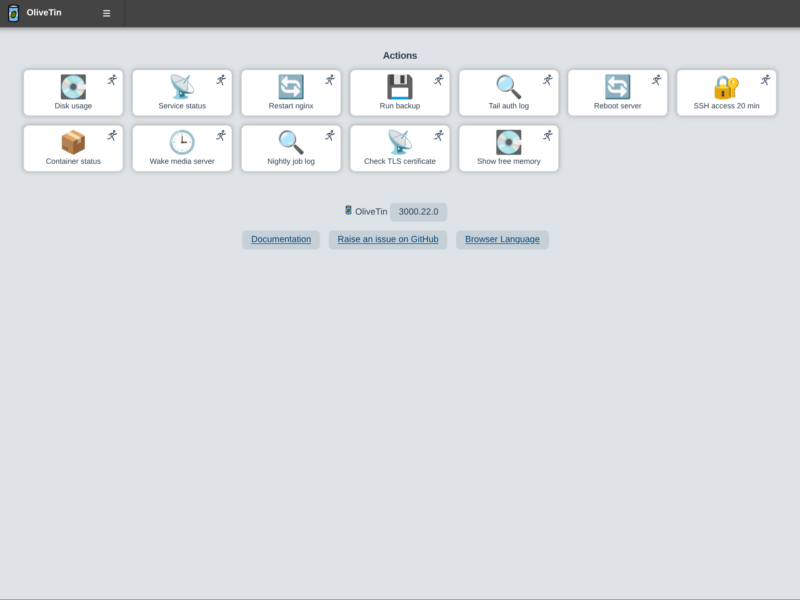
OliveTin is a web interface in front of a list of shell commands you already trust. You write the commands in a YAML file, give each one a title and an icon, and OliveTin serves a grid of buttons that runs them. The point is not automation for its own sake — it is handing a narrow, pre-approved action to someone who should not have a shell: a family member restarting the media server, a junior admin running the backup script with a dropdown of customers, a tablet on the wall that reboots the router.
What it does
- Commands as buttons — every action is a
title, ashellcommand and a timeout in one YAML file; the web UI renders them as a touch-friendly grid, and the user never sees or edits the command itself. - Arguments become form fields — a command written with placeholders turns into a select box, a text field, a password field, a checkbox or a date picker, with regex validation and confirmation prompts where you want them.
- Run on demand or on a schedule — actions can be clicked, run on a cron expression, triggered by a webhook or a GitHub event, started on boot, or fired when a file appears or changes.
- Live output and history — the output streams into a log view as the command runs, and recent runs are kept so a failure at 03:00 can be read back in the morning.
- Access control — local users, API keys, OAuth2 or a trusted header from a reverse proxy, with per-action ACLs so one group sees the restart buttons and another only reads logs.
- Entity directories — containers, systemd units or hosts can be loaded from a command into a list, which turns one action into a controlled picker over what actually exists on the box.
- A real API — the frontend talks to a Protobuf-defined Connect RPC API, so the same actions can be driven from scripts, generated clients or an AI agent.
- Light footprint — written in Go as a single binary with a static frontend, using a few megabytes of RAM, with a documented dark mode and a UI that passes accessibility checks.
Deployment and requirements
The container is the usual route: docker run -it -p 1337:1337 -v ./config.yaml:/config/config.yaml ghcr.io/olivetin/olivetin:latest, with the UI on port 1337. Packages exist for the common Linux distributions, plus a Windows service build, a macOS build and a manual tarball. Nothing else is required — no database and no agent — because OliveTin executes local commands as the user it runs as. That detail is the whole security model: whatever the OliveTin process can do, the buttons can do, so it belongs behind a proxy with TLS and, ideally, on a host where the account is deliberately limited.
Where it stands in 2026
Version 3000.22.0 shipped in November 2026 and closed two high-severity OAuth issues, which is a fair reminder that the authentication options are the part to keep patched. Development is steady, the project is AGPL-3.0 with about 3.9k GitHub stars, and it holds a CII best-practices badge. It is not a workflow engine and does not try to be: there are no dependencies between actions and no state machine, just commands with guards in front of them. That narrowness is why it fits places a full orchestration platform would never be installed, such as a home server, a workshop terminal or a small office.
Alternatives
- Cronicle — scheduled jobs with a web UI and a job history, but aimed at cron replacement rather than giving people safe buttons.
- CTFreak — self-hosted task scheduler that runs commands over SSH and WinRM across many machines; proprietary and freemium.
- n8n — a full node-based automation platform, far more capable for API-to-API work and much heavier to run.
- Huginn — agents that watch the web and trigger actions, a different model that suits monitoring rather than manual operations.