AnyAppStart
- Platform
- Docker Linux Self-hosted
- Licence
- MIT Open source
Overview
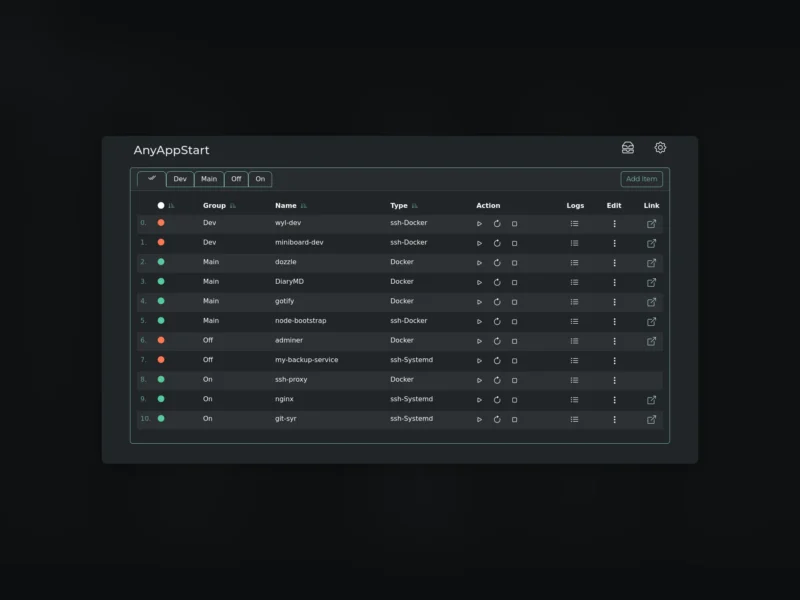
AnyAppStart is a self-hosted web control panel for the things running on your machines. Each entry in its table is a Docker container, a systemd unit, a virtual machine or a type you define yourself, and each row carries the buttons that matter: start, restart, stop, open the logs, edit the configuration. A few rows in, the panel stops being a dashboard of links and becomes the place you actually operate the box from.
It is a single Go binary with a React and TypeScript front end — small enough to run next to the services it manages, with all configuration in YAML files and no database to look after.
Features
- Start, stop, restart and read the logs of Docker containers, systemd services and virtual machines from one table
- Remote control over SSH:
ssh-Dockerandssh-Systemdrows point at another host’s containers or units - User-defined types, so LXC containers, WakeOnLAN targets or a shell script can sit in the same list with the same buttons
- Live CPU and memory figures per row, and a status dot that shows what is up and what is not
- Configuration in plain YAML (
types.yaml), editable in the GUI or by hand — nothing to migrate, nothing to back up beyond a directory - A simple HTTP API for scripting the same actions
- Binaries for amd64, i386, arm_v5 through arm64 as .deb, .rpm, .apk and .tar.gz, plus a Docker image
Setup
Docker is the quickest route: run aceberg/anyappstart, publish port 8855, mount a host directory on /data/AnyAppStart for the YAML files and mount /var/run/docker.sock if the panel is to control local containers. Set TZ for sensible log timestamps. On a host, the release packages install a systemd unit, started per user with systemctl enable --now AnyAppStart@$USER.service.
After installing, fill types.yaml — the GUI’s Add Type dialog or the sample file in the repository both work. Controlling another machine over SSH needs a private key and a known_hosts file placed in the config directory, with the SSH command string stored on the type. One caveat the project states plainly: there is no built-in authentication, so the panel belongs behind a firewall, a VPN or an SSO proxy such as Authelia rather than on the open internet — it can stop your containers, after all.
Who it is for
Homelab and small-server operators who are tired of typing docker restart or systemctl status for the same dozen units, and who want one page that works from a phone browser. It suits a handful of machines administered by one person; it is not a deployment system, a metrics stack or a container orchestrator — Homepage and similar dashboards are better at presenting services, and Portainer goes deeper into Docker itself.
AnyAppStart is MIT licensed, has a little over two hundred stars on GitHub, and is written by the author of the same family of small self-hosted apps.