Tymeslot
- Platform
- Web Docker
- Licence
- AGPL-3.0 Open source
- Website
- tymeslot.app
- Source code
- github.com/Tymeslot/tymeslot
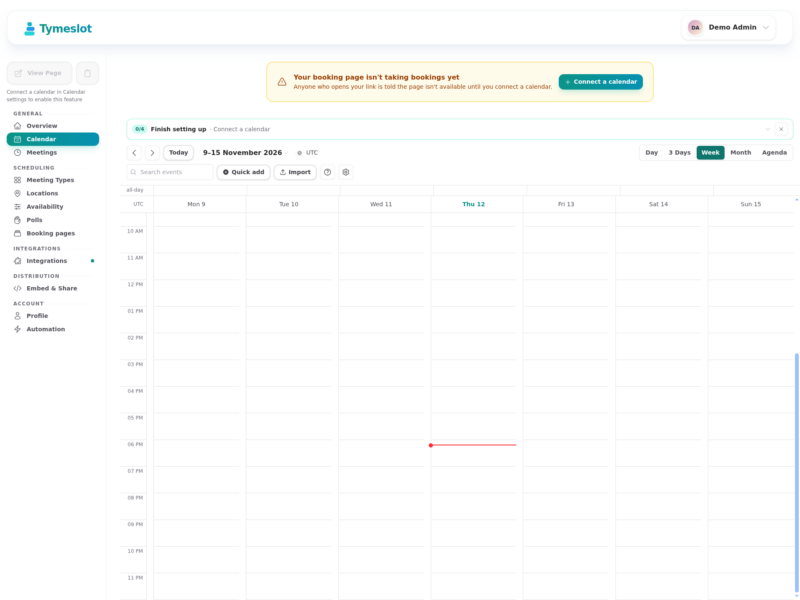
Tymeslot is a self-hosted meeting scheduling platform: you define when you are available, publish a booking link, and other people pick a slot without needing an account of their own. It is written in Elixir on Phoenix LiveView, ships as a single container with PostgreSQL inside it, and is developed in the open under the AGPL. The commercial cloud at tymeslot.app runs the same build, so nothing is held back from the self-hosted edition.
What it does
- Booking pages – four themes (Quill, Rhythm, Paper, Folio), custom colours and backgrounds, white-label output. Guests need no account and see the page in their own language and time zone.
- Meeting types – duration, custom intake questions, booking limits, optional approval before a slot is confirmed, and several locations per type for the guest to choose from.
- Availability – named schedules with working hours, breaks and date overrides, plus buffers, minimum notice and a booking window per meeting type.
- Calendar sync – two-way sync with Google, Outlook, iCloud and any CalDAV server (Nextcloud, Radicale, Zimbra, Baikal, mailbox.org). A conflict in any connected calendar blocks that slot everywhere.
- Video rooms – meeting links created automatically on Google Meet, Teams, Zoom, Jitsi, MiroTalk, kMeet or Nextcloud Talk, or a plain in-person, phone or custom-link location.
- Email – branded, responsive templates carrying an
.icsinvite, configurable reminders, and cancel or reschedule links that need no login. - Automation – HMAC-signed webhooks for
meeting_created,meeting_cancelledandmeeting_rescheduled, plus Slack and Telegram notifications. - Embedding – inline, popup or floating-button widget with signed, domain-locked tokens.
- Sign-in and admin – email and password, Google, GitHub or generic OAuth/OIDC (Keycloak, Authentik, Okta, Azure AD); registration and password sign-in can be toggled from
/adminwithout a redeploy. - Optional payments – paid bookings through Stripe Connect, off by default and fee-free when you host it yourself.
- Interface languages – English, German, French, Italian, Czech, Polish, Ukrainian, Brazilian Portuguese and Spanish across the dashboard, the booking pages and every email.
Requirements and deployment
Self-hosting is one Docker command: the published image starts the application together with its own PostgreSQL, and the first account created becomes the administrator. State lives in two volumes – the application directory and the PostgreSQL data directory – so the container itself is disposable. Three values matter on first start: SECRET_KEY_BASE, PHX_HOST and, for anything beyond a first look, DATA_ENCRYPTION_KEY, which decouples stored calendar credentials from the signing secret. SMTP for reminder mail, TLS and an external PostgreSQL are documented in the repository’s Docker guide, and Cloudron and Railway carry one-click installs. The stack is Elixir/OTP with Phoenix LiveView, PostgreSQL 14 or newer, and Oban for background work; there is nothing to compile.
One deployment detail to plan for: calendar providers expect the instance to be reachable on a real hostname with TLS. Google will not accept a bare private IP address or a .local name as an OAuth redirect target, so a home install needs a domain in front of it before Google or Outlook sync can connect. CalDAV servers work with fewer preconditions, and busy-time checks and bookings still work without any calendar connected, though the dashboard warns that the page is not taking bookings until one is.
Where it fits
This is the self-hostable branch of the Calendly family. Cal.com is the larger project with the wider ecosystem and team round-robin scheduling; Cal.rs is a lighter Rust implementation of the same booking-link idea; Calino is a CalDAV client rather than a booking page. Tymeslot’s distinguishing choices are the Elixir/Phoenix stack, the four themed booking pages, and a self-hosted build that is feature-identical to the paid cloud. On the calendar side it is a scheduling front end, not a calendar server – keep the events in Nextcloud, Radicale or Google and let Tymeslot read busy times from them; FluidCalendar covers the other direction, placing a task list into the free time a calendar leaves behind.