Manage My Damn Life
- Platform
- Docker Web Self-hosted
- Licence
- GPL-3.0 Open source
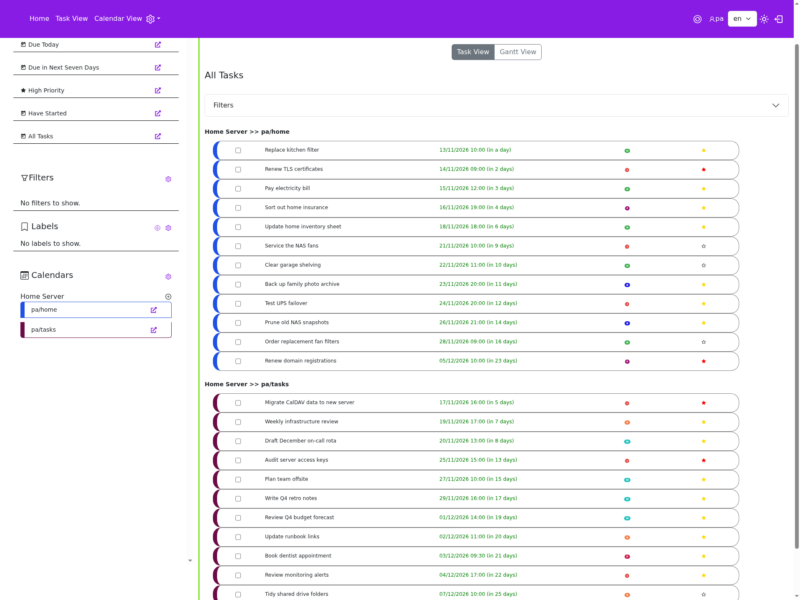
Manage My Damn Life (MMDL) is a self-hosted web front end for the CalDAV tasks and calendars that already live on your own server. Point it at Nextcloud, Radicale or Baikal and it opens a task-first workspace in the browser: what is due today, what lands in the next seven days, the high-priority items and the work already started, with a Gantt view and a month calendar beside the plain list.
Because everything stays a standard VTODO or VEVENT inside your CalDAV collections, MMDL adds a desktop-friendly view without taking ownership of the data. Mobile clients such as JTX Board or OpenTasks keep working against the same account, and the CalDAV server stays the single source of truth.
Who it is for
People who already run a CalDAV server and want a dense task board for a large screen instead of a mobile-shaped web interface. It is also a practical front end for a home lab: one instance can hold several CalDAV accounts and serve several users.
Features
- CalDAV task management with subtasks and the fields that matter in practice: due date, status, percent complete, recurrence and notes.
- Three reading modes over the same data: task list, Gantt view and calendar view.
- Calendar event handling alongside tasks, so appointments and to-dos sit in one place.
- Multiple CalDAV accounts and multiple user accounts on a single installation.
- Saved task filters and labels for slicing a long list down to what you are working on.
- OAuth sign-in for CalDAV providers, with Google Calendar as the documented example.
- Interface translations handled through Weblate.
- Tested against Nextcloud, Radicale and Baikal; other servers are covered through the tsdav client library the project is built on.
Deployment
MMDL runs from a Docker image (intriin/mmdl) or from the project’s Compose file, which starts the application next to a MySQL container. Configuration is a single environment file: the public base URL, the database connection, an AES key used to encrypt the CalDAV passwords it stores, plus optional SMTP and OAuth settings. The first visit goes to /install, which verifies the database, creates the tables and registers the admin account. Installing on Node.js without Docker is documented as well.
Project status
The README describes the project as beta and advises care with production data, so it is worth trying first against a test CalDAV account. Development is active, with releases and fixes landing on the main branch through late 2026.
Licence
Free and open source. Released under the GNU General Public License v3.0 — you can self-host it, modify it and share it under the same terms.