umbrelOS
- Platform
- Linux
- Licence
- PolyForm Noncommercial 1.0.0
- Website
- umbrel.com/umbrelos
- Source code
- github.com/getumbrel/umbrel
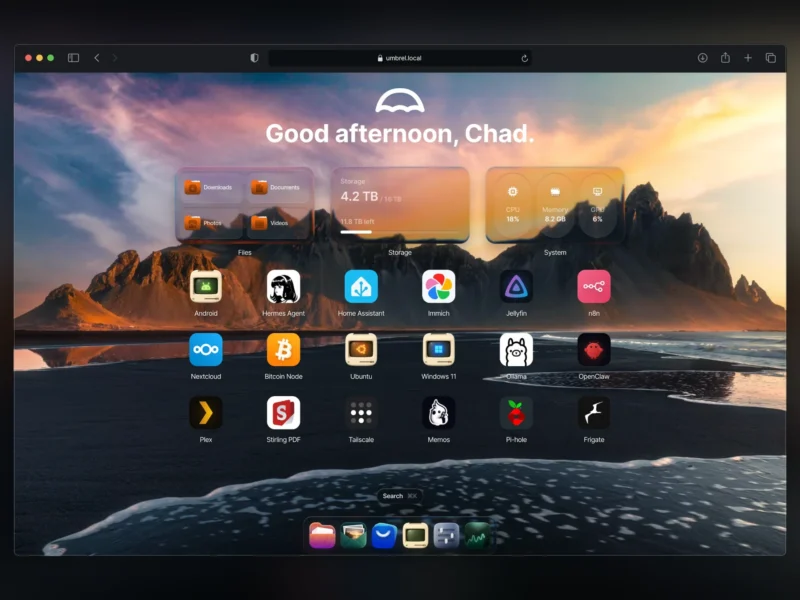
umbrelOS is a self-hosting operating system from Umbrel that turns a mini PC, a Raspberry Pi 5 or a virtual machine into a personal home server with a browser-based desktop. Instead of assembling Docker containers by hand, you boot umbrelOS and install services from the Umbrel App Store — more than 300 apps covering file sync, media servers, photo libraries, automation and AI.
Key Features
- App Store with 300+ apps — one-click installs for self-hosted services such as Immich, Jellyfin, Nextcloud, Pi-hole and n8n, each running in its own container
- Web desktop — a clean home screen in the browser with app tiles, a dock, widgets and per-app settings
- Photos — photos and videos land in the built-in Photos app, and the Umbrel for iPhone app can back up the whole camera roll automatically
- Machines — run Windows, Ubuntu, Debian or Android desktops inside the server and reach them from a browser tab
- Multi-user — every household member gets their own account, home screen and private home folder, sharing only the apps and folders you choose
- Storage Manager and FailSafe — combine several internal drives into one pool, or enable RAID-style redundancy against a disk failure
- GPU acceleration — Ollama, Jellyfin and other apps can use NVIDIA, AMD and Intel GPUs, including Thunderbolt eGPUs
- Cloud import — pull files in from Google Drive, Dropbox, OneDrive and iCloud in one go, or keep them backing up continuously
- AI agents — a built-in MCP server lets an AI agent install apps, organise files or troubleshoot the server within the permissions you grant
- Desktop and mobile apps — Umbrel for Mac mounts the server as a drive in Finder, at home or remotely over Tailscale
Why Use umbrelOS?
umbrelOS takes the chores out of running a home server: no package management, no compose files and no separate dashboard to wire up. It is a complete operating system, so a spare mini PC becomes an app platform in one install, and the same image ships on Umbrel’s own Home and Pro hardware with the same features and updates. For people who want the convenience of the cloud but ownership of the data, it is one of the shortest paths from bare hardware to a working private cloud.
Use Cases
- Turning an old office mini PC into a private photo and file server for the family
- Self-hosting media, notes, bookmarks and backup apps behind a single login
- Running local AI models and agents on a always-on box in the house
- Keeping a desktop-class machine available in a browser tab for remote work
Deployment and Requirements
- Intel and AMD machines: dual-core CPU, 4 GB RAM (8 GB+ recommended) and a 32 GB drive; umbrelOS boots from one drive and uses the rest for apps and data
- Raspberry Pi 5: boot from an NVMe or USB drive rather than a microSD card
- Virtual machines: Proxmox, VirtualBox, VMware or anything that supports EFI boot
- umbrelOS is a standalone system: it installs directly onto the device and cannot be installed on top of an existing Linux distribution
- Some features depend on hardware — Storage Manager and FailSafe need two or more internal NVMe or SATA drives, and GPU acceleration needs a supported GPU on an Intel or AMD machine
Licence
Not an open source licence. umbrelOS is source-available under the PolyForm Noncommercial License 1.0.0. Umbrel’s own FAQ states that the source code may be used, modified and redistributed freely for personal or nonprofit purposes — forking and contributing are allowed — but selling umbrelOS, hosting it for others, or bundling it with hardware or support services requires a commercial agreement with Umbrel. It is free to download and use for personal self-hosting.
Alternatives
- CasaOS — Apache-2.0 home cloud dashboard for Linux, the closest open-source equivalent
- YunoHost — Debian-based self-hosting distribution with its own app catalogue
- StartOS — open-source server OS built around a marketplace of packaged services
- Runtipi — one-click self-hosted app installer with a friendly web interface