XBackBone
- Platform
- Web Docker
- Licence
- AGPL-3.0 Open source
- Website
- xbackbone.app
- Source code
- github.com/sergix44/xbackbone
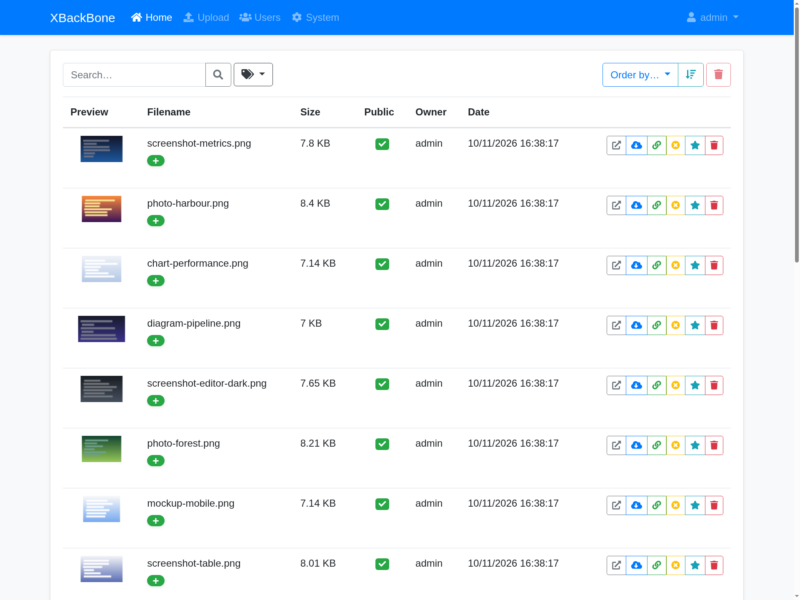
XBackBone is a self-hosted file and media sharing server written in PHP, built around one narrow job: take an upload from a screenshot tool and hand back a short link. It is the piece most people bolt onto ShareX — the Windows capture utility — when they do not want their screenshots sitting in a third-party cloud, and it also ships ready-made uploader configurations for ScreenCloud, ishare, Spectacle on KDE and a plain shell script.
What it does
- Accept uploads over the web form or the token-authenticated HTTP endpoint, then serve them at a clean short URL (
/KUZE9/jecuhABU52.png) that can be pasted straight into a chat or a ticket - Generate ShareX, ScreenCloud and Linux-script configuration files from the profile page, pre-filled with the instance URL and a personal API token
- Per-user accounts with admin roles, individual disk quotas, and a system page showing storage and upload limits
- Storage backends configured at install time: local disk, FTP, Amazon S3 or S3-compatible, Google Cloud Storage, Azure Blob and Dropbox
- Inline previews and thumbnails for images, plus video, audio and PDF uploads kept as opaque files behind a link
- Per-upload visibility, so a file can stay private to its owner or be published to the public listing
- Vanity URLs and link shortening for uploads you expect to share repeatedly
- Optional LDAP authentication for instances with an existing directory, and a browser-based installer that writes the database and storage configuration for you
Running it
The easiest install is the community Docker image (lscr.io/linuxserver/xbackbone, or Pe46dro/xbackbone-docker), which expects three volumes: /config, a data directory and the application root where config.php lands. On first visit the web installer asks for a base URL, a database (SQLite is offered as the default and needs no separate server), a storage driver and the admin account — that is the whole setup, there is no shell step.
Uploads land in the storage path you choose, and a fresh instance is empty until you either upload through the browser or point a ShareX profile at it. The upload endpoint accepts a multipart POST with the account token in a token field, which is what makes scripting and capture-tool integration trivial.
Version 4 in the works
The repository is being rebuilt on Laravel and Livewire for a 4.x release that is still labelled under development in the documentation, and that rebuild moves the licence from AGPL-3.0 to Apache-2.0. The stable line remains 3.8.2 for now, so check which generation a third-party Docker tag is actually packaging before comparing features: the 10 features listed above are the 3.x behaviour.
Where it fits
XBackBone is the light option next to a full Nextcloud or an imgur-style hosted service: one PHP application, one directory of files, no sync client and no document editing. If what you want is a place for screenshots and one-off files to live, with links that do not expire when someone else’s service changes its terms, it does exactly that.