FTPGrab
- Platform
- Linux macOS Windows Docker
- Licence
- MIT Open source
- Website
- crazymax.dev/ftpgrab/
- Source code
- github.com/crazy-max/ftpgrab
Overview
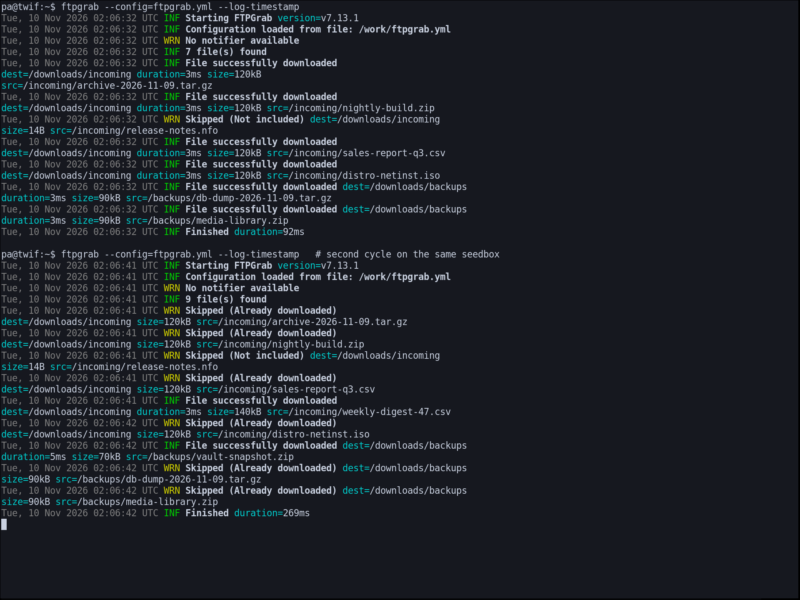
FTPGrab pulls files from remote FTP and SFTP servers down to your own machine, NAS or server, on a schedule and without anyone watching. You describe where to connect, what to take and where to put it in one YAML file; FTPGrab walks the source directories, downloads what matches your filters, records what it has already taken, and logs what happened.
It is a Go binary: one static executable for Linux, macOS and Windows, plus the crazymax/ftpgrab container image. There is no database server to keep running — a small local file holds the record of grabbed files, which is how a second run skips everything it already has. That makes it easy to drop on a seedbox-adjacent VPS, a QNAP or Synology NAS, or into a Compose stack beside the rest of your services.
Key Features
- FTP, FTPS and SFTP sources — plain FTP, explicit TLS or SSH, with per-server timeout, path encoding, UTF-8 and EPSV toggles for servers that need them.
- Several sources in one run — multiple directory sources per server, and several servers configured side by side.
- Regex include/exclude filters — take what matches a pattern and drop the rest, plus a
sincedate filter so only recent files are considered. - Download database — files already grabbed are logged as Already downloaded and skipped, so repeated runs only transfer what is new.
- Built-in cron scheduling — pass
--scheduleand it stays up on its own, or run it one-shot from cron, a systemd timer or a Kubernetes CronJob. - Post-download control — output root,
uid/gid,chmodFile/chmodDir, retry count, andtempFirstto write to a temporary name and rename on completion so a half-finished file never appears. - Notifications per run — e-mail over SMTP, Slack, a generic webhook with its own method, headers and body template, or a script hook.
- Config as YAML or environment — every option has an
FTPGRAB_*equivalent, so a container can be configured entirely from its environment.
Limitations
- There is no web interface or dashboard. The log and the exit code are the interface, which is fine for a cron job and awkward if you want to watch transfers live.
- It is a grabber, not a two-way sync: files come down, nothing is uploaded or deleted on the remote side.
- Credentials live in the configuration file or environment variables — there is no agent, token refresh or OAuth flow for the remote server.
- Filtering is per configured server, so very different rules for several remotes mean several server entries rather than one rule set with exceptions.
Requirements and Installation
Download the archive for your platform from the releases page, put the binary somewhere on your PATH, and write ftpgrab.yml. A minimal run against one server looks like this:
db:
  path: /data/ftpgrab.db
server:
  ftp:
    host: ftp.example.com
    port: 21
    username: user
    password: secret
    sources:
      - /incoming
download:
  output: /downloads
  include:
    - .(tar.gz|zip|iso)$
  exclude:
    - .nfo$
Then run ftpgrab --config=/etc/ftpgrab/ftpgrab.yml once, or add --schedule="0 */6 * * *" and leave it running. --log-json, --log-level and --log-file change the output if you are shipping logs somewhere. The container image takes the same flags: mount the configuration file and the download directory as volumes and run the image with --config pointing at the mounted file.
Related: rclone covers far more back ends (S3, WebDAV, cloud storage) and can mount or sync them, and Syncthing keeps folders in step between your own devices — FTPGrab is the narrower tool for “pull whatever is new off this FTP/SFTP box on a timer”.