LeafWiki
- Platform
- Web Docker Linux Windows macOS Self-hosted
- Licence
- MIT Open source
- Website
- leafwiki.com
- Source code
- github.com/perber/leafwiki
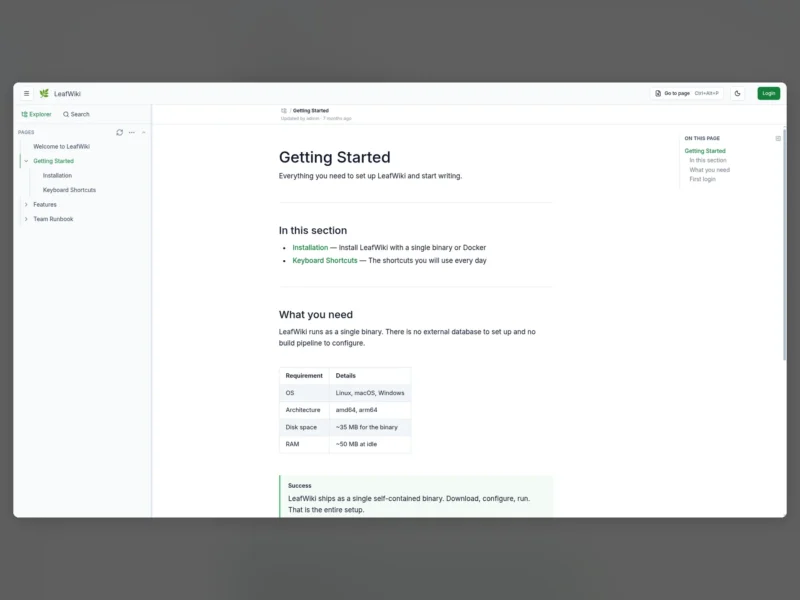
LeafWiki is a self-hosted wiki shipped as a single Go binary: no Node.js, no Redis, no PostgreSQL. Page content is stored as Markdown files on disk with SQLite alongside for metadata, so a backup is a copy of the data directory and the pages stay readable outside the app. It is aimed at personal wikis, engineering notebooks and runbooks, internal team documentation, and existing Markdown or Obsidian vaults that need a proper wiki interface in front of them. The explicit comparison the project draws is with Wiki.js and Outline: LeafWiki is narrower on purpose.
Tree navigation, not a feed
- Pages live in an explicit hierarchy you navigate in a tree sidebar, rather than a chronological feed of notes.
- Page order is set manually per page, not derived from the filename.
- Full-text search covers titles and content, and can be filtered by tag.
- Every page shows backlinks and link status: incoming links, outgoing links and broken links, with an admin view for auditing broken ones.
- Optimistic locking handles two people editing the same page at once.
Markdown beyond the basics
The built-in editor has live preview, keyboard shortcuts and autocomplete for internal page links. The renderer covers tables, task lists, footnotes, callout blocks (:::info, :::warning), collapsible sections, Mermaid diagrams, KaTeX math blocks and sanitised inline HTML. PDFs can be embedded and opened on a specific page with .
Operating modes and roles
Three access modes are configured with flags at start-up: fully internal with login required (the default), public read with login required for editing, or open editing without login. Accounts carry one of three roles — admin, editor or viewer. Reverse-proxy authentication via a trusted HTTP header is supported, as is running under a sub-path with --base-path.
Deployment
- Docker:
ghcr.io/perber/leafwiki:latestwith a data volume and--jwt-secret/--admin-passwordflags. Docker Compose, Kubernetes manifests, a Linux installer and a standalone binary are all documented. - Runs on Linux, macOS, Windows and Raspberry Pi, on x86_64 and ARM64, with 32-bit x86 Linux through the standalone binary.
- Optional features sit behind flags: revision history, automatic link rewriting when pages are renamed, SMTP for password reset and invitations, and experimental Git backup.
- External edits to the Markdown files can be resynced into the wiki, and the UI ships in English, German and Spanish with a configurable default language.
- Branding is configurable — logo, favicon, site name, a custom stylesheet and injected head HTML — and there is a dark mode plus a mobile-friendly layout.
Licence
MIT. Free and open source.