Memos
- Platform
- Docker Web Self-hosted
- Licence
- MIT Open source
- Website
- usememos.com
- Source code
- github.com/usememos/memos
Overview
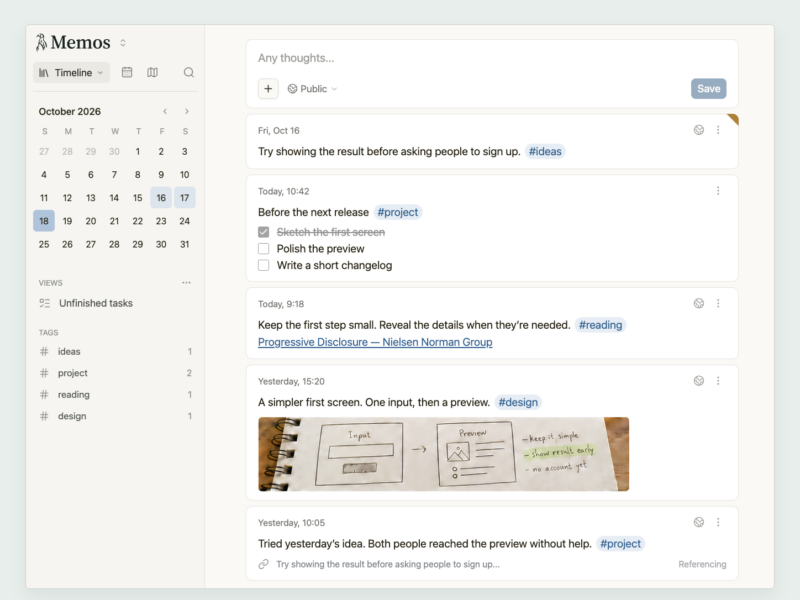
Memos is a self-hosted place to write things down without deciding first what they are. A memo can be a single sentence or a longer Markdown entry, and every one stays with the day it was written on a personal timeline that you scroll back through — closer to a private social feed than to a folder of documents.
The trade-off is deliberate: there are no notebooks, no hierarchy and no rich document canvas. Structure comes from tags, from search and from the order of the timeline, and everything you write lives in one data directory on your own server. That makes it quick to use and trivial to back up, but it will not replace a wiki or a project tool. Accounts can be private, shared with a group or published to the web, and several people can write in one instance while each keeps their own memos.
Key Features
- Timeline first: memos are grouped by the day you wrote them, newest first, with a composer always at hand.
- Markdown: headings, lists, code, links, task lists and images in any memo.
- Tags: hashtags connect memos across days so a topic can be picked up again later.
- Per-memo visibility: keep a memo private, share it with specific users, or publish it on the public web — decided per memo, not per account.
- Multi-user instances: separate accounts with their own timelines, plus shared spaces where people write alongside each other.
- Search: find a memo by its text rather than by where you filed it.
- Attachments: images and other files upload straight into a memo.
- REST API and MCP server: full programmatic access, plus an MCP endpoint for AI tools and scripts.
- Web Clipper: Chrome and Firefox extensions save a page, a selection or an image as a memo in Markdown with a link to the source.
- Telegram bot: Memogram forwards messages and images from Telegram into your timeline.
- One data directory: the database and uploads sit under a single mounted folder, so a backup is one
taraway.
Why Use Memos
Most note apps ask you to choose a structure before you have anything to put in it. Memos inverts that: you write, tags and search take care of retrieval, and the timeline gives you the context of when a thought happened. Running it yourself means the record is not tied to a subscription or to somebody else’s export format. It is also unusually cheap to operate — a single container, a single volume, and a first account created on the login screen — which makes it a realistic replacement for the notes app you keep meaning to leave.
Typical Uses
- A daily log of short thoughts, links and quotes that would be lost in a chat app.
- Shared household or team notes on an instance with more than one account.
- Publishing selected memos to the web as a lightweight microblog.
- Clipping articles and snippets from the browser straight into a searchable timeline.
- Capturing ideas from a phone through the Telegram bot when a browser is not to hand.
Getting Started
The quickest install is a single container: docker run -d --name memos -p 5230:5230 -v ~/.memos:/var/opt/memos neosmemo/memos:stable, then open port 5230 and create the first account. Docker Compose, Kubernetes and a plain binary are covered in the deployment guide. Releases are tagged YY.MM.N without a leading v; the current stable is 26.11.0, with stable, month tags such as 26.10 and canary available as image tags. Installing over a release older than v0.31.0 needs that version run once first. A public demo runs at demo.usememos.com.