MediKeep
- Platform
- Docker Linux Web
- Licence
- Apache-2.0 Open source
- Source code
- github.com/afairgiant/MediKeep
Overview
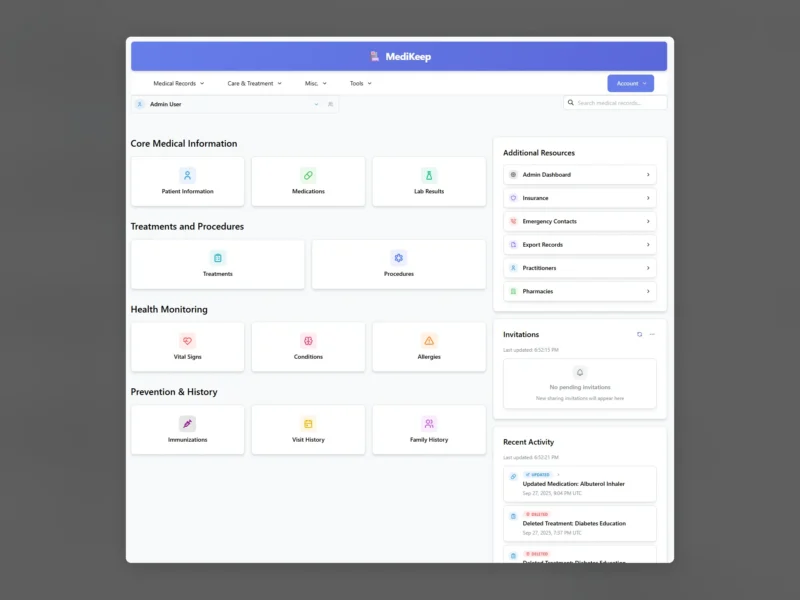
MediKeep is a self-hosted personal health record keeper: a web application that keeps one medical history per family member — medications, allergies, conditions, vitals, lab results, treatments, immunisations, procedures and visits — in a database you run yourself. It replaces the folder of discharge letters, PDFs downloaded from clinic portals and notes on the fridge with a searchable record, and it can export a clean summary when you need to hand something to a doctor.
The stack is a React front end over a FastAPI backend with PostgreSQL, deployed as a Docker Compose stack. That makes it a household-scale application: a family of patient profiles under separate logins, with role-based users, two-factor authentication and optional single sign-on, all served from your own hardware at http://your-host:8005. It was formerly published as Personal-Medical-Records-Keeper and renamed to MediKeep in 2025.
Key Features
- Per-patient records: a profile for each person you track — yourself, a partner, a child — with the relationship recorded, so one instance holds the whole household’s history.
- Fourteen record types: medications, allergies, conditions, vitals, lab results, treatments, immunisations, procedures, visits and encounters, practitioners, pharmacies, emergency contacts, insurance and family history.
- Lab results in detail: upload a lab report PDF and let the parser extract values, enter individual test values by hand, link them to standardised test codes and follow each value as a trend.
- Treatment plans: a simple mode for therapy, exercise or surgery-style treatments, or an advanced plan mode where each linked medication carries its own dosage, frequency, prescriber and pharmacy override, with linked encounters, lab results and equipment.
- Report builder: generate and export custom reports of a patient’s records and share them with a healthcare provider instead of filling in another clipboard form.
- Document attachments: keep referral letters, scans and lab PDFs attached to the record they belong to, with optional Paperless-ngx and Papra integration for an existing document archive.
- Multi-user security: role-based user accounts, two-factor authentication, and SSO through Google, GitHub, Microsoft or a generic OpenID Connect provider such as Keycloak or Authentik.
- Backup and restore: scheduled backups from the admin dashboard, plus a backup/restore CLI that can be run from cron and pointed at an external volume.
- Deployment control: Docker Compose with PostgreSQL, a
.envthat holds the database credentials and application secret, optional TLS inside the container, and API docs exposed only when you enable them.
Why Use MediKeep
Medical history ends up scattered: some in a patient portal you cannot export from, some in PDFs, some on paper. When a new specialist asks what medication you were on two years ago, the answer is usually a guess. A self-hosted record keeper puts the whole history in one place you control, keeps it out of a third-party service, and lets you print or export the part that matters before an appointment. Because it is Docker and PostgreSQL, it fits the same backup and reverse-proxy routine as the rest of a home lab.
Typical Uses
- Keeping a family’s medication list, allergies and conditions current across several patient profiles.
- Tracking a chronic condition through lab values over time rather than comparing PDF reports by eye.
- Preparing a summary of the last year’s visits and treatments before seeing a new specialist.
- Archiving discharge letters and lab PDFs next to the records they belong to, with Paperless-ngx handling the document side.
Getting Started
Create a Docker Compose file with a PostgreSQL service and the ghcr.io/afairgiant/medikeep application image, fill in the database name, user and password plus a SECRET_KEY, then docker compose up -d. The app listens on port 8005 by default and creates an admin user on first start — change that default password immediately, and set ADMIN_DEFAULT_PASSWORD for fresh installs. After logging in, create a patient profile and start adding records. Backups are written to /app/backups, so mount that path on a volume that survives the container.
Licence
Apache-2.0 — free to use, modify and redistribute, including commercially, with the usual patent grant and attribution requirements.
Related Tools
- LibreHealth EHR — a full clinical practice EHR, the heavier option when you need multi-clinician records rather than personal ones.
- wger — open source workout and body-tracking, a natural companion for the fitness side of health data.