MediaMTX
- Platform
- Linux Windows macOS Docker
- Licence
- MIT Open source
- Website
- mediamtx.org
- Source code
- github.com/bluenviron/mediamtx
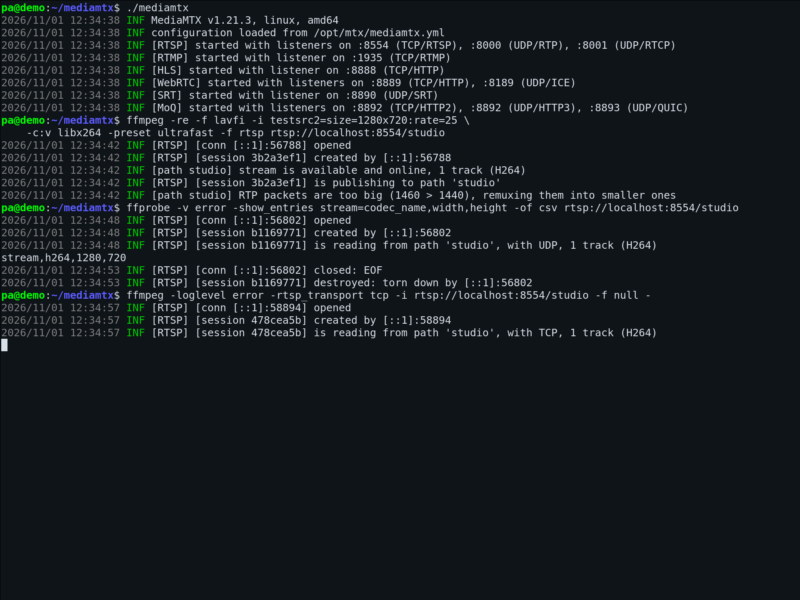
Overview
MediaMTX is a ready-to-use, zero-dependency live media server and media proxy. It publishes, reads, proxies, records and plays back real-time video and audio streams, and it was designed as a “media router”: its job is to take a stream in on one protocol and hand it out on another, with a focus on efficiency and portability.
That single role makes it unusually useful. Instead of wiring ffmpeg pipelines together to turn an RTSP camera into something a browser can watch, you run one process, point the publisher at it, and let the server convert between WebRTC, RTSP, RTMP, HLS, SRT, MPEG-TS, RTP and Media-over-QUIC as needed. Every stream is opened on its own path, several streams can be served at once, and clients keep their connection when the configuration is reloaded.
It is written in Go and ships as one static executable with no dependencies and no interpreter, which is why it runs happily on a small VPS, a NAS, a Raspberry Pi or a laptop. Official builds are published for Linux, Windows and macOS, and there is an official Docker image (bluenviron/mediamtx). MediaMTX is open source under the MIT licence.
Key Features
- Many protocols, both directions — publish with WebRTC, SRT, RTSP, RTMP, HLS, MPEG-TS, RTP or Media-over-QUIC using FFmpeg, GStreamer, OBS Studio, a browser, Python, Go, Unity or a Raspberry Pi camera; read the same stream back with FFmpeg, GStreamer, VLC, OBS, a browser or your own code.
- Automatic protocol conversion — a stream published over RTSP is immediately available over WebRTC, HLS and RTMP as well, so the format the camera speaks no longer decides the format the viewer needs.
- Multiple paths in one server — each stream lives on its own path (for example
/studio,/front-door), and each path is configured independently with its own source, recording and authentication rules. - Hot configuration reload — edit the YAML configuration and apply it without disconnecting the clients that are already watching or publishing.
- Always-available streams — a stream stays served even when the publisher is temporarily offline, so viewers get a stable endpoint instead of an error.
- Recording and playback — record streams to disk in fragmented MP4 or MPEG-TS format and play the recorded material back through the same server.
- Authentication — control who may publish and read with internal credentials, an external HTTP endpoint or JWT.
- Forwarding and proxying — relay streams to other MediaMTX instances or third-party servers, and proxy read or publish requests upstream.
- Control API and metrics — a full HTTP Control API for inspecting and configuring paths at runtime, plus Prometheus-compatible metrics and performance counters for CPU and memory use.
- Hooks — run external commands when clients connect, disconnect, read or publish, which makes it easy to trigger scripts, notifications or session bookkeeping.
- Zero dependencies — one executable, no runtime, no system libraries to install, and the same behaviour on every supported platform.
Why Use It
Most home and small-office streaming setups grow into a chain of scripts: one ffmpeg process to pull from the camera, another to repackage the stream, a third to serve HLS, and a supervisor to restart them all. MediaMTX replaces that chain with a single service that speaks every protocol on both ends, keeps a stable endpoint per stream, and can record or forward the same input at the same time.
It is also a practical way to get a low-latency stream into a browser. WebRTC is served directly by MediaMTX, so an RTSP or RTMP source becomes watchable on a phone or in any modern browser without plugins and without a cloud service in the middle. The footprint is small enough for a Raspberry Pi, and nothing leaves your network unless you configure it to.
Use Cases
- IP camera relay — pull an RTSP feed from a camera and republish it as WebRTC and HLS so it can be watched in a browser, while recording it to disk at the same time.
- Own streaming endpoint — point OBS at MediaMTX over RTMP and give viewers an HLS or WebRTC URL that you control, instead of a third-party platform.
- Protocol bridging — make an SRT or RTP contribution feed available to HLS players, or bring a WebRTC publisher into an RTSP workflow.
- Recording and archiving — keep continuous or on-demand recordings of one or more streams without running a separate recorder.
- Distribution — forward a stream to another MediaMTX instance or to an external server, and authenticate each reader independently.
- Testing and development — a local server on
localhostgives you every protocol to test a player, an encoder or a camera integration against.
Licence
Open source. MediaMTX is released under the MIT licence (Copyright © 2019 aler9), which allows commercial use, modification and redistribution provided the copyright notice is kept.