Vuls
- Platform
- Linux macOS Docker
- Licence
- GPL-3.0 Open source
- Website
- vuls.io/
- Source code
- github.com/future-architect/vuls
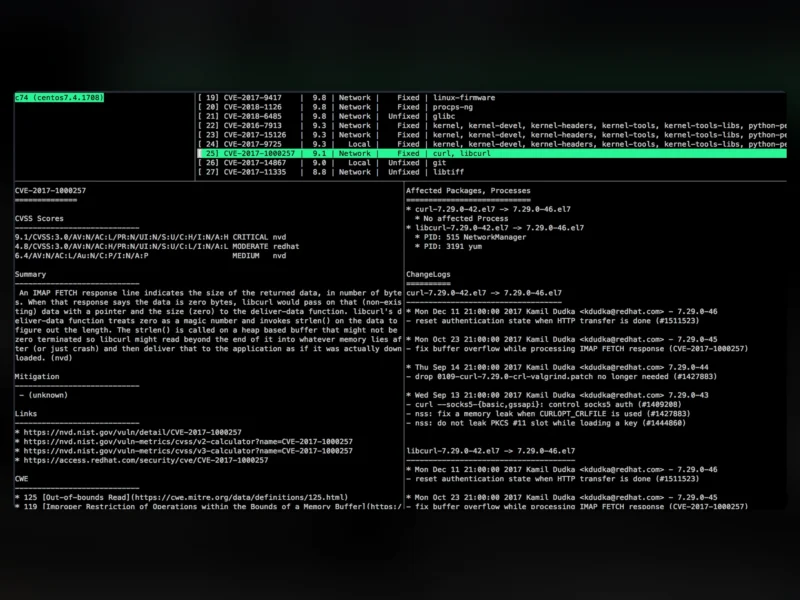
Vuls is an agent-less vulnerability scanner for Linux, FreeBSD, Windows and macOS, written in Go and maintained by Future Architect. Rather than installing a resident agent on every machine, Vuls logs in over SSH (or scans the local host), collects the installed packages and their versions, and matches them against vulnerability data — NVD, JVN, vendor OVAL definitions, security advisories, the CISA KEV catalogue and public exploit feeds — to answer two questions that matter during an incident: which CVEs affect this server, and which servers are affected by this CVE.
Key features
- No agent to deploy. Nothing is installed on the scan targets; Vuls collects package information over SSH, in local scan mode, or through server mode, where each host pushes its software inventory to a central Vuls server over HTTP.
- Wide operating system coverage. Alpine, Amazon Linux, RHEL, CentOS, AlmaLinux, Rocky Linux, Oracle Linux, Fedora, Debian, Ubuntu, Raspbian, openSUSE and SUSE Enterprise Linux, plus FreeBSD, Windows, macOS and running Docker containers.
- Layered vulnerability sources. NVD and JVN data, OVAL definitions from Red Hat, Debian, Ubuntu, SUSE and Oracle Linux, Alpine’s secdb, the Debian Security Bug Tracker, the Ubuntu CVE Tracker and Microsoft CVRF, cross-checked with Red Hat, Amazon and Oracle security advisories and package changelogs.
- Exploit and threat intelligence context. CISA’s Known Exploited Vulnerabilities catalogue, VulnCheck KEV, Exploit-DB, Metasploit modules, PoC repositories, MITRE ATT&CK and CAPEC, so a finding can be triaged by real-world exploitation rather than CVSS score alone.
- Fast, low-impact scans. Fast scan needs no root privileges and puts almost no load on the target; fast-root mode additionally detects processes that are still running with a library that has since been updated, so you know a service needs a restart, not just a patch.
- Beyond OS packages. Lockfile-based scans for language libraries, CPE-based matching for self-compiled software, OWASP Dependency-Check integration, GitHub security alert integration, WordPress core, theme and plugin scanning, and network device firmware checks.
- Dynamic state checks. Vuls records listening ports and can warn when the kernel or a core package was updated but the machine has not been rebooted, and when the target OS has reached end of life.
- Reports where you already work. A terminal TUI for interactive triage, JSON output for automation, Slack and email notification, and the third-party VulsRepo web UI for a dashboard view.
Why use it
Patch management at scale is mostly an inventory problem. Manually comparing the package list of dozens of servers against the day’s CVE feed does not scale, and the usual outcome is that a critical advisory is applied late on the hosts someone remembered. Vuls turns that into a scheduled, repeatable job: a nightly run produces a per-server list of vulnerable packages with the fixed version alongside, and the same data inverted answers “who is exposed to this CVE right now?” — the question that gets asked at 2 a.m. Because scans are read-only and non-destructive, they can run from cron, from CI, or during working hours without touching the running system.
Use cases
- Fleet vulnerability management — one central Vuls server scanning an inventory of VMs and bare-metal hosts, with the results mailed or posted to Slack on a schedule.
- Change and restart tracking — spotting hosts where a patched library is still in memory inside a running service, a common cause of “we patched it but the vulnerability is still there”.
- Compliance evidence — a dated, machine-readable record of what was vulnerable on each host and when it was fixed.
- Container and application images — scanning the packages and language libraries baked into an image or a lockfile as part of a build pipeline.
- WordPress sites — checking core, theme and plugin versions against known vulnerabilities through the WPScan API.
Getting started
The quickest route is the official container image: mount a config.toml that lists your target servers and run vuls scan, then inspect the results with vuls tui or generate a report. A scan in local mode, where port = "local" is set for a host, needs no SSH at all and is a good way to try it on a single machine. Reports that resolve CVEs need a vulnerability database, which Vuls downloads and updates itself; vuls configtest validates the configuration and reports problems before a long scan starts.