LosslessCut
Overview
LosslessCut is a cross-platform graphical front end for FFmpeg, built around a single idea: trimming, cutting, splitting, merging and remuxing video and audio files without re-encoding them. Its author, Mikael Finstad (mifi, Norway), calls it “the swiss army knife of lossless video/audio editing”. The repository has been on GitHub since 30 October 2016 and by mid-October 2026 had around 44,600 stars and 2,200 forks. The application is written in TypeScript and packaged with Electron, so preview uses Chromium’s HTML5 player while FFmpeg does the real work: an export is an almost direct data copy of the selected streams, which is why a trim that takes a conventional editor minutes to render finishes in well under a second.
The scope is deliberately narrow. A normal video editor re-encodes every frame it touches — slow, and slightly lossy every time. LosslessCut instead copies the compressed packets of the parts you keep, so a 40 GB card dump can be rough-cut down to the good 300 MB with no generation loss at all. That makes it the quickest way to throw away the boring parts of footage from a camera, phone, GoPro or drone before any serious editing happens elsewhere — the official site’s pitch is “shave gigabytes off video and audio files in seconds without loss of quality”.
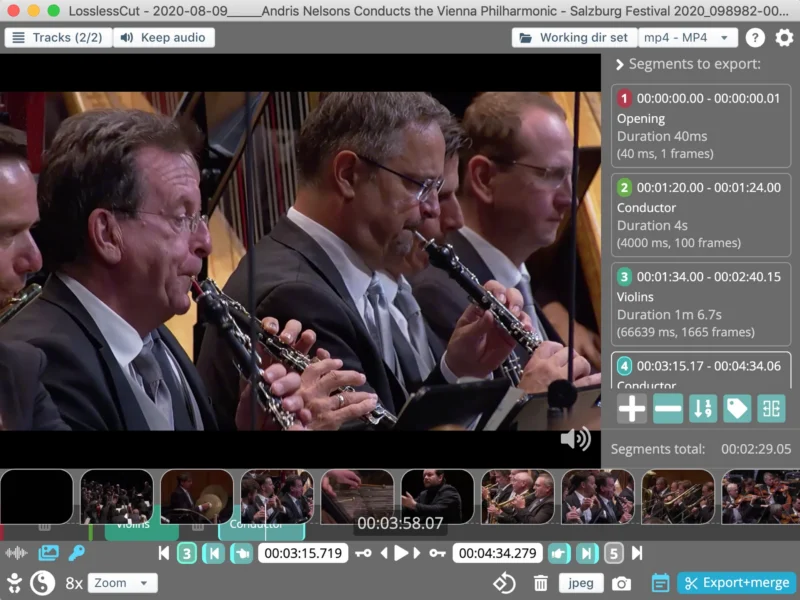
It is not a non-linear editor. LosslessCut’s model is the segment: you mark start and end points on a zoomable timeline with video thumbnails and an audio waveform, and those segments are what get exported — either as one file per segment or merged into a single output, in whatever order you arrange them. The author says plainly that editing several files together on one timeline is a job for a different tool. What it does have is an unusually complete set of stream-surgery tools: cutting every track equally, enabling or disabling individual tracks, adding audio or subtitle tracks from other files, extracting all tracks from a file into separate outputs, rewriting container formats and metadata, and pruning all non-keyframes for an instant timelapse.
Key Features
- Lossless cutting — trim or cut parts out of most video and audio formats by copying the data stream, with an optional (experimental) Smart cut mode for cutting between keyframes.
- Lossless merge and reordering — concatenate files that share identical codec parameters and export the timeline’s segments in any order, skipping the parts in between.
- Multi-track and stream editing — combine arbitrary tracks from different files (add a music or subtitle track), remove unneeded ones, re-encode only a single track, or extract every track of a file into separate outputs.
- Remuxing — change the container without touching the encoded streams, e.g. H.264 in Matroska to MP4 so it plays on an iPhone.
- Metadata and track editors — inspect the technical details of every track, edit file, per-track and disposition metadata, fix the rotation/orientation flag, set author, title, GPS position and recording time, and attach cover art from an external JPEG or from a frame on the timeline.
- Segments as first-class objects — labels, tags and annotations, markers, per-segment details (duration and frame count), drag-and-drop reordering, and a JavaScript-based expression language for advanced segment queries and mutations.
- Segment import and export — CSV, TSV, MP4/MKV chapters, CUE sheets, XML for DaVinci Resolve and Final Cut Pro, and YouTube chapter lists, so a cut list can be produced in another tool and executed here (or vice versa). There is a built-in chapter-mark editor too.
- Timeline tools — zoom, frame and keyframe jumping for cutting around reference frames, video thumbnails, audio waveform, black-scene detection, silent-audio detection and scene-change detection, plus tools to divide a timeline into N segments, fixed-length segments, fixed-size (MB) segments, or randomised ones.
- Frame and still export — full-resolution JPEG/PNG snapshots at low or high quality, or bulk export of frames every n-th frame or second, by scene change, or as “best thumbnail” candidates, optionally restricted to a selected range.
- Speed, FPS and crop — speed a file up or slow it down (including an FPS change) without a full re-encode, and — new in 3.69.0 — lossless crop and aspect-ratio override through bitstream and container metadata.
- Project files and undo — cut segments are auto-saved to a per-project
.llc(JSON5) file so a session can be resumed later, with undo/redo via keyboard shortcuts and fully customisable hotkeys. - FFmpeg transparency — the last FFmpeg command is always shown in a log panel so you can copy it, modify it and re-run it on the command line.
- Automation — a basic command-line interface and an HTTP API for scripted exports, with
export-startandexport-completeAPI events added in 3.69.0. - Extras — losslessly download an HLS stream (
.m3u8), display an embedded DJI GPS track on a map, and strip every non-keyframe to produce a timelapse almost instantly.
Why Use LosslessCut?
Speed and integrity. A lossless export writes only the selected packets, so the practical cost is disk I/O rather than CPU — cutting a segment out of a multi-gigabyte recording is effectively instantaneous and needs no GPU. Because nothing is re-encoded, the output has exactly the source’s image quality, so it can be used as a first-pass cutter ahead of a heavier editor with no generation loss. The site’s own users make the point bluntly: one testimonial describes spending 45 minutes exporting 1.5 seconds of video in a normal editor, against under a second here.
The second reason is that it is free, open source (GPL-2.0), local and offline. No account, no upload, no subscription, no watermark and no telemetry — the footage never leaves the machine. The author states the project “will always remain free and open source” and funds it through donations and paid store editions rather than feature locks.
The honest caveats are worth knowing before you start. A truly lossless cut can only begin at a keyframe, so each segment’s start time is normally rounded back to the preceding keyframe — often a few frames earlier than you marked — and the documented workaround is to nudge start points forward, or to try the experimental Smart Cut mode, which works only for some files. Lossy operations are intentionally absent: no resize, watermark, blur, redaction, colour grading, GIF or audio mixing. There is no mass/batch export, so multi-file work is done in separate passes. MPEG-TS (.ts/.mts) footage is better remuxed to MP4/MKV first. FFmpeg does not always preserve metadata perfectly — the docs suggest running exiftool over the result — and there are proprietary data tracks (GoPro’s gpmd, tmcd, fdsc) that can be extracted but not cut. Merging files over ~10 GB can sit at 100% for several minutes before finishing, and the source file is never modified in place by design.
Use Cases
- Cutting the commercials out of a recorded TV show, then remuxing the result from TS to MP4.
- Rough-cutting large camera, GoPro or drone footage down to the keepers before importing it into a full editor.
- Removing or replacing a soundtrack, adding music to a video, or combining the audio from one recording with the video from another.
- Extracting the music or a subtitle track from a video and cutting that track to length.
- Embedding an external subtitle file into a video, or attaching cover art to a video or audio file.
- Splitting a video into one file per scene, or cutting the silent parts out of a recording.
- Making a clip fit a platform’s length limit, or looping a clip n times without re-encoding.
- Producing a timelapse in seconds by discarding all non-keyframes.
- Fixing a phone video whose rotation flag is wrong, or rewriting the author, title, GPS position and recording time of existing footage.
- Downloading and trimming an HLS (
.m3u8) stream without re-encoding. - Driving edits from a list produced elsewhere — import the CSV or chapter marks and export the cuts.
Supported Formats
LosslessCut previews through Chromium’s HTML5 player, so the working set is: containers MP4, MOV, WebM, Matroska, OGG and WAV; audio codecs FLAC, MP3, Opus, PCM, Vorbis and AAC; video codecs H.264, AV1, Theora, VP8, VP9 and H.265 (with a hardware decoder). Anything else can still be opened by letting FFmpeg create a low-quality proxy for playback — the actual cut is still performed on the original file, so the export stays lossless.
Similar
- Avidemux — another lightweight cutter and transcoder, with a linear-editor style interface and filters that do re-encode.
- Shotcut and Kdenlive — full non-linear editors, for when you need transitions, effects and multi-track timing rather than stream cutting.
- HandBrake — the tool LosslessCut’s own documentation recommends when you genuinely want to re-encode a file smaller.
- FFmpeg — the engine underneath; LosslessCut is the GUI for the cases where you would otherwise type the trim command by hand.
- mpv — a keyboard-driven player, handy for checking the exported result.
Platform
Cross-platform desktop application: Windows (x64 and ARM64), macOS (Intel and Apple Silicon) and Linux (x64, ARM64 and armv7l for the Raspberry Pi). Official downloads are the GitHub release builds — a .7z for Windows, a .dmg for macOS, AppImage or .tar.bz2 for Linux — alongside the Snap Store on Linux, the Mac App Store and the Microsoft Store. The store editions cost money and are typically a few versions behind the GitHub builds: the author treats the newest GitHub builds as a public beta and moves a release to the stores once he is confident it is solid, so the store version buys convenience, sandboxing and frictionless automatic updates rather than extra features. An unofficial community build exists on Flathub (no.mifi.losslesscut) and is not maintained by the author, who asks people to use only the official sources. Official builds ship their own FFmpeg binary. Older operating systems are only served by older releases — macOS 11 support ended with v3.66, macOS 10.14 and older with v3.58.0, Windows 8.1 and older with v3.52.0, and 32-bit Linux with v3.48.2.
Licence
GNU General Public License v2.0 (GPL-2.0). The LICENSE file in the repository is the text of the GNU GPL version 2 (June 1991), and package.json declares "license": "GPL-2.0-only"; GitHub reports the repository licence as GPL-2.0. The software is free of charge with full source available, and the paid App Store and Microsoft Store editions exist because the author asks those who can afford it to pay for a smoother installation and update path — not because any feature is held back.
Website
losslesscut.app · source on GitHub · releases · documentation · Snap Store · nightly builds