ufw (Uncomplicated Firewall)
Overview
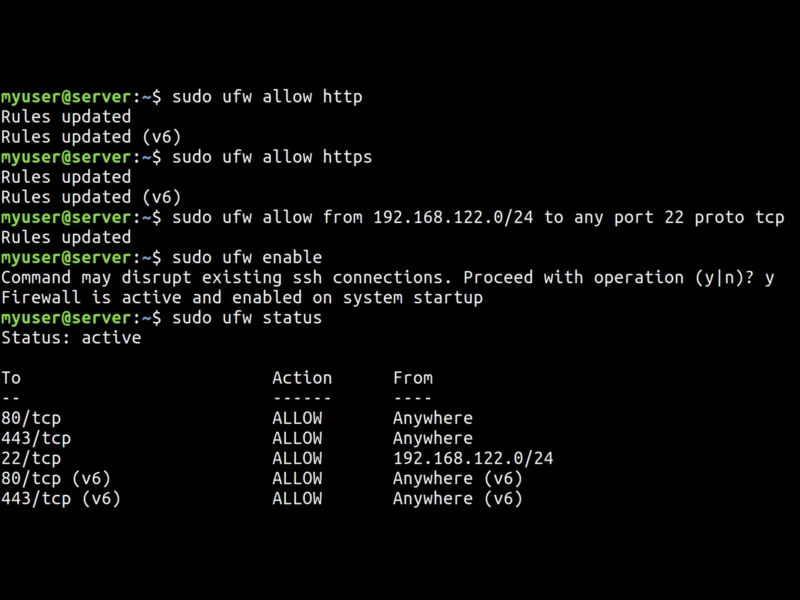
ufw (the Uncomplicated Firewall) is the friendly command-line front end to the Linux kernel’s netfilter packet filter — the Netfilter/iptables layer that every Linux firewall ultimately talks to. Instead of hand-writing chains and matches, you describe what you want in plain words: ufw allow ssh, ufw allow from 192.168.122.0/24 to any port 22 proto tcp, ufw limit 2222/tcp. ufw translates those into the ruleset for you, and keeps the rules it generated in its own files so you always know which rules you wrote and which it added.
It is a Canonical project — maintained by Jamie Strandboge, with contributions from Ubuntu and Debian developers — and it is old enough to be boring in the best way: ufw has shipped in every Ubuntu installation since 8.04 LTS, and in every Debian installation since Debian 10, which makes it the firewall most Linux users actually run whether they chose it or not. The current upstream release is 0.36.2 (18 May 2023), a maintenance release for the 0.36 series. ufw is written in Python, and it drives iptables; on modern distributions that means the nftables-backed iptables-nft compatibility layer underneath, so a Debian 13 or Ubuntu 24.04 box is really filtering with nftables even though you only ever type ufw commands.
Key Features
- Rules in plain English — allow, deny, reject or limit a port, protocol, interface, direction (in/out) or address range, by number or by service name:
ufw allow 443/tcp,ufw allow in on eth0 to any port 80,ufw deny from 203.0.113.7. - Application profiles — packages drop profile files into
/etc/ufw/applications.d, so instead of guessing ports you runufw app listand thenufw allow OpenSSHorufw allow 'Apache Full'. This is how a rule survives a service changing its port inventory. - Rate limiting against brute force —
ufw limit ssh/tcprefuses an address that tries to open more than six connections inside 30 seconds, which is the cheapest hardening step for an internet-facing SSH server. Rules can also be logged individually, or withlog-all. - Default-deny posture — the shipped default policies are deny incoming and allow outgoing, so the moment you run
ufw enablethe machine is closed rather than open. Policies are set per direction withufw default. - IPv4 and IPv6 in one pass — every rule is applied to both stacks, and
ufw statusshows the(v6)counterparts next to the IPv4 entries so you can see they matched. - Routed traffic and forwarding — the
ufw routecommand manages the FORWARD path, which is what you need on a gateway, router or container host rather than on a leaf server. - Safe editing and control —
ufw status numbered,insert NUM,prepend,delete NUM, plus--dry-runto print the ruleset ufw would apply without touching the live firewall.prependexists specifically so tools such as Fail2ban can push a high-priority rule in front of yours. - Five logging levels —
ufw logging off|low|medium|high|fullcontrols how much traffic is written to the kernel log, all rate-limited so a flood cannot spin the disk. - Graphical front ends — ufw is the engine behind Gufw (GTK, the default firewall tool on the Ubuntu desktop) and KDE’s firewall module, so the same rules can be managed from a GUI or a shell.
Why Use ufw?
Because a firewall you actually configure is worth more than a firewall with better features that you keep postponing. Raw iptables is powerful and precise, but it is a language of tables, chains and matches, and a single transposed argument can lock you out of the box you are sitting in front of — or, worse, silently leave a port open. ufw gives you a vocabulary that fits in your head, applies sane defaults, and remembers your rules across reboots through its own startup files (/etc/ufw/before.rules, user.rules and friends) written in exactly the same syntax the ufw command accepts, so the configuration stays legible and can be version-controlled, templated and copied between hosts like any other config file.
It is also the pragmatic choice on Debian and Ubuntu: it is already installed, already integrated with the distribution’s packaging (application profiles arrive with the packages they describe), and documented as the default tool. That means less bespoke glue, fewer surprises after an upgrade, and a ruleset your colleagues can read. The honest limitation is that ufw is a host firewall, not an intrusion-detection system or a network policy engine: it decides which packets a single machine accepts, and nothing more. It pairs with — rather than replaces — a log-driven blocker like Fail2ban or CrowdSec, which can add and remove ufw rules in response to what they observe.
Use Cases
- Closing the inbound side of a fresh VPS: enable ufw, allow ssh, allow 443, done.
- Hardening SSH with
ufw limit, optionally restricted to a VPN or management subnet. - Home servers and NAS boxes: allow the services you run, deny the rest, with the rules kept in a file you can read.
- Routers, VPN gateways and NAT hosts, using
ufw routeto manage forwarded traffic. - Lab and classroom machines, where the same handful of rules is copied onto dozens of identical hosts.
- Desktops — either directly, or through Gufw for anyone who prefers clicking to typing.
- Auditing what a machine is currently exposing:
ufw status verboseis a one-line answer to “is this port actually open?”.
Similar
- Fail2ban — watches logs and inserts temporary ufw (or iptables) rules against repeat offenders; the natural companion to a rate-limited ufw setup.
- CrowdSec — community-sourced intrusion prevention: the same idea as Fail2ban, scaled up and collaborative, and able to drive ufw too.
- Suricata — deep packet inspection and IDS/IPS, where ufw only decides accept or deny by address and port.
- Nmap — run it against your own host after configuring ufw to confirm the ruleset says what you meant.
- Firejail — sandboxes individual applications; a different layer of the same “reduce the blast radius” job.
Platform
Linux: packaged in Debian, Ubuntu, Arch, Fedora and openSUSE, and installed by default on Ubuntu (since 8.04 LTS) and Debian (since 10). Requires Python 3, gettext, a few netfilter kernel modules and iptables 1.4 or later. IPv4 and IPv6, with iptables as the interface to the kernel (nftables-backed on current distributions). Graphical front ends: Gufw (GTK) and KDE’s firewall module. There is no Windows or macOS port — ufw is a Linux firewall.
Licence
GPL-3.0 — GNU General Public License version 3, copyright Canonical Ltd.
Website
launchpad.net/ufw (project, bug tracker, source) · wiki.ubuntu.com/UncomplicatedFirewall (documentation) · ufw(8) man page