Omarchy
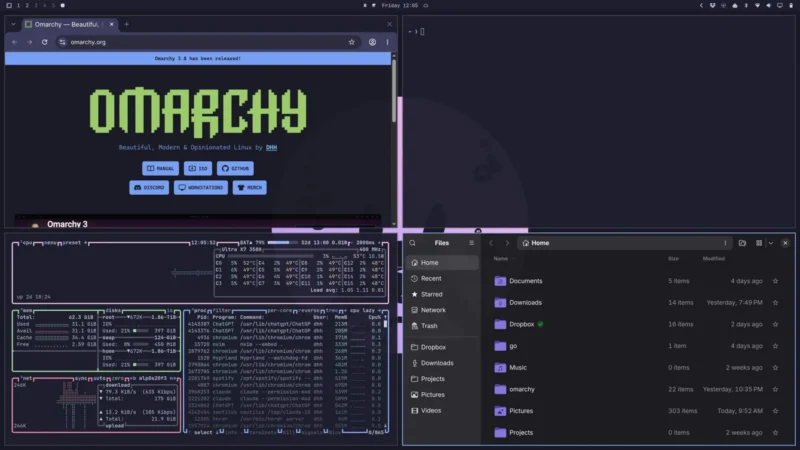
Omarchy is a free and open-source, opinionated Linux distribution built on Arch Linux, created by David Heinemeier Hansson (DHH). It pairs the Hyprland tiling window manager with carefully chosen defaults so you get a fast, beautiful, fully working desktop straight after installation — no endless configuration choices. Its defining idea is being “agentic”: AI coding agents are treated as first-class citizens of the system, with a default agent chosen on first boot.
Key Features
- Fast, one-shot install — a single command installs and configures a complete Hyprland desktop on Arch Linux, typically finishing in a couple of minutes.
- Beautiful, opinionated defaults — the Omarchy theme, status bar, keybindings, terminal and editor are pre-tuned, so the system looks and works well out of the box. Everything remains changeable.
- Agentic by design — on first boot you pick a default AI agent (Claude Code, Codex, Crush, Gemini’s Antigravity and others), sign in once, and can hand it jobs from the desktop. It can inspect a crash dump and help diagnose or report a bug.
- Tiling window management — Hyprland provides dynamic tiling, workspace switching, and layouts (dwindle, scrolling, four-way tiling) driven mainly from the keyboard.
- An integrated toolchain — Neovim as the default editor, Foot as the default terminal (with Alacritty, Ghostty and Kitty one command away), mise for per-project language versions, Docker, Lazygit, tmux and a curated set of modern shell tools.
- Themes and plugins — a theming system plus a plugin ecosystem for bar widgets, desktop pets, media controls and more.
- Runs Windows apps — an optional Windows 11 virtual machine (via the Omarchy menu) hosts native Microsoft Office and other Windows-only work apps, with a shared clipboard and folder.
- Runs on old and new hardware — from a 2011 ThinkPad X220 with 2 GB of RAM to the latest laptops and Intel Macs.
Why Use Omarchy?
Most Linux distributions hand you a bare system and a mountain of choices; Omarchy makes the choices for you and tunes the details so you can get straight to work. It is unusually well suited to developers and power users who want a modern, keyboard-driven, tiling desktop without spending a weekend assembling one — and it bakes AI agents into the workflow rather than treating them as an afterthought. It is completely free, with no accounts, telemetry or paid tiers, and the whole configuration lives in a readable Git repository you can fork and change.
Use Cases
- Turning a laptop or desktop into a fast, good-looking, keyboard-driven Linux workstation in one install.
- Giving older hardware (including vintage Intel Macs and low-spec “potato” PCs) a modern desktop.
- Running AI coding agents as a native part of your daily environment.
- Keeping Windows-only work apps (Microsoft Office) nearby in a VM while living on Linux.
- A well-documented, hackable Arch + Hyprland configuration to learn from or build on.
Platform
Arch Linux-based, x86_64 (ARM builds in progress). Installs on modern laptops and desktops, older PCs, and Intel Macs.
Licence
MIT (free and open source).